 CloudConsole
aws ssm put-parameter
aws ssm put-parameter --name /app/prod/db-host --value orders-db.example --type String creates a parameter. To change an existing one you must add --overwrite, which creates a new version; use --type SecureString for secrets so the value is encrypted with KMS.
What the command does
It writes a value to Parameter Store. A new name creates version 1; with --overwrite, an existing name gets a new version and the old ones remain readable by version number (up to a retained history limit). The response is just the new Version and the Tier.
Syntax
aws ssm put-parameter --name <name> --value <value> \
  [--type String|StringList|SecureString] [--key-id <kms-key>] \
  [--overwrite] [--description "..."] \
  [--tier Standard|Advanced|Intelligent-Tiering] [--tags Key=k,Value=v]
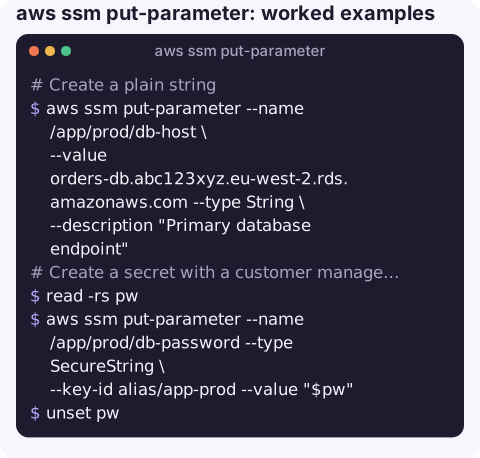
Worked examples
Create a plain string:
aws ssm put-parameter --name /app/prod/db-host \
  --value orders-db.abc123xyz.eu-west-2.rds.amazonaws.com --type String \
  --description "Primary database endpoint"
Create a secret with a customer managed KMS key, reading the value from a prompt so it is not in shell history:
read -rs pw
aws ssm put-parameter --name /app/prod/db-password --type SecureString \
  --key-id alias/app-prod --value "$pw"
unset pw
Update an existing value (fails with ParameterAlreadyExists without --overwrite):
aws ssm put-parameter --name /app/prod/feature-flags \
  --value '{"newCheckout":true}' --type String --overwrite
Value from a file, for multi-line content such as a certificate:
aws ssm put-parameter --name /app/prod/ca-cert --type String \
  --value file://ca.pem --overwrite
Tag on create, then label the version you know is good:
aws ssm put-parameter --name /app/prod/batch-size --value 500 --type String \
  --tags Key=owner,Value=platform
aws ssm label-parameter-version --name /app/prod/batch-size \
  --parameter-version 1 --labels stable
Types and tiers
| Choice | Notes |
|---|---|
String | Plain text. |
StringList | Comma-separated list; consumers split on commas. |
SecureString | Encrypted with KMS: the AWS managed alias/aws/ssm key unless you pass --key-id. |
Standard tier | Values up to 4 KB, no parameter policies, no extra charge. |
Advanced tier | Values up to 8 KB and parameter policies (such as expiry), charged per parameter. Cannot be downgraded back to Standard. |
Gotchas
--tagsand--overwritecannot be combined. Tag existing parameters withaws ssm add-tags-to-resource.- Type is fixed in practice. Changing an existing parameter's type needs
--overwritewith the new type and breaks consumers expecting the old one; plan names so it never needs to change. - Values that look like URLs. AWS CLI version 1 could try to fetch
http://orhttps://values as remote content, depending on its configuration. Version 2 stores the literal string. If a v1 user reports a parameter containing a web page, this is why. - Change history matters. An overwrite instantly affects every consumer that reads the parameter at runtime. Update in a quiet window or behind a feature flag.
- Throttling on bulk writes; add a short sleep in loops that create hundreds of parameters.
Questions
How do I update an existing SSM parameter?
Run put-parameter with the same --name, the new --value and --overwrite. The parameter gets a new version number; older versions remain readable as name:version.
How do I store a secret in Parameter Store?
Use --type SecureString, optionally with --key-id to choose the KMS key. Read it back with get-parameter --with-decryption.
How do I delete a parameter?
aws ssm delete-parameter --name <name>. It removes all versions immediately; there is no recovery window as there is in Secrets Manager.
A configuration change pushed in a hurry is a common cause of late-night alarms. CloudConsole is built with production guardrails and to show the alarms that follow a change on a phone.
About the app → · Download on the App Store