 CloudConsole
How to update Lambda environment variables
In the Lambda console, open the function's Configuration tab, choose Environment variables, Edit, change the values and save. From the CLI, aws lambda update-function-configuration --environment sets them, but it replaces the whole set: any variable you leave out is deleted. Read the current values first and merge. Changes apply to $LATEST; publish a version and move your alias if callers use one.
Read the current values
aws lambda get-function-configuration --function-name checkout \
  --query 'Environment.Variables'
For a specific version or alias, add --qualifier live. Values are shown in plain text to anyone allowed to call GetFunctionConfiguration, which is one reason not to keep secrets here.
Change one variable without losing the rest
# 1. Save the current set
aws lambda get-function-configuration --function-name checkout \
  --query 'Environment' > env.json

# 2. Merge your change (needs jq)
jq '.Variables.LOG_LEVEL = "debug"' env.json > env-new.json

# 3. Apply the full set
aws lambda update-function-configuration --function-name checkout \
  --environment file://env-new.json

# 4. Wait for the update to finish before the next change
aws lambda wait function-updated --function-name checkout
Writing the variables inline is fine for a function with only a couple of them: --environment "Variables={LOG_LEVEL=debug,TABLE_NAME=orders}". Just remember it is the complete list.
Removing a variable works the same way: jq 'del(.Variables.OLD_FLAG)' env.json, then apply the result. To clear every variable, pass --environment '{"Variables":{}}'.
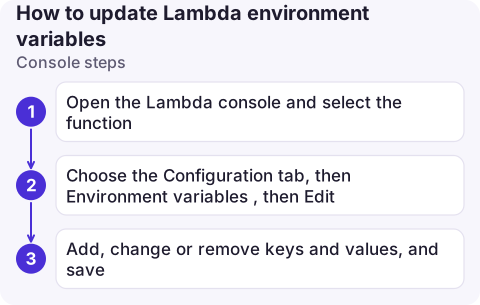
Console steps
- Open the Lambda console and select the function.
- Choose the Configuration tab, then Environment variables, then Edit.
- Add, change or remove keys and values, and save. The console sends the full set for you, so other variables are kept.
New invocations pick up the values as soon as the update completes; warm execution environments are replaced rather than updated in place.
Versions, aliases and deploy tools
- Published versions are immutable. If an alias such as
livepoints to version 12, changing$LATESThas no effect on traffic until you publish a new version and move the alias (publish-version, then update-alias). - Infrastructure as code wins. If SAM, CDK, Terraform or CloudFormation manage the function, a manual change is overwritten on the next deploy. Change it in the template.
- Rollback: because versions snapshot configuration, moving the alias back restores the old variables too; see rolling back a Lambda version.
Limits and mistakes
- Size: all variables together are limited to 4 KB. Larger configuration belongs in Parameter Store, AppConfig or S3.
- Reserved names: keys such as
AWS_REGIONandAWS_LAMBDA_FUNCTION_NAMEare set by Lambda and can't be overridden. - Secrets: environment variables are encrypted at rest, but readable by anyone with configuration access. Store secrets in Secrets Manager or Parameter Store and fetch them at start-up.
ResourceConflictExceptionmeans another update is still in progress; wait withaws lambda wait function-updated. See ResourceConflictException.- Typos in keys fail silently: the function just sees no value. Read the configuration back after each change, and make the code fail fast when a required variable is missing.
Questions
Does update-function-configuration overwrite existing environment variables?
Yes. The --environment value replaces the entire set, so include every variable you want to keep.
How do I get Lambda environment variables with the AWS CLI?
aws lambda get-function-configuration --function-name my-function --query Environment.Variables returns them as JSON.
Do I need to redeploy after changing Lambda environment variables?
No code redeploy is needed for $LATEST. If traffic goes through an alias to a published version, publish a new version and point the alias at it.

Flipping a log level or a feature flag is a small change that is often needed in a hurry. CloudConsole, a phone app for AWS, is built to show function configuration and errors on your phone, with production guardrails on any change.
About the app → · Download on the App Store