 CloudConsole
aws ssm send-command
aws ssm send-command --document-name AWS-RunShellScript --instance-ids i-0123456789abcdef0 --parameters commands="uptime" runs a command on managed instances through Systems Manager Run Command, without SSH. It returns a CommandId straight away; fetch each instance's result with aws ssm get-command-invocation.
What the command does
Run Command sends an SSM document (a script template) to one or many managed nodes and collects their exit status and output. AWS-RunShellScript runs shell commands on Linux and macOS, AWS-RunPowerShellScript on Windows. Everything is logged in the Systems Manager command history and CloudTrail, which makes it a better audit trail than ad-hoc SSH.
Syntax
aws ssm send-command --document-name AWS-RunShellScript \
  (--instance-ids i-... | --targets Key=tag:<k>,Values=<v>) \
  --parameters 'commands=["cmd1","cmd2"],executionTimeout=["600"]' \
  [--comment "..."] [--max-concurrency 10%] [--max-errors 1] \
  [--timeout-seconds <delivery-timeout>] \
  [--cloud-watch-output-config CloudWatchOutputEnabled=true]
Worked examples
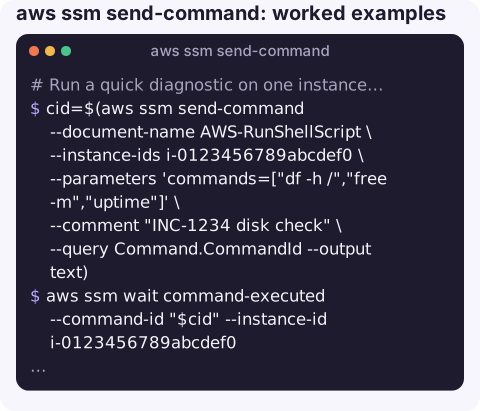
Run a quick diagnostic on one instance and read the output:
cid=$(aws ssm send-command --document-name AWS-RunShellScript \
  --instance-ids i-0123456789abcdef0 \
  --parameters 'commands=["df -h /","free -m","uptime"]' \
  --comment "INC-1234 disk check" \
  --query Command.CommandId --output text)
aws ssm wait command-executed --command-id "$cid" --instance-id i-0123456789abcdef0
aws ssm get-command-invocation --command-id "$cid" --instance-id i-0123456789abcdef0 \
  --query "[Status,StandardOutputContent,StandardErrorContent]" --output text
Restart a service on every instance tagged role=web, a quarter of the fleet at a time, stopping after two failures:
aws ssm send-command --document-name AWS-RunShellScript \
  --targets Key=tag:role,Values=web \
  --parameters 'commands=["sudo systemctl restart nginx"]' \
  --max-concurrency 25% --max-errors 2 \
  --comment "Restart nginx after config push"
Summary per instance for a multi-target command:
aws ssm list-command-invocations --command-id "$cid" \
  --query "CommandInvocations[].[InstanceId,Status]" --output table
Keep full output in CloudWatch Logs instead of the truncated console copy:
aws ssm send-command --document-name AWS-RunShellScript \
  --instance-ids i-0123456789abcdef0 \
  --parameters 'commands=["journalctl -u app --since \"1 hour ago\""]' \
  --cloud-watch-output-config CloudWatchOutputEnabled=true,CloudWatchLogGroupName=/ssm/run-command
Reading the status
| Status | Meaning |
|---|---|
Pending / InProgress | Delivered or running |
Success | The script exited with code 0 |
Failed | Non-zero exit code; read StandardErrorContent |
TimedOut | Hit the execution timeout, or never started within the delivery timeout |
Undeliverable | The instance is not reachable by Systems Manager |
Cancelled | Stopped with aws ssm cancel-command |
Key options
| Option | Notes |
|---|---|
--instance-ids / --targets | Explicit IDs, or tag-based targeting (Key=tag:Env,Values=prod) for fleets. |
--parameters | Document parameters. For AWS-RunShellScript: commands, optional workingDirectory and executionTimeout (seconds, default 3600). |
--timeout-seconds | Delivery timeout: how long to wait for the command to start on an instance. Not the run time. |
--max-concurrency, --max-errors | Rate control for fleets: number or percentage. |
--output-s3-bucket-name | Write complete output to S3. |
Gotchas
- Output is truncated in the API response (to roughly 24,000 characters for standard output). Use S3 or CloudWatch output for anything long.
- Commands run as root on Linux. That is convenient and dangerous; review what you send, especially to tag-based targets.
- Quoting is two layers deep: shell quoting for the CLI, then JSON-ish list syntax for
commands. Put complex scripts in a file and use--parameters file://params.json. - Unreachable instances show
Undeliverableor time out; they have the same prerequisites as Session Manager. - The waiter is short.
aws ssm wait command-executedgives up after about 100 seconds; for longer commands pollget-command-invocationyourself.
Questions
How do I see the output of aws ssm send-command?
Call aws ssm get-command-invocation --command-id <id> --instance-id <id> and read StandardOutputContent. For many instances, list-command-invocations --details shows output for each.
How do I run a command on all instances with a tag?
Use --targets Key=tag:<TagKey>,Values=<value> instead of --instance-ids, with --max-concurrency and --max-errors to control the rollout.
What is the difference between send-command and start-session?
send-command runs a non-interactive script and collects the result, on one or many instances. start-session gives you an interactive shell or port forward on a single instance.
Running a command across a fleet is powerful enough to deserve a second look before it goes out. CloudConsole, a phone app for AWS, is built with production guardrails for exactly that kind of change.
About the app → · Download on the App Store