 CloudConsole
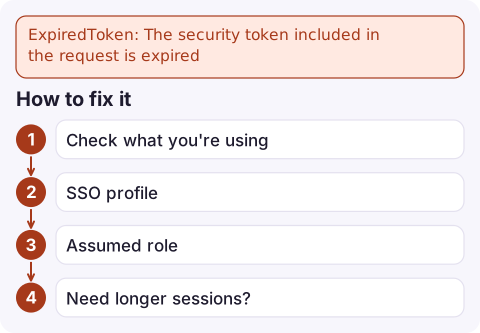
ExpiredToken: The security token included in the request is expired
Your request was signed with temporary credentials whose expiry time has passed. Get fresh ones: run aws sso login for an SSO profile, re-run the assume-role step for role credentials, or unset stale AWS_SESSION_TOKEN variables so the SDK can fetch and refresh credentials itself.
What the error means
Temporary credentials (access keys starting ASIA, plus a session token) carry an expiry time. Once it passes, every service rejects them:
An error occurred (ExpiredToken) when calling the ListObjectsV2 operation: The provided token has expired.
An error occurred (ExpiredTokenException) when calling the DescribeTable operation: The security token included in the request is expired
Nothing is wrong with your permissions. The identity was valid an hour ago; it simply needs new credentials. The real question is why nothing refreshed them.
Why the credentials were not refreshed
| Where the credentials came from | Why they went stale |
|---|---|
Values pasted or exported into the shell (export AWS_SESSION_TOKEN=…) | Nothing can refresh environment variables. They die at the session's expiry, often one hour. |
| IAM Identity Center (SSO) profile | The role credentials and the SSO sign-in session both expire; once the sign-in session ends, a new aws sso login is required. |
Manual aws sts assume-role output | Default session is one hour; role chaining (assuming a role from a role) is capped at one hour regardless of the role's maximum. |
| A long-running process that copied credentials at start-up | Your code read keys once and passed them to a client, bypassing the SDK's refreshing provider. |
A large aws s3 cp or sync using pasted credentials | The transfer outlived the token and fails partway through. |
How to fix it
- Check what you're using. If
aws configure listshowsenvas the type, the expired values are in your shell.aws configure list unset AWS_ACCESS_KEY_ID AWS_SECRET_ACCESS_KEY AWS_SESSION_TOKEN - SSO profile: sign in again, then retry.
aws sso login --profile prod-admin aws sts get-caller-identity --profile prod-admin - Assumed role: let the CLI do the assuming so it refreshes automatically. Define a profile instead of exporting keys:
Then[profile prod-deploy] role_arn = arn:aws:iam::123456789012:role/Deploy source_profile = default duration_seconds = 3600aws s3 ls --profile prod-deployassumes and refreshes the role on demand. See switching roles in the CLI. - Need longer sessions? Raise the role's maximum session duration (up to 12 hours), then request it with
duration_seconds. This does not help with role chaining, which stays at one hour.
In applications and pipelines
- Create SDK clients from the default credential chain instead of passing
aws_access_key_id/aws_session_tokenexplicitly. The chain re-reads instance, task and container credentials before they expire. - On EC2, ECS and Lambda, never copy role credentials into a config file or environment variable; that freezes them.
- For CI jobs that assume a role through OIDC, request a session at least as long as the slowest job, and split very long jobs into stages that each get fresh credentials.
- Tools that call
aws configure export-credentialsto hand keys to another program get a snapshot; re-run it when the program is long-lived.
Mistakes to avoid
Don't respond by creating long-term access keys "so it stops expiring". That trades a nuisance for a leaked-key risk. Also don't only raise the role's maximum duration without checking the request: the CLI and SDKs default to one hour unless you ask for more, so the change appears to do nothing.
If aws sso login itself fails with a refresh error, that is a separate problem with the cached SSO token; see SSO token has expired and refresh failed.
Questions
How long do AWS temporary credentials last?
It depends on how they were issued. AssumeRole defaults to one hour and can go up to the role's maximum session duration (12 hours at most); role chaining is limited to one hour; SSO role credentials follow the permission set's session duration.
Why does the AWS CLI say the SSO token has expired?
Your IAM Identity Center sign-in session has ended. Run aws sso login --profile <name> to start a new one; the CLI then fetches fresh role credentials automatically.
Why does aws s3 fail with ExpiredToken halfway through a copy?
The transfer is using fixed temporary credentials, usually exported in the shell, and it ran past their expiry. Use a profile with role_arn or an SSO profile so the CLI can refresh them, or request a longer session.

Expired credentials are a laptop problem rather than a production one, but they often block you at the worst moment of an incident. CloudConsole, a phone app for AWS, is built so you can still read alarms, logs and resource state from your phone while your terminal session is being renewed.
Did it start after a deploy? What changed? on the app’s alarm screen lists the deploys and configuration changes from the hour before the alarm fired.
About the app → · Download on the App Store