 CloudConsole
RDS backup retention period, backup window and maintenance window
RDS keeps automated backups for the backup retention period, 0 to 35 days. The default is 1 day when you create an instance with the API or CLI and 7 days in the console; 0 disables automated backups and point-in-time recovery. The backup window is a daily UTC range of at least 30 minutes, and the maintenance window a weekly UTC range of at least 30 minutes; they must not overlap. If you don't choose, RDS picks random 30-minute windows within an 8-hour block for the Region.
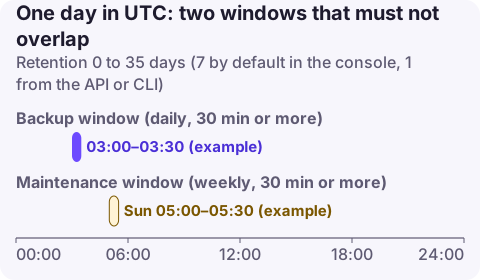
The settings
| Setting | Range / format | Default |
|---|---|---|
Backup retention period (BackupRetentionPeriod) | 0 to 35 days (Multi-AZ DB clusters: 1 to 35) | 1 day via API/CLI, 7 days in the console |
Backup window (PreferredBackupWindow) | hh24:mi-hh24:mi UTC, at least 30 minutes | Random 30 minutes in the Region's 8-hour block |
Maintenance window (PreferredMaintenanceWindow) | ddd:hh24:mi-ddd:hh24:mi UTC, at least 30 minutes | Random 30 minutes on a random day in the Region's block |
| Auto minor version upgrade | true / false | Varies by how the instance was created; check it |
In eu-west-2 the default block is 22:00 to 06:00 UTC; in us-east-1 it is 03:00 to 11:00 UTC. The windows can't overlap each other.
Recommended values
| Database | Retention | Backup window | Maintenance window |
|---|---|---|---|
| Production | 14 to 35 days, plus AWS Backup or manual snapshots for longer | Lowest-traffic hour | A low-traffic weekday slot your team is awake for |
| Staging | 3 to 7 days | Any | Before production's, to catch problems first |
| Development | 1 day | Any | Any |
| Replica-source instances | At least 1 (required) | - | - |
Retention beyond 35 days needs manual snapshots or AWS Backup plans; manual snapshots don't expire and count against the 100-snapshot quota. Backup storage up to the total provisioned database storage in the Region carries no extra charge; beyond that it is billed per GB-month.
Change them
aws rds modify-db-instance --db-instance-identifier orders-db \
  --backup-retention-period 14 \
  --preferred-backup-window 02:00-02:30 \
  --preferred-maintenance-window tue:03:30-tue:04:30 \
  --apply-immediately

aws rds describe-db-instances --db-instance-identifier orders-db \
  --query 'DBInstances[0].{retention:BackupRetentionPeriod,backup:PreferredBackupWindow,maint:PreferredMaintenanceWindow,minor:AutoMinorVersionUpgrade}'

# What maintenance is scheduled?
aws rds describe-pending-maintenance-actions \
  --query 'PendingMaintenanceActions[].{db:ResourceIdentifier,actions:PendingMaintenanceActionDetails[].[Action,AutoAppliedAfterDate,ForcedApplyDate]}'
CloudFormation: BackupRetentionPeriod, PreferredBackupWindow, PreferredMaintenanceWindow, AutoMinorVersionUpgrade, DeleteAutomatedBackups on AWS::RDS::DBInstance. Terraform: backup_retention_period, backup_window, maintenance_window, auto_minor_version_upgrade, delete_automated_backups on aws_db_instance. Aurora sets backup retention and the backup window on the cluster.
How changes are applied
- Changing retention between two non-zero values applies as soon as possible with no outage.
- Changing from 0 to non-zero, or to 0, causes an outage (a brief I/O suspension) and is applied in the next maintenance window unless you use
--apply-immediately. - Changing the windows themselves doesn't cause an outage, except that moving the maintenance window to include the current time can trigger pending reboot actions straight away.
- Maintenance usually finishes within the 30-minute window but can take longer; on Multi-AZ instances some updates are applied with a failover.
Mistakes to avoid
- Retention 0 in production to save money: no point-in-time recovery, and read replicas can't be created.
- **Deleting the instance with
DeleteAutomatedBackupsleft at its default (true)** removes automated backups; take a final snapshot. - Windows in local time: both are UTC; a "night-time" window can land in your peak.
- Ignoring pending maintenance: forced-apply dates arrive regardless of your window preferences being convenient. Check
describe-pending-maintenance-actionsmonthly. - Stopped instances: backups don't run while stopped, and RDS starts a stopped instance automatically after seven days.
Questions
What is the default backup retention period for RDS?
1 day when created through the API or CLI, and 7 days when created in the console. The maximum is 35 days.
Can the RDS backup window overlap the maintenance window?
No. Both must be at least 30 minutes long and in UTC, and they must not overlap.
Does changing the RDS backup retention period cause downtime?
Only when switching between 0 and a non-zero value. Changing from one non-zero value to another applies without an outage.
Maintenance that runs at a bad time is easier to handle if you hear about it as it starts. CloudConsole, a phone app for AWS, is being built to show RDS events and alarms on your phone.
About the app → · Download on the App Store