 CloudConsole
How to restore RDS from a snapshot
Restoring a snapshot always creates a new DB instance; it never overwrites the existing one. In the RDS console select the snapshot and choose Restore snapshot, or run aws rds restore-db-instance-from-db-snapshot with a new identifier. To keep applications pointing at the same endpoint, rename the old instance first and give the restored one the original name.
Pick the right restore
| You have | Use |
|---|---|
| A manual or automated snapshot of an RDS instance | restore-db-instance-from-db-snapshot |
| Automated backups and you need a specific time (e.g. just before a bad migration) | restore-db-instance-to-point-in-time |
| An Aurora cluster snapshot | restore-db-cluster-from-snapshot, then add an instance |
| A snapshot shared from another account, or encrypted with a key you can't use | Copy it into your account (re-encrypting with your key), then restore |
Console steps
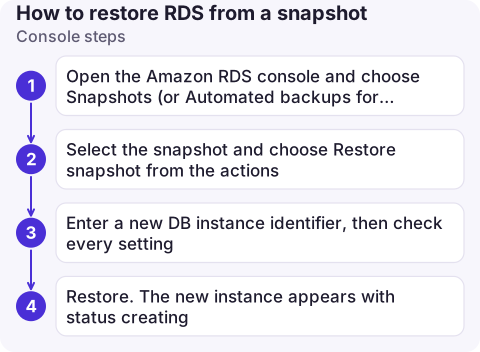
- Open the Amazon RDS console and choose Snapshots (or Automated backups for point-in-time restore).
- Select the snapshot and choose Restore snapshot from the actions.
- Enter a new DB instance identifier, then check every setting: instance class, VPC and subnet group, security groups, parameter group, option group, Multi-AZ, public access.
- Restore. The new instance appears with status
creating.
CLI steps
# Restore a snapshot to a new instance, settings stated explicitly
aws rds restore-db-instance-from-db-snapshot \
  --db-instance-identifier orders-db-restored \
  --db-snapshot-identifier orders-db-before-migration \
  --db-instance-class db.r6g.large \
  --db-subnet-group-name private-db-subnets \
  --vpc-security-group-ids sg-0a1b2c3d4e5f67890 \
  --db-parameter-group-name orders-pg15 \
  --no-publicly-accessible \
  --multi-az
aws rds wait db-instance-available --db-instance-identifier orders-db-restored

# Or: point in time, from automated backups
aws rds restore-db-instance-to-point-in-time \
  --source-db-instance-identifier orders-db \
  --target-db-instance-identifier orders-db-pitr \
  --restore-time 2026-11-16T08:55:00Z \
  --db-subnet-group-name private-db-subnets \
  --vpc-security-group-ids sg-0a1b2c3d4e5f67890
For Aurora, the restored cluster has no instances until you add one:
aws rds restore-db-cluster-from-snapshot \
  --db-cluster-identifier orders-aurora-restored \
  --snapshot-identifier orders-aurora-snap \
  --engine aurora-postgresql \
  --db-subnet-group-name private-db-subnets \
  --vpc-security-group-ids sg-0a1b2c3d4e5f67890
aws rds create-db-instance \
  --db-instance-identifier orders-aurora-restored-1 \
  --db-cluster-identifier orders-aurora-restored \
  --engine aurora-postgresql \
  --db-instance-class db.r6g.large
Keeping the same endpoint
Applications connect to an endpoint built from the instance identifier. To swap in the restored copy without changing configuration:
- Rename the current instance:
aws rds modify-db-instance --db-instance-identifier orders-db --new-db-instance-identifier orders-db-old --apply-immediately. - Restore (or rename the already-restored instance) to
orders-db. - Delete
orders-db-oldonly after you're sure, taking a final snapshot.
Renames take effect within minutes and briefly interrupt connections; DNS caches in clients may hold the old answer for a while.
Things that bite after a restore
- Default security group. If you don't specify security groups, the restored instance may get the VPC's default group and your application can't connect: a classic cause of connection timed out.
- Default parameter group. Custom settings are lost unless you name your parameter group.
- Slow first queries. Data blocks are loaded from S3 as they're first read, so a freshly restored instance is slower until warmed up. Run the queries you care about, or a full table scan, before sending production traffic.
- Cost. The restored instance is a full, billed instance. Delete test restores.
- Same master password as when the snapshot was taken, which may not match what's in your secrets store.
Questions
Can I restore an RDS snapshot to an existing database?
No. A restore always creates a new instance. To replace an existing database, rename it, restore with the original name, then delete the old one.
How long does an RDS snapshot restore take?
It depends on the size of the database and the instance class; small databases are often ready in tens of minutes, large ones longer. Performance can stay lower until data is loaded from S3.
How do I restore just one table from an RDS snapshot?
Restore the snapshot to a temporary instance, export the table with your engine's dump tool, import it into the live database, then delete the temporary instance.

Restores usually start under pressure, after a bad migration or a dropped table. CloudConsole, a phone app for AWS, is built to show snapshot and instance status on your phone so you can follow a restore while away from your laptop.
About the app → · Download on the App Store