 CloudConsole
aws rds restore-db-instance-to-point-in-time
aws rds restore-db-instance-to-point-in-time creates a new DB instance whose data matches the source as it was at a chosen moment, using automated backups plus transaction logs. Pass --source-db-instance-identifier, a new --target-db-instance-identifier, and either --restore-time in UTC or --use-latest-restorable-time.
What the command does
Point-in-time restore (PITR) is the tool for "someone ran a bad DELETE at 14:02". RDS takes the most recent automated backup before your chosen time, then replays the transaction logs it has been shipping every few minutes up to that moment, and builds a new instance from the result. The source instance keeps running and is not touched.
It only works inside the backup retention window, and only if automated backups are on (a retention period of at least 1 day). The latest moment you can restore to is reported as LatestRestorableTime, which normally trails real time by a few minutes.
Syntax
aws rds restore-db-instance-to-point-in-time \
  --source-db-instance-identifier <source> \
  --target-db-instance-identifier <new-name> \
  --restore-time 2026-11-16T14:01:00Z \
  [--db-subnet-group-name <group>] \
  [--vpc-security-group-ids sg-...] \
  [--db-parameter-group-name <group>] \
  [--db-instance-class <class>] [--multi-az]
Worked examples
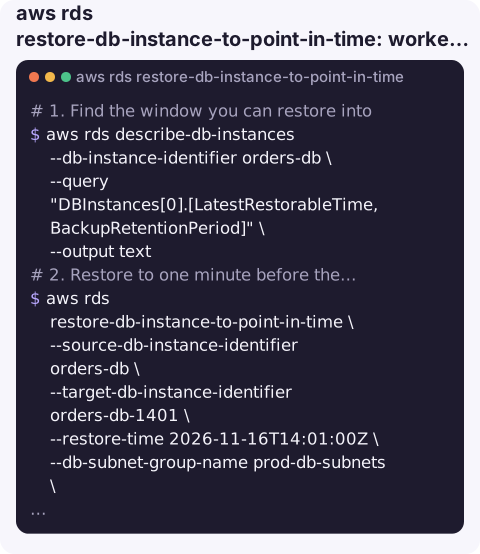
1. Find the window you can restore into.
aws rds describe-db-instances --db-instance-identifier orders-db \
  --query "DBInstances[0].[LatestRestorableTime,BackupRetentionPeriod]" \
  --output text
The earliest point is roughly the retention period back from now; aws rds describe-db-instance-automated-backups shows the exact RestoreWindow.
2. Restore to one minute before the mistake, into the right network:
aws rds restore-db-instance-to-point-in-time \
  --source-db-instance-identifier orders-db \
  --target-db-instance-identifier orders-db-1401 \
  --restore-time 2026-11-16T14:01:00Z \
  --db-subnet-group-name prod-db-subnets \
  --vpc-security-group-ids sg-0a1b2c3d4e5f67890 \
  --db-parameter-group-name orders-pg16 \
  --no-publicly-accessible
aws rds wait db-instance-available --db-instance-identifier orders-db-1401
3. Restore to the latest possible moment, for example to clone production for a risky test:
aws rds restore-db-instance-to-point-in-time \
  --source-db-instance-identifier orders-db \
  --target-db-instance-identifier orders-db-clone \
  --use-latest-restorable-time \
  --db-instance-class db.t4g.medium
4. Restore a deleted instance from its retained automated backups. Use the resource ID instead of the name, since the name no longer exists:
aws rds describe-db-instance-automated-backups \
  --query "DBInstanceAutomatedBackups[].[DBInstanceIdentifier,DbiResourceId,Status]" --output text
aws rds restore-db-instance-to-point-in-time \
  --source-dbi-resource-id db-ABCDEFGHIJKLMNOP1234567890 \
  --target-db-instance-identifier orders-db-recovered \
  --use-latest-restorable-time
Key options
| Option | Notes |
|---|---|
--restore-time | ISO 8601 in UTC, e.g. 2026-11-16T14:01:00Z. Must fall before LatestRestorableTime. Cannot be combined with the next option. |
--use-latest-restorable-time | Restore as close to now as the logs allow. |
--source-dbi-resource-id | Identify the source by its immutable resource ID; needed when the source instance has been deleted. |
--source-db-instance-automated-backups-arn | Restore from automated backups that were replicated to another Region. |
--db-subnet-group-name, --vpc-security-group-ids | Not copied from the source. Without them you get the defaults, which is the most common reason a restored instance is unreachable. |
--multi-az | The restored instance is Single-AZ unless you ask otherwise. |
Gotchas
- Times are UTC. Convert from your local clock first. Restoring an hour off during British Summer Time is a classic mistake.
- It is not an in-place rollback. You get a second database. Either copy the lost rows back into production or swap the instances by renaming them.
- It can take a long time. Replaying a busy day of logs on top of the backup can take far longer than a snapshot restore. Start it early in the incident.
- Aurora is different. Aurora clusters use
aws rds restore-db-cluster-to-point-in-time, followed by adding an instance to the new cluster. - Retention matters before the incident. With a 1-day retention you cannot go back to last week. Check
BackupRetentionPeriodon important databases now.
Questions
How far back can I restore an RDS instance?
As far back as its backup retention period, which can be set up to 35 days. The exact earliest and latest times are in the RestoreWindow returned by describe-db-instance-automated-backups.
Does point-in-time restore overwrite my database?
No. It always creates a new instance with a new name and endpoint. The original keeps running.
Why does my restored RDS instance have the wrong security group?
PITR uses the default security group, subnet group and parameter group unless you pass them. Supply --vpc-security-group-ids, --db-subnet-group-name and --db-parameter-group-name on the restore, or fix them afterwards with modify-db-instance.
Data-loss incidents rarely wait for office hours. CloudConsole, a phone app for AWS, is built to show RDS instances and their status on a phone, so you can follow a restore once it is running.
About the app → · Download on the App Store