 CloudConsole
RDS parameter groups explained
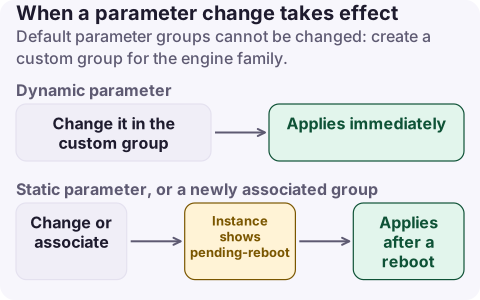
A DB parameter group holds an RDS instance's engine settings. Default groups can't be changed, so create a custom group for the right family (for example mysql8.0 or postgres16), change parameters there and associate it with the instance. Dynamic parameters apply immediately; static ones, and any newly associated group, only take effect after a reboot, and the instance shows pending-reboot until then. Changes to a group affect every instance using it.
Key concepts
| Concept | What it means for you |
|---|---|
Default parameter group (default.mysql8.0) | Read-only. Every instance created without a custom group uses it |
| Custom DB parameter group | Copy of the defaults you can edit; tied to one family |
| Family | Engine and major version (mysql8.0, postgres16). A major version upgrade needs a group of the new family |
| Dynamic parameter | Applies straight away to every associated instance (ApplyMethod=immediate) |
| Static parameter | Applies only after you reboot each instance (pending-reboot) |
| Formula values | Defaults like {DBInstanceClassMemory/12582880} scale with instance size |
| DB cluster parameter group | For Multi-AZ DB clusters and Aurora; cluster-wide settings |
Associating a new group with an instance happens immediately, but its values (static and dynamic) are only applied after the next reboot.
Parameters people commonly change
| Engine | Parameter | Why |
|---|---|---|
| MySQL | max_connections | Usually leave as the formula; see max connections |
| MySQL | slow_query_log, long_query_time | Find slow queries (dynamic) |
| MySQL | wait_timeout, interactive_timeout | Close idle connections |
| MySQL | binlog_format | Replication tooling requirements |
| PostgreSQL | log_min_duration_statement | Log slow statements (dynamic) |
| PostgreSQL | idle_in_transaction_session_timeout | Kill sessions stuck in open transactions |
| PostgreSQL | shared_preload_libraries | Load pg_stat_statements and other extensions (static) |
| PostgreSQL | rds.force_ssl | Require TLS connections |
| PostgreSQL | max_connections, work_mem | Memory per connection and per sort; change carefully |
Create, change and apply
# Create a custom group and attach it
aws rds create-db-parameter-group --db-parameter-group-name app-postgres16 \
  --db-parameter-group-family postgres16 --description "orders-db settings"

aws rds modify-db-parameter-group --db-parameter-group-name app-postgres16 \
  --parameters "ParameterName=log_min_duration_statement,ParameterValue=500,ApplyMethod=immediate" \
               "ParameterName=shared_preload_libraries,ParameterValue=pg_stat_statements,ApplyMethod=pending-reboot"

aws rds modify-db-instance --db-instance-identifier orders-db \
  --db-parameter-group-name app-postgres16 --apply-immediately

# Is a reboot pending?
aws rds describe-db-instances --db-instance-identifier orders-db \
  --query 'DBInstances[0].DBParameterGroups[].[DBParameterGroupName,ParameterApplyStatus]'

# What you changed from the defaults
aws rds describe-db-parameters --db-parameter-group-name app-postgres16 --source user \
  --query 'Parameters[].[ParameterName,ParameterValue,ApplyType]' --output table
Reboot in a quiet period, or let the next maintenance window do it; a Multi-AZ instance can reboot with failover to shorten the outage.
CloudFormation: AWS::RDS::DBParameterGroup with Family, Description and Parameters (a map of name to value), referenced by DBParameterGroupName on AWS::RDS::DBInstance. Terraform: aws_db_parameter_group with family and parameter { name, value, apply_method }, referenced by parameter_group_name on aws_db_instance.
Mistakes that cause outages
- Shared groups: one custom group used by prod and staging means a "staging" change hits prod. Use a group per environment or workload.
- Forgotten pending-reboot: a static change waits silently until someone reboots or maintenance runs, then changes behaviour unexpectedly. Check
ParameterApplyStatusafter every change. - Memory-heavy values: raising
max_connections,work_memor buffer sizes beyond the instance's memory can leave it unable to start, in incompatible-parameters. - Major upgrades: the upgrade fails or uses defaults if you don't create and specify a parameter group for the new family.
- Hard-coded numbers: a fixed
max_connectionsthat suited a large instance becomes dangerous after scaling down; formulas follow the instance size.
Questions
Can I modify the default RDS parameter group?
No. Default parameter groups are read-only. Create a custom parameter group, change it and associate it with your DB instance.
Why does my RDS instance say pending-reboot?
A static parameter changed, or a new parameter group was associated. The change applies only after you reboot the instance.
What is an RDS parameter group family?
The engine and major version a group applies to, such as mysql8.0 or postgres16. A group can only be used with instances of that family.
Parameter changes that wait for a reboot have a habit of surprising someone weeks later during maintenance. CloudConsole, a phone app for AWS, is being built to show RDS events and alarms on your phone.
About the app → · Download on the App Store