 CloudConsole
S3 lifecycle rules: settings that matter
An S3 lifecycle configuration holds up to 1,000 rules, each with a filter (prefix, tags, object size) and actions: transition current or noncurrent versions to cheaper storage classes after N days, expire them, delete expired object delete markers, and abort incomplete multipart uploads. Since September 2024 objects smaller than 128 KB aren't transitioned by default, and moving objects before a class's minimum storage duration (for example 90 days for Glacier Instant Retrieval) still bills the full minimum. Almost every bucket should at least abort incomplete uploads after a few days.
Rule building blocks
| Element | Purpose |
|---|---|
Filter | Prefix, Tag, ObjectSizeGreaterThan, ObjectSizeLessThan, or And of several |
Transitions | Move current versions to a storage class after Days (or on a Date) |
Expiration | Expire current versions after Days; in versioned buckets this adds a delete marker |
ExpiredObjectDeleteMarker | Remove delete markers with no remaining versions |
NoncurrentVersionTransitions | Move old versions after NoncurrentDays |
NoncurrentVersionExpiration | Delete old versions after NoncurrentDays, optionally keeping NewerNoncurrentVersions |
AbortIncompleteMultipartUpload | Delete parts of uploads not completed within DaysAfterInitiation |
Lifecycle actions run asynchronously, so there can be a delay between the date an object becomes eligible and the actual transition or deletion; billing for expired objects stops when they become eligible.
Constraints that change the economics
- Small objects: objects under 128 KB aren't transitioned by default, because the per-object transition request costs more than the storage saved. Use
ObjectSizeGreaterThan/ObjectSizeLessThanfilters or the--transition-default-minimum-object-sizeoption to change that deliberately. Configurations created before September 2024 kept the old behaviour until edited. - Minimum storage durations: Standard-IA and One Zone-IA bill a minimum of 30 days, Glacier Instant Retrieval and Glacier Flexible Retrieval 90 days, Deep Archive 180 days. A single rule can't transition to a class and then on to another before the first class's minimum duration has passed.
- One-way waterfall: classes only move "down"; Glacier Flexible Retrieval can only go on to Deep Archive, and nothing comes back out of Deep Archive via lifecycle.
- Versioning: in a versioned bucket, expiring a current version only hides it. Without a noncurrent-version rule, storage keeps growing.
Recommended baseline rules
| Bucket type | Rules |
|---|---|
| Every bucket | Abort incomplete multipart uploads after 7 days |
| Versioned buckets | Expire noncurrent versions after 30 to 90 days (keep a few with NewerNoncurrentVersions), remove expired delete markers |
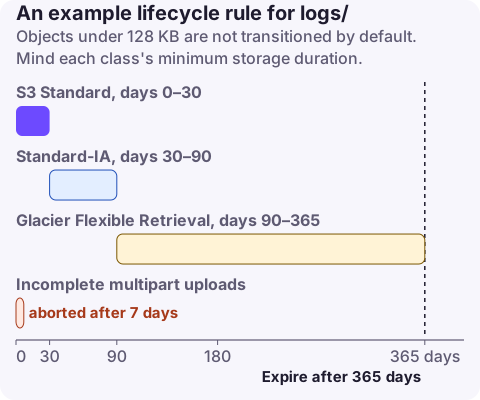
| Logs (ALB, CloudTrail, app exports) | Standard-IA at 30 days, Glacier Flexible Retrieval at 90, expire at 365 or per policy |
| Backups | Glacier or Deep Archive after the restore window you need quickly |
Temporary data (tmp/, build artefacts) | Expire after 1 to 7 days |
| Unpredictable access | S3 Intelligent-Tiering instead of fixed transitions |
{
  "Rules": [
    {"ID": "abort-mpu", "Status": "Enabled", "Filter": {},
     "AbortIncompleteMultipartUpload": {"DaysAfterInitiation": 7}},
    {"ID": "old-versions", "Status": "Enabled", "Filter": {},
     "NoncurrentVersionExpiration": {"NoncurrentDays": 30, "NewerNoncurrentVersions": 3},
     "Expiration": {"ExpiredObjectDeleteMarker": true}},
    {"ID": "logs", "Status": "Enabled", "Filter": {"Prefix": "logs/"},
     "Transitions": [{"Days": 30, "StorageClass": "STANDARD_IA"}, {"Days": 90, "StorageClass": "GLACIER"}],
     "Expiration": {"Days": 365}}
  ]
}
aws s3api put-bucket-lifecycle-configuration --bucket my-bucket --lifecycle-configuration file://lifecycle.json
aws s3api get-bucket-lifecycle-configuration --bucket my-bucketput-bucket-lifecycle-configuration replaces the whole configuration; fetch and merge existing rules first. CloudFormation: LifecycleConfiguration > Rules on AWS::S3::Bucket (properties such as Transitions, ExpirationInDays, NoncurrentVersionExpiration, AbortIncompleteMultipartUpload). Terraform: aws_s3_bucket_lifecycle_configuration with rule blocks.
Mistakes to avoid
- Expiring by prefix without checking the filter: an empty filter applies the rule to the whole bucket.
- Transitioning millions of tiny objects: request charges exceed savings.
- Moving data to Glacier that an application reads directly; reads then fail until restored.
- Assuming a rule acts immediately after you add it: the first run can take a day or more.
Questions
How long does an S3 lifecycle rule take to apply?
Lifecycle runs asynchronously. Objects become eligible on the rule's schedule, but the transition or deletion itself can take a day or more, especially for large buckets.
How many lifecycle rules can an S3 bucket have?
Up to 1,000 rules in one lifecycle configuration.
Should I use lifecycle rules or Intelligent-Tiering?
Use lifecycle rules when access patterns are predictable by age, such as logs. Use Intelligent-Tiering when you don't know how often objects will be read.
Lifecycle mistakes are noticed either on the bill or when data that should exist is gone. CloudConsole, a phone app for AWS, is being built to show cost changes and alarms on your phone so either is caught early.
About the app → · Download on the App Store