 CloudConsole
Amazon S3 limits: object size, buckets and request rates
A single S3 PUT can upload up to 5 GB; anything larger must use multipart upload, which supports objects up to 48.8 TiB (about 50 TB) in up to 10,000 parts of 5 MiB to 5 GiB each. The console uploads files up to 160 GB. An account can create 10,000 general purpose buckets by default (adjustable), buckets have no size or object-count limit, and S3 handles at least 3,500 writes and 5,500 reads per second per partitioned prefix.
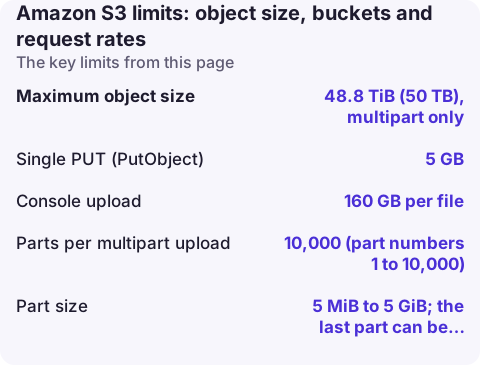
Object and upload limits
| Item | Limit |
|---|---|
| Maximum object size | 48.8 TiB (50 TB), multipart only |
| Single PUT (PutObject) | 5 GB |
| Console upload | 160 GB per file |
| Parts per multipart upload | 10,000 (part numbers 1 to 10,000) |
| Part size | 5 MiB to 5 GiB; the last part can be smaller |
| Parts returned per ListParts call | 1,000 |
The maximum object size was raised from 5 TB to 50 TB; older answers and some tools still say 5 TB. The S3 user guide recommends multipart once objects reach about 100 MB, and says to use the S3 Transfer Manager (Java, Python or the AWS CLI, ideally with the CRT) for files over 5 TB.
Part-size arithmetic matters. With 10,000 parts, the part size sets the largest file you can upload: 5 MiB parts top out around 48.8 GiB, and 8 MiB parts (the CLI default multipart_chunksize) at about 78 GiB. For bigger files the high-level CLI and SDK transfer managers raise the part size automatically; if you call CreateMultipartUpload yourself, choose the part size from the file size.
Bucket and configuration limits
| Quota | Default | Adjustable |
|---|---|---|
| General purpose buckets per account | 10,000 | Yes |
| Directory buckets per account | 100 | Yes |
| Objects or bytes per bucket | No limit | - |
| Bucket policy size | 20 KB | No |
| Lifecycle rules per bucket | 1,000 | No |
| Event notification configurations per bucket | 100 | No |
| Tags per bucket | 50 | No |
Bucket quotas for commercial Regions are viewed and raised only from US East (N. Virginia), even if your buckets live elsewhere. Above 10,000 buckets, unpaginated ListBuckets calls are rejected, so make sure every tool that lists buckets paginates.
# Current bucket quota and its code (run against us-east-1)
aws service-quotas list-service-quotas --service-code s3 --region us-east-1 \
  --query "Quotas[?contains(QuotaName,'bucket')].[QuotaName,QuotaCode,Value]" --output table

# How many buckets you have now
aws s3api list-buckets --query 'length(Buckets)'
Request rates
S3 does not publish a per-bucket request cap. It supports at least 3,500 PUT, COPY, POST or DELETE and 5,500 GET or HEAD requests per second per partitioned prefix, and there is no limit on the number of prefixes. Ten prefixes read in parallel can therefore reach 55,000 GETs per second.
Scaling to a new, higher rate is gradual. While it happens you may see 503 Slow Down responses, which disappear once S3 has repartitioned; see the SlowDown fix. The practical rules:
- Spread hot keys across prefixes (for example a short hash or date at the start of the key) when one prefix carries thousands of requests per second.
- Retry 503s with exponential backoff; the SDKs do this by default.
- Ramp batch jobs up rather than starting at full speed.
- If objects use SSE-KMS, every upload and download also calls KMS and counts against the KMS request quota; S3 Bucket Keys cut those calls sharply.
Hitting the limits: messages and fixes
EntityTooLarge: Your proposed upload exceeds the maximum allowed sizeon PutObject: switch to multipart (aws s3 cpdoes this for you).InvalidPartorEntityTooSmallon CompleteMultipartUpload: a non-final part is under 5 MiB, or the ETag list is wrong.TooManyBucketson CreateBucket: you hit the bucket quota; request an increase in us-east-1 or reuse buckets with prefixes.- Abandoned multipart uploads keep their parts (and their storage charges) until aborted; add an
AbortIncompleteMultipartUploadlifecycle rule.
Questions
What is the maximum file size for S3?
48.8 TiB (50 TB) per object using multipart upload. A single PUT request is limited to 5 GB, and the console to 160 GB per file.
How many buckets can I have in S3?
10,000 general purpose buckets per account by default, and you can request more through Service Quotas in US East (N. Virginia).
Is there a limit on the size of an S3 bucket?
No. There is no maximum bucket size and no limit on the number of objects in a bucket.
S3 limits mostly bite in batch jobs that run overnight. CloudConsole, a phone app for AWS, is being built to show the alarms and logs from those jobs on your phone so a failed upload doesn't wait until morning.
About the app → · Download on the App Store