 CloudConsole
RDS Extended Support charges explained
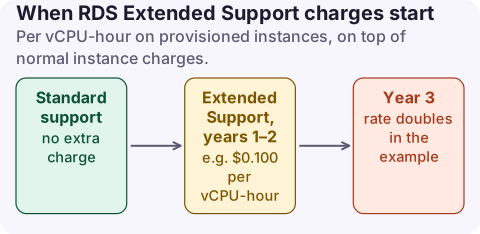
RDS Extended Support is an automatic, paid extension for Aurora, RDS for MySQL and RDS for PostgreSQL major versions past their end of standard support. It is charged per vCPU-hour on provisioned instances (per ACU-hour on Aurora Serverless v2), on top of normal instance charges, starting the day after standard support ends. The rate rises in year 3. Upgrading to a supported major version stops it.
How the charge is calculated
- Per vCPU-hour for every enrolled instance, including Multi-AZ standbys.
- Price depends on Region, engine version and how long ago standard support ended: one rate for years 1 and 2 and a higher rate in year 3.
- The RDS for MySQL pricing FAQ example: a db.r5.large (2 vCPUs) on MySQL 5.7 in US East (N. Virginia) in the first year was charged $0.100 per vCPU-hour, $0.200 per hour, at the time of writing. The same page shows the year-3 rate doubling to $0.200 per vCPU-hour in its US East (Ohio) example.
- On the bill it is a separate line whose usage type contains
ExtendedSupport, for exampleExtendedSupport:Yr1-Yr2:MySQL5.7with a Region prefix.
Large instances make this significant: a 16-vCPU instance plus its Multi-AZ standby is 32 vCPU-hours of Extended Support every hour.
Find enrolled databases
# Engine, version and Extended Support enrolment for every instance
aws rds describe-db-instances \
  --query 'DBInstances[].[DBInstanceIdentifier,Engine,EngineVersion,DBInstanceClass,MultiAZ,EngineLifecycleSupport]' \
  --output table

# Aurora clusters
aws rds describe-db-clusters \
  --query 'DBClusters[].[DBClusterIdentifier,Engine,EngineVersion,EngineLifecycleSupport]' \
  --output table
In Cost Explorer, open the Usage type filter and search for ExtendedSupport, then group by Region or linked account. Cost Explorer shows the cost but not which instance; the cost and usage export with resource IDs does.
Stop or avoid the charge
- Upgrade the major version to one in standard support. Charges stop from the day the upgrade completes. Test on a snapshot restore or a blue/green deployment first.
- Prevent new enrolments: create or restore databases with Extended Support disabled, so old versions cannot slip in.
- Opt out existing instances by setting the lifecycle parameter. If the instance is already past its end of standard support date, RDS will upgrade it to the next supported major version, so plan that as a real upgrade.
# Opt an existing instance out (may trigger a major version upgrade)
aws rds modify-db-instance --db-instance-identifier my-db \
  --engine-lifecycle-support open-source-rds-extended-support-disabled \
  --apply-immediately
To receive Extended Support you must be on the latest minor version of the major version; RDS upgrades the minor version automatically at the end of standard support if needed.
What not to do
- Do not opt out on a production database without testing the major upgrade; the automatic upgrade that follows is not a no-op.
- Do not forget restored snapshots and read replicas of old versions; each enrols separately.
- Do not treat Extended Support as permanent. It ends at the published end-of-Extended-Support date, after which an upgrade is forced anyway.
Questions
What is RDS Extended Support?
A paid offering that keeps MySQL and PostgreSQL major versions (including Aurora) running with critical fixes after the end of RDS standard support, for up to three years.
When do RDS Extended Support charges start?
The day after the RDS end of standard support date for that major version.
Do Multi-AZ standbys pay Extended Support?
Yes. The RDS documentation states that Extended Support charges apply to standby instances in Multi-AZ deployments.
Extended Support starts on a date, not after a change, so nothing in your deploy history explains it. CloudConsole, a phone app for AWS, shows spend by usage type and explains ExtendedSupport lines, so the new charge is recognisable when it appears.
About the app → · Download on the App Store