 CloudConsole
How much do EBS snapshots cost?
EBS snapshots are billed per GB-month of data stored. In the Standard tier the first snapshot of a volume stores all written blocks and later ones store only changed blocks, so cost depends on how much data changes and how long you keep the chain. Archive tier stores full copies at a lower rate, with a 90-day minimum and a retrieval fee.
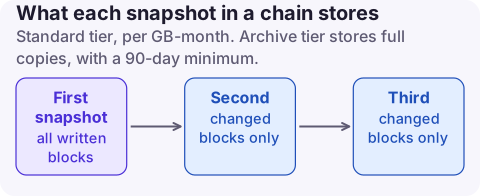
How snapshot charges work
| Usage type | What it bills |
|---|---|
EBS:SnapshotUsage | Standard tier storage, incremental, GB-month |
EBS:SnapshotArchiveStorage | Archive tier storage, full copy, GB-month |
EBS:SnapshotArchiveRetrieval | Per GB restored from Archive |
EBS:SnapshotArchiveEarlyDelete | Prorated charge for deleting or restoring before 90 days |
EBS:FastSnapshotRestore | Fast snapshot restore, per snapshot per AZ per hour |
Only written blocks count: a 200 GB volume with 100 GB of data produces a first snapshot of about 100 GB. AWS Backup snapshots of EBS are billed at the same rate. Copying a snapshot to another Region adds data transfer and a second copy of storage.
Why deleting snapshots sometimes saves little
Snapshots share blocks. Deleting an old snapshot only frees blocks that no other snapshot references; blocks still needed by later snapshots are kept and moved to them. So deleting one snapshot from the middle of a daily chain may barely change the bill, while expiring the whole tail of a long chain does.
Archiving has the same subtlety: an archived snapshot becomes a full copy, and blocks shared with Standard-tier snapshots remain billed in Standard too. Archive suits standalone monthly or end-of-project snapshots, not members of an active daily chain.
Find what is costing money
# Your snapshots in a Region, oldest first, with source volume and size
aws ec2 describe-snapshots --region eu-west-2 --owner-ids self \
  --query 'sort_by(Snapshots,&StartTime)[].[SnapshotId,VolumeId,VolumeSize,StartTime,StorageTier,Description]' \
  --output table

# Snapshots whose source volume no longer exists are good review candidates
aws ec2 describe-volumes --region eu-west-2 --volume-ids vol-0123456789abcdef0
VolumeSize is the source volume size, not the billed size. Cost Explorer with resource-level data, or the cost and usage export with resource IDs, gives the billed GB per snapshot.
Reduce it, safest first
- Put an expiry on every automated policy (Data Lifecycle Manager or AWS Backup). Unlimited retention is the main cause of snapshot growth.
- Delete snapshots of volumes and AMIs you have retired, after checking no AMI still references them; deregister the AMI first.
- Archive standalone long-term snapshots kept for 90 days or more; the Archive tier is up to 75% cheaper to store.
- Disable fast snapshot restore where you no longer need it; it bills per snapshot per AZ every hour.
# Move a long-term snapshot to the Archive tier
aws ec2 modify-snapshot-tier --snapshot-id snap-0123456789abcdef0 --storage-tier archive

# Destructive: removes the snapshot (blocks still used by others are kept)
aws ec2 delete-snapshot --snapshot-id snap-0123456789abcdef0
What not to do: archive snapshots you might need within days. Restoring from Archive takes hours and costs a retrieval fee, and early removal triggers the 90-day prorated charge.
Questions
Are EBS snapshots incremental for billing?
In the Standard tier, yes: after the first snapshot you pay only for changed blocks. Archive tier snapshots are full copies.
Am I charged for snapshots shared with me?
No. You pay only if you copy a shared snapshot into your account or create volumes from it.
Why did my bill not drop after deleting a snapshot?
Blocks still referenced by other snapshots are retained, so only unique blocks were freed.
Snapshot cost grows a little every day, which is easy to miss. CloudConsole, a phone app for AWS, shows spend by usage type and explains EBS:SnapshotUsage and the archive lines, so you can see the trend on your phone.
About the app → · Download on the App Store