 CloudConsole
How to find and remove unused EBS volumes
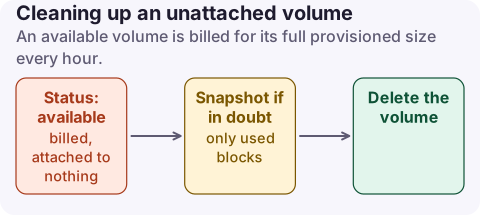
An EBS volume in the available state is not attached to any instance but is still billed for its full provisioned size every hour. List them with aws ec2 describe-volumes filtered on status=available in each Region, confirm nobody needs them, take a snapshot if in doubt, then delete. Snapshots cost less per GB than volumes and only store used blocks.
Why orphaned volumes appear
- Instances terminated with Delete on termination off for data volumes (the default for volumes attached after launch).
- Auto Scaling or CI jobs that create volumes and never clean up.
- Volumes restored from snapshots for an investigation and forgotten.
- Kubernetes persistent volumes with a
Retainreclaim policy outliving their claims.
The cost shows as EBS:VolumeUsage.* under EC2 - Other, indistinguishable from in-use volumes until you look at the resources.
To size the problem, add up the sizes of the available volumes per type and multiply by your Region's GB-month rates from the EBS pricing page. Provisioned IOPS and throughput on unattached io2 or gp3 volumes keep billing too, so a detached high-performance volume costs more than its size suggests.
Find them in every Region
# Unattached volumes in one Region, biggest first
aws ec2 describe-volumes --region eu-west-2 \
  --filters Name=status,Values=available \
  --query 'reverse(sort_by(Volumes,&Size))[].[VolumeId,Size,VolumeType,CreateTime,Tags[?Key==`Name`]|[0].Value]' \
  --output table

# Every enabled Region
for r in $(aws ec2 describe-regions --query 'Regions[].RegionName' --output text); do
  echo "== $r"
  aws ec2 describe-volumes --region "$r" --filters Name=status,Values=available \
    --query 'Volumes[].[VolumeId,Size,VolumeType,CreateTime]' --output text
done
AWS Trusted Advisor and Compute Optimizer also flag idle and underused volumes, which catches volumes that are attached but barely touched.
Check, snapshot, delete
- Check ownership: tags, the
CreateTime, and CloudTrailDetachVolumeorTerminateInstancesevents tell you who left it and when. See finding who changed a resource for the CloudTrail lookup. - Snapshot anything uncertain and tag the snapshot with the volume ID and a review date.
- Delete the volume. This is permanent; only a snapshot can bring the data back.
aws ec2 create-snapshot --volume-id vol-0123456789abcdef0 \
  --description "pre-delete backup of vol-0123456789abcdef0" \
  --tag-specifications 'ResourceType=snapshot,Tags=[{Key=review-by,Value=2027-02-01}]'

# Wait for the snapshot to complete before deleting
aws ec2 wait snapshot-completed --snapshot-ids snap-0123456789abcdef0

# Destructive
aws ec2 delete-volume --volume-id vol-0123456789abcdef0
Stop it happening again
- Set
DeleteOnTerminationto true in launch templates for volumes that do not hold unique data. - Require an
ownertag on volumes and activate it as a cost allocation tag so the next orphan has a name. - Turn on Recycle Bin retention rules for volumes if you want an undo window. Volumes in the Recycle Bin are billed at the normal volume rate, so keep the retention short.
- Review available volumes monthly; it takes one command.
What not to do: bulk-delete every available volume in a script with no snapshot. Some teams detach volumes deliberately during maintenance and reattach them later.
Questions
Do unattached EBS volumes cost money?
Yes. EBS bills for provisioned storage until the volume is deleted, attached or not.
Is it cheaper to keep a snapshot than a volume?
Usually. Snapshots are billed at a lower rate per GB-month than active volumes and store only written blocks, not the full provisioned size.
How do I find unused EBS volumes in all regions?
Loop over aws ec2 describe-regions and run describe-volumes with the status=available filter in each Region.
Orphaned volumes are found by whoever looks first. CloudConsole, a phone app for AWS, shows EBS spend by usage type with a short explanation of each line, which makes a slow rise in volume storage easy to notice away from a desk.
About the app → · Download on the App Store