 CloudConsole
EKS extended support cost
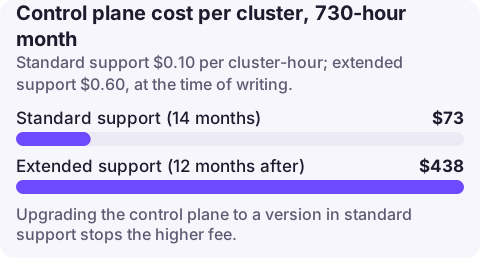
Each EKS cluster pays a per-hour fee that depends on its Kubernetes version. During the 14 months of standard support it is $0.10 per cluster-hour; once the version enters the following 12 months of extended support it is $0.60 per cluster-hour, at the time of writing. That is roughly $438 instead of $73 per cluster for a 730-hour month. Upgrading the control plane to a version in standard support returns it to the lower rate.
How the charge works
- The fee is per cluster, not per node; it is independent of cluster size.
- Extended support is enabled by default for new and existing clusters via the cluster upgrade policy (
supportType=EXTENDED). - With
supportType=STANDARD, the cluster is automatically upgraded at the end of standard support instead of entering extended support. - You can only change the policy while the cluster runs a version in standard support; once in extended support it cannot be switched off without upgrading.
- On the bill the cluster-hours line for extended support has a usage type that includes
extendedSupport; search the Usage type filter in Cost Explorer for it.
Worker nodes, Fargate pods and add-ons are billed separately and do not change with the support period.
For scale: ten clusters left one version behind cost about $3,650 a month more than the same clusters in standard support (10 clusters x $0.50 extra x 730 hours), before any change to nodes or workloads.
Check your clusters
# Version and upgrade policy for every cluster in the Region
for c in $(aws eks list-clusters --query 'clusters[]' --output text); do
  aws eks describe-cluster --name "$c" \
    --query 'cluster.[name,version,upgradePolicy.supportType]' --output text
done
Compare each version with the EKS Kubernetes release calendar in the documentation. A cluster whose version is past its end of standard support date is billing at the extended rate.
Avoid or stop the charge
- Upgrade the control plane one minor version at a time to a version in standard support, then upgrade node groups and add-ons. Check deprecated API usage before each step.
- Set the upgrade policy to STANDARD on non-production clusters while they are still in standard support, so they cannot drift into extended support:
aws eks update-cluster-config --name my-cluster --upgrade-policy supportType=STANDARDWith STANDARD, EKS upgrades the control plane automatically when standard support ends, which can break workloads relying on removed APIs. Use it where you would rather be upgraded than billed, and keep production on a planned upgrade cycle.
What not to do
- Do not set STANDARD on production as a cost fix without a tested upgrade path; an automatic control plane upgrade with incompatible manifests is an outage.
- Do not forget idle clusters: a forgotten test cluster on an old version pays $0.60 an hour with no workloads.
- Do not assume upgrading nodes is enough; the fee follows the control plane version.
Questions
How much does EKS extended support cost?
The EKS pricing page lists $0.60 per cluster per hour for versions in extended support, versus $0.10 in standard support, at the time of writing.
How long is EKS standard support?
14 months after a Kubernetes version is released on EKS, followed by 12 months of extended support.
Can I turn off EKS extended support?
Set the cluster upgrade policy to STANDARD while it is still on a version in standard support; once in extended support, upgrade to leave it.
The jump from $0.10 to $0.60 an hour happens on a calendar date with no change on your side. CloudConsole, a phone app for AWS, shows spend by usage type and explains the EKS extended support line, so the step change is easy to recognise.
About the app → · Download on the App Store