 CloudConsole
AWS Cost Anomaly Detection explained
AWS Cost Anomaly Detection uses machine learning on your Cost Explorer data to flag spend that departs from its usual pattern, and reports the root cause by service, account, Region and usage type. It runs about three times a day, so an anomaly can take up to 24 hours to appear. You choose monitors (what to watch) and alert subscriptions (who hears, how often, and above what impact).
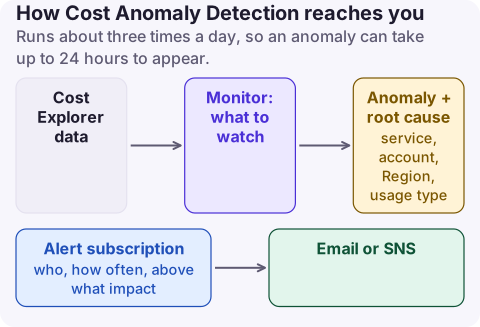
How it works
- Monitors: AWS managed monitors track every service, linked account, cost category or tag value independently; customer managed monitors watch a specific set you choose.
- Data: net unblended cost from Cost Explorer, which lags up to 24 hours. A new monitor can take 24 hours to start, and a newly used service needs about 10 days of history before anomalies are detected for it.
- Alerts: individual alerts through SNS (which can feed Slack or Chime via Amazon Q Developer in chat applications), or daily and weekly email summaries.
- Thresholds: absolute (impact in dollars) or percentage (impact relative to expected spend), and you can combine two with AND or OR.
- Coverage gaps: AWS Marketplace charges are not monitored (except third-party models on Amazon Bedrock); use a budget for those.
Set it up with the CLI
# A monitor that tracks each AWS service separately
aws ce create-anomaly-monitor --region us-east-1 \
  --anomaly-monitor '{"MonitorName":"per-service","MonitorType":"DIMENSIONAL","MonitorDimension":"SERVICE"}'

# Immediate alerts to SNS when an anomaly's impact is at least $50
aws ce create-anomaly-subscription --region us-east-1 \
  --anomaly-subscription '{
    "SubscriptionName":"anomalies-to-oncall",
    "MonitorArnList":["arn:aws:ce::123456789012:anomalymonitor/abcd1234-ab12-cd34-ef56-abcdef123456"],
    "Subscribers":[{"Type":"SNS","Address":"arn:aws:sns:us-east-1:123456789012:cost-anomalies"}],
    "Frequency":"IMMEDIATE",
    "ThresholdExpression":{"Dimensions":{"Key":"ANOMALY_TOTAL_IMPACT_ABSOLUTE","Values":["50"],"MatchOptions":["GREATER_THAN_OR_EQUAL"]}}}'
The SNS topic needs a policy allowing costalerts.amazonaws.com to publish. Email subscribers work only with daily or weekly frequency.
Read an anomaly
aws ce get-anomalies --region us-east-1 \
  --date-interval StartDate=2026-11-01,EndDate=2026-11-17 \
  --query 'Anomalies[].[AnomalyStartDate,Impact.TotalImpact,RootCauses[0].Service,RootCauses[0].Region,RootCauses[0].UsageType]' \
  --output table
The root cause's usage type is the most useful field: EUW2-NatGateway-Bytes sends you to the NAT bytes page, DataProcessing-Bytes to log ingestion. Give feedback on each anomaly (accurate, planned activity, not an anomaly); it is used to improve future detection.
Getting value from it
- Start with an absolute threshold that matters to you (for a small account, $20; for a large one, a few hundred) and adjust after a few weeks of noise.
- Pair it with a monthly budget: anomalies catch sudden changes, budgets catch slow drift.
- Expect a day of delay. For a leaked access key spinning up GPU instances, CloudTrail and GuardDuty findings are faster signals.
What not to do: mark planned launches as "not an anomaly" without thinking. Use "planned activity" so the model learns the difference.
For organisations, create monitors per linked account or per cost allocation tag for teams that own their spend, and send each team its own subscription rather than one shared inbox that nobody reads.
Questions
Is AWS Cost Anomaly Detection free?
AWS does not list a charge for Cost Anomaly Detection itself; you pay only for services such as SNS that deliver the alerts.
How fast does Cost Anomaly Detection alert?
It runs about three times a day on Cost Explorer data that can lag 24 hours, so expect up to a day between the spend and the alert.
Can Cost Anomaly Detection send to Slack?
Yes, through an SNS topic connected to Amazon Q Developer in chat applications (formerly AWS Chatbot).
An anomaly alert is only useful if you can see the breakdown behind it quickly. CloudConsole, a phone app for AWS, shows spend by service and usage type with each usage type explained, which is the context an anomaly email does not give you.
About the app → · Download on the App Store