 CloudConsole
AWS load balancer cost and LCUs explained
An Application Load Balancer bills for every hour (or partial hour) it runs plus Load Balancer Capacity Units (LCUs), charged on whichever of four dimensions is highest: new connections, active connections, processed bytes or rule evaluations. The ELB pricing example for US East (N. Virginia) uses $0.0225 per hour and $0.008 per LCU-hour. Every internet-facing load balancer also pays the public IPv4 charge for its addresses.
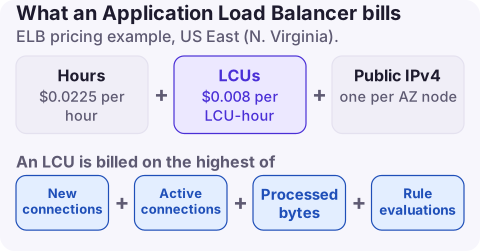
How an LCU is measured
One LCU on an Application Load Balancer covers, averaged over the hour:
| Dimension | Per LCU |
|---|---|
| New connections | 25 per second |
| Active connections | 3,000 per minute (1,500 with mutual TLS) |
| Processed bytes | 1 GB per hour for EC2, container and IP targets; 0.4 GB per hour for Lambda targets |
| Rule evaluations | 1,000 per second, after the first 10 rules, which are free |
You pay only for the highest dimension each hour. Network Load Balancers use NLCUs and Gateway Load Balancers GLCUs, with their own definitions. On the bill the lines are LoadBalancerUsage (hours) and LCUUsage (capacity units), each with a Region prefix, under the Elastic Load Balancing service.
Find idle and expensive load balancers
# Load balancers with no target groups at all
for arn in $(aws elbv2 describe-load-balancers --query 'LoadBalancers[].LoadBalancerArn' --output text); do
  n=$(aws elbv2 describe-target-groups --load-balancer-arn "$arn" --query 'length(TargetGroups)')
  [ "$n" = "0" ] && echo "no target groups: $arn"
done

# Requests and LCUs for one ALB over the last week
aws cloudwatch get-metric-statistics --namespace AWS/ApplicationELB \
  --metric-name ConsumedLCUs \
  --dimensions Name=LoadBalancer,Value=app/my-alb/0123456789abcdef \
  --start-time 2026-11-10T00:00:00Z --end-time 2026-11-17T00:00:00Z \
  --period 86400 --statistics Average
An ALB with zero RequestCount for weeks, or whose target groups have no healthy targets, is a strong deletion candidate. Repeat per Region. If LCUUsage rather than LoadBalancerUsage dominates, check which dimension drives it: high NewConnectionCount points to clients not reusing connections; high ProcessedBytes points to large responses.
Reduce it
- Delete idle load balancers left from old environments and preview stacks. Each one pays hourly and for its public addresses.
- Consolidate small services behind one ALB with host- or path-based rules, within the same trust boundary. Stay near the 10 free rules per request where you can.
- Encourage connection reuse: HTTP keep-alive and HTTP/2 in clients cut the new-connections dimension.
- Compress and cache: gzip responses and put CloudFront in front of cacheable content to cut processed bytes.
- Make internal services internal: an internal load balancer avoids public IPv4 address charges.
What not to do
- Do not delete a load balancer because its
RequestCountis low without checking DNS records and Route 53 aliases that point at it. - Do not merge services with different security requirements onto one load balancer just to save the hourly fee.
- Do not count only the hourly charge when estimating savings: deleting an internet-facing load balancer also removes its public IPv4 charges.
Questions
Does an AWS load balancer cost money with no traffic?
Yes. The hourly charge applies for every hour it runs, plus public IPv4 charges if it is internet-facing, even with zero requests.
What is an LCU on an Application Load Balancer?
A Load Balancer Capacity Unit, measured on new connections, active connections, processed bytes and rule evaluations. You pay for the highest of the four each hour.
Is the first ALB free?
New AWS customers have historically had a free tier allowance of ALB hours and LCUs; check the ELB pricing page for what applies to your account.
Idle load balancers outlive the projects that created them. CloudConsole, a phone app for AWS, shows spend by service and usage type and explains LoadBalancerUsage and LCUUsage, so you can see which side of the bill is growing.
About the app → · Download on the App Store