 CloudConsole
429 Too Many Requests from API Gateway
API Gateway returns 429 when requests exceed a throttle limit: the account's Regional limit, a stage or method limit, or a usage plan limit for an API key. "Limit Exceeded" with a 429 means a usage plan quota (per day, week or month) is used up instead. Identify which limit applies, then raise it or slow the client down with backoff.
The two flavours of 429
| Response body | Gateway response type | Meaning |
|---|---|---|
{"message":"Too Many Requests"} | THROTTLED | Request rate exceeded a rate or burst limit |
{"message":"Limit Exceeded"} | QUOTA_EXCEEDED | The API key's usage plan quota for the period is exhausted |
Throttling uses a token bucket: the rate limit is how fast tokens refill per second, the burst limit is the bucket size. Short spikes above the rate are absorbed by the burst until the bucket empties.
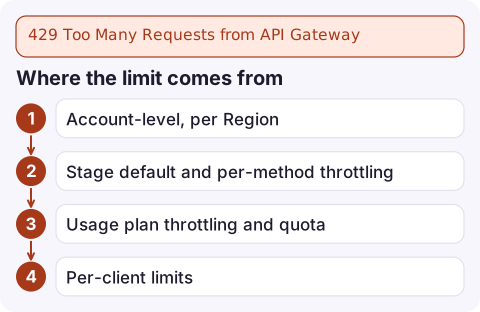
Where the limit comes from
Several limits apply at once, and the most restrictive one wins:
- Account-level, per Region: shared by every API in the account and Region (10,000 requests per second with a 5,000 burst by default at the time of writing). One noisy API can throttle the others.
- Stage default and per-method throttling that you configured.
- Usage plan throttling and quota per API key, for APIs that require keys.
- Per-client limits in a usage plan, applied to each key separately.
Check each level:
aws apigateway get-account --query throttleSettings

aws apigateway get-stage --rest-api-id abc123 --stage-name prod \
  --query methodSettings

aws apigateway get-usage-plans \
  --query 'items[].{name:name,throttle:throttle,quota:quota,stages:apiStages}'
Confirm it from logs
REST APIs have no dedicated 429 metric; throttles count towards 4XXError. Add $context.status, $context.error.responseType and $context.identity.apiKeyId to the stage's access log format, then count by type and caller:
filter status = 429
| stats count(*) by errorType, apiKeyId
| sort count(*) desc
The field names depend on the JSON keys you chose in the access log format. If the throttled requests all come from one key, it is a usage plan problem; if they are spread across everyone, look at stage or account limits.
Fix it
- Raise stage or method limits you set too low:
aws apigateway update-stage --rest-api-id abc123 --stage-name prod \ --patch-operations op=replace,path=/*/*/throttling/rateLimit,value=500 \ op=replace,path=/*/*/throttling/burstLimit,value=1000 - HTTP APIs set limits on the stage's route settings:
aws apigatewayv2 update-stage --api-id a1b2c3d4 --stage-name '$default' \ --default-route-settings ThrottlingRateLimit=500,ThrottlingBurstLimit=1000 - Usage plans: move the customer to a higher plan, or raise the quota if
Limit Exceededis the issue. - Account limit: request an increase through Service Quotas or AWS Support, and set per-stage limits so one API cannot starve the rest.
- Clients: retry 429s with exponential backoff and jitter, and avoid synchronised bursts such as every device polling on the minute.
Not every rejection is a 429
- AWS WAF rate-based rules block with
403 Forbiddenby default, not 429. - If your backend returns 429 itself (for example a Lambda function relaying a downstream limit), API Gateway passes it through; check whether the integration status matches.
- Throttled requests never reach the backend, so you are not billed for backend time, but the client sees an error: alarm on 4XXError.
Questions
What is the default API Gateway throttle limit?
At the time of writing, 10,000 requests per second per account per Region, with a burst of 5,000, shared across your APIs. You can request an increase.
What does Limit Exceeded mean in API Gateway?
The API key has used its usage plan quota for the current day, week or month. It resets at the start of the next period or when the quota is raised.
Does API Gateway retry throttled requests?
No. The client receives 429 and must retry, ideally with exponential backoff and jitter.

A burst of 429s usually means a single client or launch-day traffic, and the right response depends on which. CloudConsole, a phone app for AWS, is built to show the 4xx alarm and the request logs behind it on your phone so you can tell quickly.
Did it start after a deploy? What changed? on the app’s alarm screen lists the deploys and configuration changes from the hour before the alarm fired.
About the app → · Download on the App Store