 CloudConsole
ConditionalCheckFailedException: The conditional request failed
The write carried a condition expression and the item in the table did not satisfy it, so DynamoDB made no change. Often that is the condition doing its job (a duplicate create or a lost optimistic-locking race); when it is unexpected, the usual bugs are a stale version number, a type mismatch such as "5" versus 5, or a condition that refers to the wrong attribute name.
What it means
An error occurred (ConditionalCheckFailedException) when calling the
PutItem operation: The conditional request failedPutItem, UpdateItem and DeleteItem accept a ConditionExpression. DynamoDB reads the current item, evaluates the condition atomically, and only writes if it is true. When it is false you get this exception. It is a client-side outcome, not an outage: the SDK does not retry it, and retrying the identical request will usually fail again. The failed write still consumes write capacity, and it is counted in the ConditionalCheckFailedRequests metric.
Expected vs unexpected
| Pattern | Condition | What the exception means |
|---|---|---|
| Create only if new | attribute_not_exists(pk) | The item already exists: treat as duplicate or idempotent success |
| Optimistic locking | #ver = :expected | Someone else updated first: re-read, reapply, retry |
| Update only if present | attribute_exists(pk) | Item missing: return not found instead of silently creating one |
| State machine guard | #st = :pending | Item already moved on: a duplicate message, or a real bug |
Handle the expected cases explicitly in code; catching and logging every one as an error creates alarm noise.
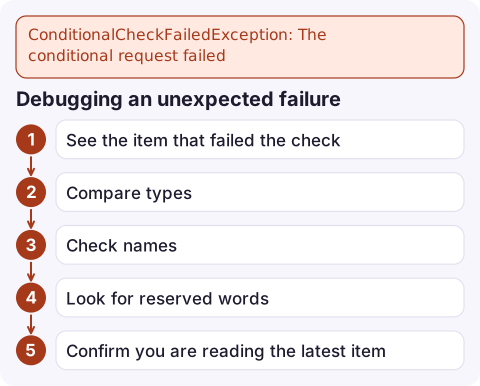
Debugging an unexpected failure
- See the item that failed the check. Ask DynamoDB to return it with the error:
aws dynamodb update-item --table-name orders \ --key '{"pk":{"S":"ORDER#1001"}}' \ --update-expression 'SET #st = :paid, #ver = #ver + :one' \ --condition-expression '#ver = :expected' \ --expression-attribute-names '{"#st":"status","#ver":"version"}' \ --expression-attribute-values '{":paid":{"S":"PAID"},":one":{"N":"1"},":expected":{"N":"7"}}' \ --return-values-on-condition-check-failure ALL_OLD - Compare types: a number stored as
{"S":"7"}never equals{"N":"7"}. - Check names: attribute names are case-sensitive, and
attribute_not_existson a misspelt name is always true, whileattribute_existson one is always false. - Look for reserved words such as
status; use#placeholdersin--expression-attribute-names. - Confirm you are reading the latest item: if you read with eventual consistency before writing, the version you hold may already be stale. Use a strongly consistent read for the read-modify-write.
Fixes in code
- Optimistic locking: on failure, re-read the item (strongly consistent), reapply the change and retry a bounded number of times.
- Idempotent consumers: for SQS or stream processing, treat a failed
attribute_not_existsas "already processed" and acknowledge the message. - Stop accidental upserts:
UpdateItemcreates the item if the key is missing; addattribute_exists(pk)if that is not what you want. - Transactions: a failing condition inside
TransactWriteItemssurfaces as TransactionCanceledException with a ConditionalCheckFailed reason, not as this exception.
Monitoring
A sudden rise in ConditionalCheckFailedRequests after a deploy usually means a code change broke a condition (types or names), while a steady background level is normal concurrency. Graph it next to write volume rather than alarming on any non-zero value.
Questions
Is ConditionalCheckFailedException an error I should alarm on?
Usually not on its own. Many conditions fail by design (duplicates, lost races). Alarm on a change in its rate relative to traffic, or handle it explicitly in code.
Does a failed condition consume write capacity?
Yes. DynamoDB has to evaluate the condition against the item, and the request consumes write capacity even though nothing is written.
How do I see the current item when the condition fails?
Set ReturnValuesOnConditionCheckFailure to ALL_OLD on the write. The exception then includes the item as it was, so you can see which attribute failed the check.

Conditional failures are rarely urgent, but a spike right after a release can mean orders are silently not updating. CloudConsole, a phone app for AWS, is built to show such metric changes and the related logs on your phone, so you can spot the pattern without a laptop.
Did it start after a deploy? What changed? on the app’s alarm screen lists the deploys and configuration changes from the hour before the alarm fired.
About the app → · Download on the App Store