 CloudConsole
aws dynamodb get-item
aws dynamodb get-item --table-name my-table --key '{"pk":{"S":"USER#42"}}' returns a single item by its full primary key. You must give the partition key and, if the table has one, the sort key; if no item matches, the command succeeds and simply prints nothing instead of raising an error.
What the command does
GetItem is the cheapest, fastest read in DynamoDB: one exact key, one item, at most 400 KB. It reads with eventual consistency unless you add --consistent-read, which doubles the read cost but guarantees you see the latest successful write.
It cannot search. You need the complete key. To find items by a non-key attribute, use query on an index or scan.
Syntax
aws dynamodb get-item --table-name <table> \
  --key '{"<pk>":{"S":"..."}, "<sk>":{"S":"..."}}' \
  [--consistent-read] \
  [--projection-expression "a, b, #c"] \
  [--expression-attribute-names '{"#c":"..."}']
Worked examples
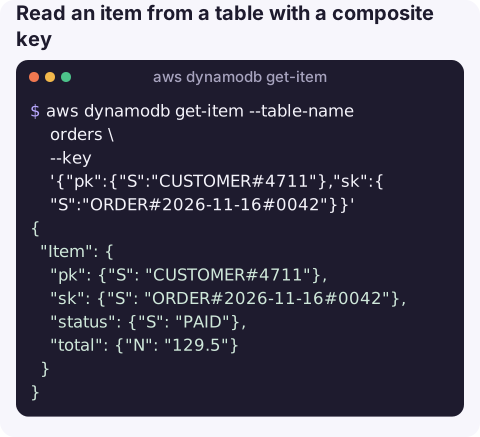
Read an item from a table with a composite key:
aws dynamodb get-item --table-name orders \
  --key '{"pk":{"S":"CUSTOMER#4711"},"sk":{"S":"ORDER#2026-11-16#0042"}}'
Output shape:
{
  "Item": {
    "pk": {"S": "CUSTOMER#4711"},
    "sk": {"S": "ORDER#2026-11-16#0042"},
    "status": {"S": "PAID"},
    "total": {"N": "129.5"}
  }
}
Strongly consistent read of selected attributes, printing plain values:
aws dynamodb get-item --table-name orders \
  --key '{"pk":{"S":"CUSTOMER#4711"},"sk":{"S":"ORDER#2026-11-16#0042"}}' \
  --consistent-read \
  --projection-expression "#s, total" \
  --expression-attribute-names '{"#s":"status"}' \
  --query "Item.[status.S, total.N]" --output text
Key from a file, which avoids quoting trouble on Windows:
aws dynamodb get-item --table-name users --key file://key.jsonCheck whether an item exists in a shell script:
found=$(aws dynamodb get-item --table-name users \
  --key '{"userId":{"S":"42"}}' \
  --query "Item.userId.S" --output text)
if [ "$found" = "None" ]; then echo "no such user"; fi
Querying one key attribute keeps the comparison simple: text output prints None when the item is absent.
Read several known keys in one call with batch-get-item, which accepts up to 100 keys:
aws dynamodb batch-get-item --request-items '{"users":{"Keys":[{"userId":{"S":"42"}},{"userId":{"S":"43"}}],"ProjectionExpression":"userId, email"}}' \
  --query "Responses.users[].[userId.S, email.S]" --output text
Anything DynamoDB could not read in that call comes back in UnprocessedKeys; retry those.
Key options
| Option | Notes |
|---|---|
--key | The full primary key in typed JSON. Must name exactly the key attributes, with the right types. |
--consistent-read | Return the latest committed value. Twice the read units of an eventually consistent read. |
--projection-expression | Return only these attributes. Read cost is still based on the full item size. |
--return-consumed-capacity TOTAL | Show how many read units the call used; handy when sizing a table. |
Gotchas
- Missing item = empty output, not an error. The response just has no
Itemkey. With--query Item --output textyou getNone. Check for it explicitly. - Key type mismatch is an error. Passing
{"N":"42"}when the key is a string, or leaving out the sort key, gives The provided key element does not match the schema. - Numbers are strings in JSON. Write
{"N":"42"}, with the quotes. - No wildcards.
get-itemcannot return "all items for a key prefix"; that is a query withbegins_with. - Wrong Region looks like a missing table. A ResourceNotFoundException usually means the CLI is pointed at another Region or account.
Questions
How do I get all items from a DynamoDB table with the CLI?
get-item only reads one item. Use aws dynamodb scan --table-name my-table for everything, or query for all items under one partition key.
How do I get several items at once?
Use aws dynamodb batch-get-item with a --request-items JSON listing the keys per table. It reads up to 100 items per call and may return UnprocessedKeys that you need to retry.
How do I list DynamoDB tables from the CLI?
Run aws dynamodb list-tables. It returns table names in the current Region only, so add --region to check others.
Checking a single record is often all you need to confirm a customer's report. CloudConsole is built to show AWS resources and alarms on a phone, so the first look at a problem does not need a laptop.
About the app → · Download on the App Store