 CloudConsole
ValidationException: Item size has exceeded the maximum allowed size
A DynamoDB item, including every attribute name and value, cannot exceed 400 KB. Your write would have produced a larger item, often because a list or map keeps growing with each update. Move large payloads to S3 and store a pointer, split the item into several items under the same partition key, or compress the large attribute.
What triggers it
An error occurred (ValidationException) when calling the UpdateItem
operation: Item size has exceeded the maximum allowed size
The limit applies to the item as it would be after the write. That is why an UpdateItem that appends one small element can fail: the item grew a little on every previous call and has now reached the ceiling. The size counts the UTF-8 length of each attribute name plus its value, so long attribute names repeated in nested maps add up.
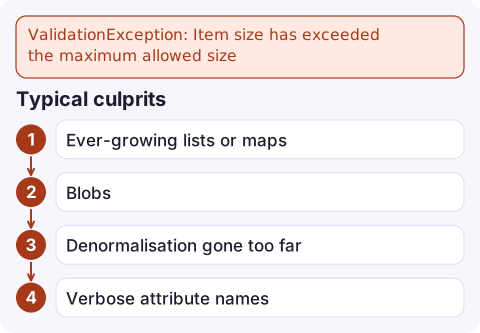
Typical culprits
- Ever-growing lists or maps: an
eventslist appended withlist_append, a map of every login, a chat history in one item. - Blobs: base64 images, PDFs, raw HTML or large JSON documents stored as strings.
- Denormalisation gone too far: embedding whole child records inside a parent item.
- Verbose attribute names inside deeply nested structures.
Related limits that produce different errors: a single request in BatchWriteItem is capped at 16 MB in total, and a transaction at 4 MB. Tables with a local secondary index also have a 10 GB limit per item collection.
Find how big the item is
Fetch the item and measure its JSON as a rough upper bound (the DynamoDB JSON format adds type wrappers, so the real size is somewhat smaller):
aws dynamodb get-item --table-name sessions \
  --key '{"pk":{"S":"USER#42"}}' --output json | wc -c
To see which attribute is the problem, list attribute sizes:
aws dynamodb get-item --table-name sessions \
  --key '{"pk":{"S":"USER#42"}}' --output json \
  | jq '.Item | to_entries | map({k: .key, bytes: (.value | tostring | length)}) | sort_by(-.bytes)'
Fixes
| Approach | When it fits |
|---|---|
| Store the payload in S3, keep the bucket and key in DynamoDB | Documents, images, anything you read whole and rarely query inside |
Split into multiple items under one partition key (for example sk = EVENT#2026-11-16T09:41:07Z) | Growing collections; you can then Query a range instead of loading everything |
| Compress (gzip) into a binary attribute | Text that is large but compressible and not needed in filters |
| Shorten attribute names | Small wins on nested, repetitive data; rarely enough alone |
| Trim on write | Keep only the last N entries of a list, with older ones archived elsewhere |
Splitting a growing list into separate items is usually the best long-term fix: writes become small appends, reads can paginate, and you also stop paying to rewrite a large item on every update (write capacity is charged on item size).
Gotchas
- The limit cannot be raised; design around it.
- An item that is close to the limit makes every update expensive in write units, long before it fails.
- If you move data to S3, write the S3 object first and the DynamoDB pointer second, so readers never see a pointer to a missing object.
- Do not catch and drop this exception in a queue consumer; the message will keep failing. Send it to a dead-letter queue and fix the data model.
Questions
What is the maximum item size in DynamoDB?
400 KB, counting both attribute names and values. It is a hard limit.
Does the 400 KB limit include attribute names?
Yes. Each attribute name's UTF-8 length counts towards the item size, which is why short names help with deeply nested data.
How do I store large objects with DynamoDB?
Put the object in S3 and store its bucket, key and any metadata you query on in the DynamoDB item.

An item hitting 400 KB usually breaks one customer at a time, so it shows up as a trickle of errors rather than an outage. CloudConsole, a phone app for AWS, is built to surface those error alarms and log lines on your phone so a slow-burning failure is not missed.
Did it start after a deploy? What changed? on the app’s alarm screen lists the deploys and configuration changes from the hour before the alarm fired.
About the app → · Download on the App Store