 CloudConsole
EC2 Instance Connect: Failed to connect to your instance
Browser-based EC2 Instance Connect connects to port 22 from AWS's own IP range for your Region, so the security group must allow that range, the instance needs a public IPv4 address, and the AMI must have the Instance Connect package. "Access denied" variants mean your IAM identity lacks ec2-instance-connect:SendSSHPublicKey for that instance and OS user.
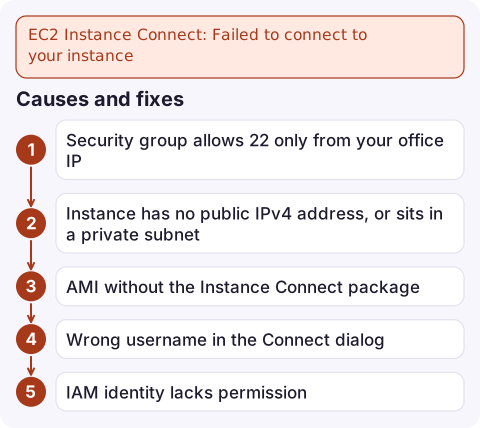
How Instance Connect works (and why it fails)
When you click Connect, the console generates a one-time key, calls SendSSHPublicKey to place it in the instance metadata for about 60 seconds, then opens an SSH session from an AWS-operated service in that Region. On the instance, the ec2-instance-connect package configures sshd to read that temporary key. Any broken link in that chain produces the same vague console message:
Failed to connect to your instance
Error establishing SSH connection to your instance. Try again later.
Causes and fixes
| Cause | Fix |
|---|---|
| Security group allows 22 only from your office IP | Allow the EC2_INSTANCE_CONNECT range for the Region (published in AWS's ip-ranges.json) |
| Instance has no public IPv4 address, or sits in a private subnet | Use an EC2 Instance Connect Endpoint, or Session Manager |
| AMI without the Instance Connect package | Amazon Linux 2/2023 and recent Ubuntu include it; on others install ec2-instance-connect or use plain SSH |
| Wrong username in the Connect dialog | Match the AMI: ec2-user, ubuntu and so on |
| IAM identity lacks permission | Grant ec2-instance-connect:SendSSHPublicKey (see below) |
| Instance not running, failing status checks, or sshd modified | Check state and console output; restore the default sshd configuration |
Allow the Instance Connect IP range
Find the published range for your Region:
curl -s https://ip-ranges.amazonaws.com/ip-ranges.json \
  | jq -r '.prefixes[] | select(.service=="EC2_INSTANCE_CONNECT" and .region=="eu-west-2") | .ip_prefix'
Then add it to the instance's security group:
aws ec2 authorize-security-group-ingress --group-id sg-0123456789abcdef0 \
  --protocol tcp --port 22 --cidr 192.0.2.0/27
Replace the placeholder with the exact prefix the command prints. This opens SSH to the Instance Connect service, not to the whole internet, but key authentication still matters.
Fix "access denied" with IAM
A policy scoped to specific instances and one OS user:
{
  "Version": "2012-10-17",
  "Statement": [
    {
      "Effect": "Allow",
      "Action": "ec2-instance-connect:SendSSHPublicKey",
      "Resource": "arn:aws:ec2:eu-west-2:123456789012:instance/i-0123456789abcdef0",
      "Condition": { "StringEquals": { "ec2:osuser": "ec2-user" } }
    },
    { "Effect": "Allow", "Action": "ec2:DescribeInstances", "Resource": "*" }
  ]
}
If you connect through an Instance Connect Endpoint you also need ec2-instance-connect:OpenTunnel on the endpoint. Test the permission directly from the CLI; an AccessDeniedException here confirms the IAM side:
aws ec2-instance-connect send-ssh-public-key \
  --instance-id i-0123456789abcdef0 --instance-os-user ec2-user \
  --ssh-public-key file://~/.ssh/id_ed25519.pub
If that succeeds, SSH with the matching private key within 60 seconds. Success there but failure in the browser points back at the security group or public IP.
Private instances and other options
- EC2 Instance Connect Endpoint lets you reach instances in private subnets without a public IP or bastion; the instance's security group must allow 22 from the endpoint's security group.
- Session Manager needs no inbound port at all, only the SSM agent and an instance profile.
- Instance Connect is for Linux; Windows instances use RDP or Fleet Manager.
Questions
Why do I get access denied by EC2 Instance Connect?
Your IAM user or role is not allowed ec2-instance-connect:SendSSHPublicKey on that instance, or a condition such as ec2:osuser does not match the username you chose. Check the policy, any permissions boundary and SCPs.
How do I use EC2 Instance Connect from the AWS CLI?
Push a public key with aws ec2-instance-connect send-ssh-public-key, then ssh with the matching private key within 60 seconds. AWS CLI v2 also offers an ssh subcommand that does both steps and supports Instance Connect Endpoints.
Does EC2 Instance Connect work without a public IP?
Not the standard browser flow. Use an EC2 Instance Connect Endpoint in the VPC, or Session Manager.

Instance Connect is the tool people try when they are away from their usual laptop and keys. CloudConsole, a phone app for AWS, is built to show instance health and alarms on your phone, which helps you decide whether you need a shell at all.
Did it start after a deploy? What changed? on the app’s alarm screen lists the deploys and configuration changes from the hour before the alarm fired.
About the app → · Download on the App Store