 CloudConsole
Permission denied (publickey) when connecting to EC2 over SSH
The instance's SSH server reached you but rejected every key you offered. Nine times out of ten it is the wrong username for the AMI (ec2-user, ubuntu, admin) or the wrong private key file; the rest are key file permissions, an instance launched without a key pair, or a broken authorized_keys file on the instance.
What the message tells you
[email protected]: Permission denied (publickey,gssapi-keyex,gssapi-with-mic).Getting this far is good news: the network path, security group and sshd are all working. The list in brackets is just the authentication methods the server would accept (Amazon Linux and RHEL also advertise the two GSSAPI methods, Ubuntu usually shows only publickey). None of the keys your client offered matched an entry in that user's ~/.ssh/authorized_keys, or the user does not exist.
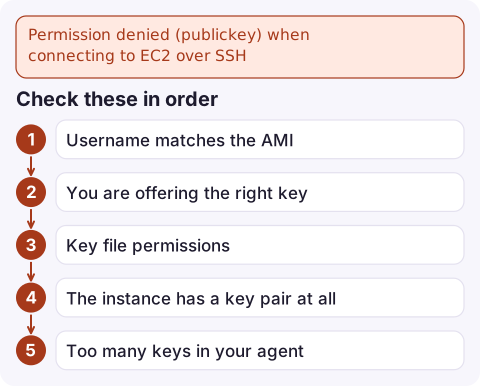
Check these in order
| Check | How |
|---|---|
| Username matches the AMI | Amazon Linux, RHEL, SUSE: ec2-user. Ubuntu: ubuntu. Debian: admin. CentOS: centos. Fedora: fedora. Bitnami: bitnami. Never root. |
| You are offering the right key | ssh -i pointing at the .pem for the instance's key pair |
| Key file permissions | OpenSSH ignores a private key readable by others: chmod 400 my-key.pem |
| The instance has a key pair at all | Launched with "Proceed without a key pair" means no key will ever work |
| Too many keys in your agent | The server gives up after several failed offers; add -o IdentitiesOnly=yes |
Look up which key pair the instance was launched with:
aws ec2 describe-instances --instance-ids i-0123456789abcdef0 \
  --query 'Reservations[].Instances[].{key:KeyName,image:ImageId,ip:PublicIpAddress}'
Confirm the key and debug the handshake
Run the client verbosely and watch which files it offers and which one the server refuses:
ssh -v -o IdentitiesOnly=yes -i ~/.ssh/my-key.pem [email protected]Lines like Offering public key: /home/me/.ssh/my-key.pem RSA SHA256:... followed by Authentications that can continue: publickey mean the key is not in authorized_keys for that user. If you see Load key ... bad permissions, fix the file mode first.
To prove a local .pem belongs to a key pair, compare fingerprints. For key pairs that AWS generated (RSA), the console shows a SHA-1 of the private key in PKCS#8 form:
aws ec2 describe-key-pairs --key-names my-key \
  --query 'KeyPairs[].KeyFingerprint' --output text

openssl pkcs8 -in my-key.pem -inform PEM -outform DER -topk8 -nocrypt \
  | openssl sha1 -c
For keys you imported, AWS uses an MD5 fingerprint of the public key instead, so the two formats will never match each other.
Get back in if the key is wrong or lost
- EC2 Instance Connect: push a temporary public key (valid for about 60 seconds) and connect with it, if the AMI has the Instance Connect package (Amazon Linux 2 and 2023, recent Ubuntu):
aws ec2-instance-connect send-ssh-public-key \ --instance-id i-0123456789abcdef0 --instance-os-user ec2-user \ --ssh-public-key file://new-key.pub ssh -i new-key [email protected] - Session Manager: if the SSM agent is running and the instance profile allows it, open a shell without SSH and append your public key to
authorized_keys. - Rescue volume: stop the instance, attach its root volume to another instance, add your public key to
home/ec2-user/.ssh/authorized_keyswith owner and mode preserved (700 on .ssh, 600 on the file), reattach and start. TheAWSSupport-ResetAccessSystems Manager runbook automates a version of this.
Mistakes that cause it again
- Fixing ownership with
chown -Ron the wrong user or loosening home directory permissions; sshd's StrictModes rejects group- or world-writable home and .ssh directories. - Replacing
authorized_keysin user data or configuration management and wiping the launch key. - Using a very old SSH client that can only sign RSA keys with SHA-1; newer servers such as Ubuntu 22.04 refuse those signatures. Upgrade the client or use an ED25519 key.
- Sharing one .pem across a team. Use Session Manager or Instance Connect with IAM instead, so access can be revoked per person.
Questions
What is the default username for an Ubuntu EC2 instance?
ubuntu. Amazon Linux uses ec2-user, Debian uses admin. Using ec2-user on Ubuntu produces exactly this Permission denied (publickey) error.
Why does the error list gssapi-keyex and gssapi-with-mic?
Those are just the other authentication methods the server advertises. They are irrelevant here; the failure is that no public key was accepted.
Can I change the key pair of a running EC2 instance?
Not through the EC2 API. Add a new public key to authorized_keys on the instance (via Session Manager, Instance Connect or a rescue volume); the key pair name shown in the console will not change.

Locked out of an instance while away from your own machine, you have neither the .pem nor a terminal to hand. CloudConsole, a phone app for AWS, is built to show the instance's state, alarms and recent logs on your phone so you can judge how urgent the lockout is.
Did it start after a deploy? What changed? on the app’s alarm screen lists the deploys and configuration changes from the hour before the alarm fired.
About the app → · Download on the App Store