 CloudConsole
CannotStartContainerError: failed to create task for container
ECS pulled your image but the container runtime could not start the process inside it. The text after "failed to create task for container" names the real problem, most often an image built for the wrong CPU architecture (exec format error), an entrypoint that does not exist or is not executable, or a volume mount that does not fit the image.
What the error means
The task got as far as creating the container: the image was pulled and the task's networking was set up. The failure happened when the runtime (containerd and runc) tried to launch the first process. ECS records the full daemon message on the container, and it usually looks like this:
CannotStartContainerError: Error response from daemon: failed to create task for container:
failed to create shim task: OCI runtime create failed: runc create failed:
unable to start container process: exec: "/app/start.sh": permission denied: unknown
Ignore the generic prefix and read the end of the line: exec format error, executable file not found in $PATH, permission denied or no such file or directory each point to a different fix. Because the process never started, the container has no exit code and nothing reaches the awslogs log group, which is why this error feels opaque.
Most common causes
| Tail of the message | Likely cause | Fix |
|---|---|---|
exec format error | Image built for arm64 (for example on an Apple Silicon laptop) running on x86_64 capacity, or the reverse | Rebuild for the target platform, or set runtimePlatform.cpuArchitecture to match the image |
executable file not found in $PATH | Task definition command or entryPoint names a binary that is not in the image | Use the full path, or check the image's real entrypoint |
permission denied | Script copied without the execute bit, or the container runs as a non-root user who cannot read it | chmod +x in the Dockerfile, or fix ownership |
no such file or directory on a script that exists | The shebang names an interpreter the image lacks (/bin/bash on Alpine) or the file has Windows CRLF line endings | Use /bin/sh, install bash, or convert line endings |
error mounting ... not a directory | A volume is mounted onto a path that is a file in the image, or the reverse | Change containerPath in mountPoints |
container init was OOM-killed | Hard memory limit too small for the process to even start | Raise the container's memory |
How to see the full message
The detail lives on the container, not only on the task. Find the stopped task and print both reasons:
aws ecs list-tasks --cluster my-cluster \
  --service-name my-service --desired-status STOPPED

aws ecs describe-tasks --cluster my-cluster \
  --tasks 0123456789abcdef0123456789abcdef \
  --query 'tasks[].{task:stoppedReason,containers:containers[].{name:name,reason:reason,exit:exitCode}}'
Stopped tasks only stay visible for a short time (roughly an hour), so if a service is crash-looping, grab a recent one. The service events from aws ecs describe-services show the loop but not the runtime message.
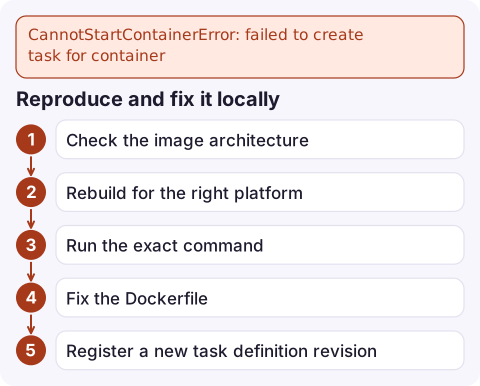
Reproduce and fix it locally
- Check the image architecture against what the task runs on (Fargate uses x86_64 unless the task definition says ARM64):
docker image inspect --format '{{.Os}}/{{.Architecture}}' \ 123456789012.dkr.ecr.eu-west-2.amazonaws.com/my-app:1.4.2 - Rebuild for the right platform if they differ:
docker buildx build --platform linux/amd64 \ -t 123456789012.dkr.ecr.eu-west-2.amazonaws.com/my-app:1.4.3 --push . - Run the exact command from the task definition, with the same user, to reproduce the exec failure before you push again:
docker run --rm --platform linux/amd64 my-app:1.4.3 /app/start.sh - Fix the Dockerfile:
RUN chmod +x /app/start.sh, a shebang that exists in the base image, and LF line endings. - Register a new task definition revision if you changed
entryPoint,command,mountPointsor memory, then update the service to use it.
Avoiding it next time
- Build images in CI with an explicit
--platform, or publish a multi-architecture manifest, so a laptop build never reaches production. - Prefer the exec form of
ENTRYPOINT(a JSON array) so there is no hidden shell that might be missing. - Pin images by tag or digest; a mutable
latesttag can change architecture under a running service. - If the error is intermittent rather than constant, look at host-level problems on EC2 capacity (disk full, Docker daemon unhealthy) instead of the image.
Questions
Why is there nothing in CloudWatch Logs for this task?
The log driver only captures output from a running process. With CannotStartContainerError the process never started, so the only record is the reason string on the stopped task.
How do I run an arm64 image on Fargate?
Set runtimePlatform with cpuArchitecture ARM64 and operatingSystemFamily LINUX in the task definition. The image (or its manifest list) must include an arm64 variant.
Is CannotStartContainerError the same as CannotPullContainerError?
No. A pull error means the image never arrived (registry auth, network, wrong tag). A start error means the image arrived but its first process could not be executed.

A service stuck in a start-fail loop keeps launching and stopping tasks, and you only have about an hour to read the reason. CloudConsole, a phone app for AWS, is built to surface stopped-task reasons alongside the service's alarms so you can see the cause before it scrolls away.
Did it start after a deploy? What changed? on the app’s alarm screen lists the deploys and configuration changes from the hour before the alarm fired.
About the app → · Download on the App Store