 CloudConsole
Task failed container health checks (Amazon ECS)
The healthCheck command in your task definition returned a non-zero exit code more times in a row than retries allows, so ECS marked an essential container UNHEALTHY and replaced the task. The commonest causes are a check command that can't run in the image (no curl or wget), checking the wrong port or path, and an app that takes longer to start than startPeriod. This is the Docker-style container check, not the load balancer's target health check.
Container check or ELB check?
ECS reports the two differently. Task failed container health checks comes from the healthCheck block in the container definition and runs inside the container. Task failed ELB health checks comes from the target group probing the task over the network; see ECS ELB health check failures. A task can pass one and fail the other.
aws ecs describe-tasks --cluster prod --tasks 0f9e1b2c3d4e5f6a7b8c9d0e1f2a3b4c \
  --query 'tasks[].{task:healthStatus,reason:stoppedReason,containers:containers[].[name,healthStatus,exitCode]}'
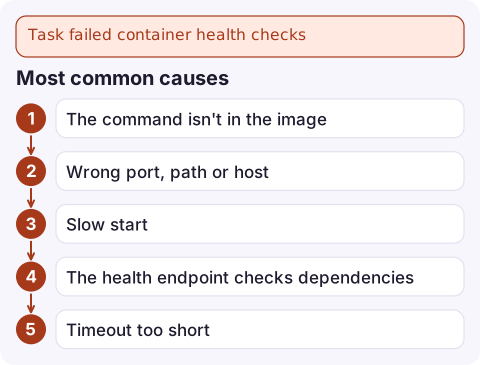
Most common causes
- The command isn't in the image.
CMD-SHELL curl -f http://localhost:8080/health || exit 1fails every time in slim, distroless or Alpine images without curl. Use a tool that exists, a tiny binary, or a language one-liner. - Wrong port, path or host. The check runs in the container's network namespace: use
localhostand the port the app listens on, not the host port or the load balancer port. - Slow start. Failures during
startPerioddon't count, but the default is no start period. JVM and large apps often need 60-120 seconds. - The health endpoint checks dependencies. A
/healththat queries the database turns a database blip into every task being replaced at once. - Timeout too short for a busy container; the default is 5 seconds.
Fix it
"healthCheck": {
  "command": ["CMD-SHELL", "wget -q -O /dev/null http://localhost:8080/health || exit 1"],
  "interval": 30,
  "timeout": 5,
  "retries": 3,
  "startPeriod": 90
}- Test the exact command inside a running container with ECS Exec or
docker runlocally, and check its exit code withecho $?. - Defaults are interval 30 s, timeout 5 s, retries 3, and no start period.
startPeriodcan be up to 300 seconds. - Keep the check cheap and local: is the process serving requests? Leave dependency checks to alarms.
- Register a new revision and deploy it, then watch the service's events and the task's
healthStatus.
Gotchas
- Only essential containers make the task unhealthy. A failing check on a non-essential sidecar shows in that container's
healthStatusbut doesn't stop the task. - Unhealthy tasks during a rolling deployment count towards the deployment circuit breaker, so a broken check can roll back a perfectly good release.
- Exit code 143 or 137 on the replaced container is ECS stopping it after the failed check, not the original problem.
- Health check output doesn't appear in your app's log stream, so a failing check can look silent. Run the command by hand with ECS Exec, or locally with
docker inspect --format '{{json .State.Health}}'on a container started from the same image.
Questions
Why does my ECS container health check keep failing?
Usually the command can't run in the image (curl or wget missing), it checks the wrong port or path, or the app needs longer to start than startPeriod allows.
What are the default ECS container health check settings?
Interval 30 seconds, timeout 5 seconds, 3 retries, and no start period unless you set startPeriod (up to 300 seconds).
Is the ECS container health check the same as the target group health check?
No. The container check runs a command inside the container; the target group check probes the task over the network. Either can stop the task.

Failing health checks show up as tasks cycling and a service that never settles. CloudConsole, a phone app for AWS, is being built to show ECS service events and stopped tasks on your phone, so you can tell a broken check from a broken app quickly.
Did it start after a deploy? What changed? on the app’s alarm screen lists the deploys and configuration changes from the hour before the alarm fired.
About the app → · Download on the App Store