 CloudConsole
How to exec into an ECS container
Turn on ECS Exec for the service (aws ecs update-service --enable-execute-command --force-new-deployment), make sure the task role allows the ssmmessages actions and the Session Manager plugin is installed on your machine, then run aws ecs execute-command --cluster c --task id --container name --interactive --command "/bin/sh". It works on Fargate and EC2.
Prerequisites checklist
| Requirement | Detail |
|---|---|
| Exec enabled on the task | Set on the service or run-task. Only tasks started after enabling it have the agent, hence the forced deployment. |
| Task role permissions | The task role (not the execution role) needs ssmmessages:CreateControlChannel, CreateDataChannel, OpenControlChannel and OpenDataChannel |
| Network path | The task must reach the Systems Manager messages endpoint: via a NAT gateway, a public IP, or an ssmmessages interface VPC endpoint |
| Your machine | AWS CLI v2 and the Session Manager plugin |
| Your permissions | ecs:ExecuteCommand on the cluster or task |
| The image | Has the shell or binary you ask for (/bin/sh exists in most; distroless images have none) |
Enable it and connect
# 1. Enable on the service and replace tasks so they pick it up
aws ecs update-service --cluster prod --service orders-api \
  --enable-execute-command --force-new-deployment

# 2. Pick a task and check the agent is running
TASK=$(aws ecs list-tasks --cluster prod --service-name orders-api \
  --query 'taskArns[0]' --output text)
aws ecs describe-tasks --cluster prod --tasks "$TASK" \
  --query 'tasks[0].{exec:enableExecuteCommand,agents:containers[].managedAgents[].[name,lastStatus]}'

# 3. Open a shell
aws ecs execute-command --cluster prod --task "$TASK" \
  --container app --interactive --command "/bin/sh"
The ExecuteCommandAgent should report RUNNING. --container is optional for single-container tasks. You can run a one-off command instead of a shell, for example --command "env", but the session is still interactive.
Fixing the usual errors
| Error | Fix |
|---|---|
TargetNotConnectedException | Agent can't reach SSM: task role permissions or networking. See the TargetNotConnected guide. |
| "The execute command failed because execute command was not enabled when the task was run" | Enable it and force a new deployment |
| "SessionManagerPlugin is not found" | Install the Session Manager plugin locally |
AccessDeniedException | Your identity lacks ecs:ExecuteCommand, or a condition in your policy (such as a cluster tag) doesn't match |
| Session opens then closes immediately | The command doesn't exist in the image; try /bin/sh instead of /bin/bash |
Use it safely
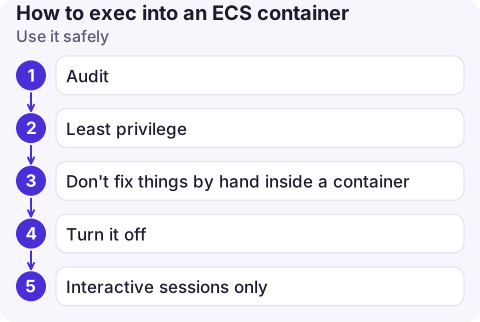
- Audit: the cluster's execute command configuration can log session output to CloudWatch Logs or S3, and every
ExecuteCommandcall is in CloudTrail. - Least privilege: restrict
ecs:ExecuteCommandto specific clusters or container names; production shells should be rare and deliberate. - Don't fix things by hand inside a container. Changes vanish when the task is replaced. Use the shell to diagnose, then fix in the image or task definition.
- Turn it off again (
--no-enable-execute-commandplus a deployment) if you enabled it only for an investigation. - Interactive sessions only: ECS Exec is built for interactive use. For scripted one-off jobs, start a separate task with run-task and a command override.
Questions
Can I exec into a Fargate container?
Yes. ECS Exec works on Fargate as well as EC2, as long as the task was started with execute command enabled and the prerequisites are met.
What is the AWS CLI command to exec into an ECS task?
aws ecs execute-command --cluster my-cluster --task task-id --container app --interactive --command "/bin/sh".
Does ECS Exec need SSH or open ports?
No. It uses an agent and Systems Manager channels, so no inbound ports or SSH keys are needed.

Debugging inside a container needs a real terminal. CloudConsole, a phone app for AWS, is built for the step before: seeing task status, stopped reasons and logs on your phone so you know whether to head for a laptop.
About the app → · Download on the App Store