 CloudConsole
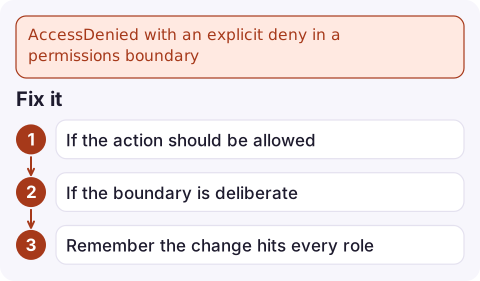
AccessDenied with an explicit deny in a permissions boundary
The user or role you're calling as has a permissions boundary, and that boundary either explicitly denies the action or doesn't allow it. A boundary caps what identity policies can grant, so adding permissions to the role won't help. Look up the boundary with aws iam get-role, read its current policy version, and add the action there (or use a role without that boundary).
How boundaries change the picture
A permissions boundary is a managed policy attached to a user or role as a limit. An action is allowed only if both an identity policy and the boundary allow it (along with any SCPs). Two messages point here:
... is not authorized to perform: lambda:CreateFunction on resource: ...
with an explicit deny in a permissions boundary

... is not authorized to perform: sqs:SendMessage on resource: ...
because no permissions boundary allows the sqs:SendMessage action
The first means the boundary has a Deny that matches. The second means the boundary is simply narrower than the role's own policies. Both are fixed in the boundary policy, not in the role's permissions.
Where boundaries come from
- Delegated IAM administration. Platform teams let developers create roles only if they attach a set boundary (enforced through an
iam:PermissionsBoundarycondition). Roles created by those developers inherit its limits. - Deployment tooling. CDK bootstrap and some landing-zone products can be configured to apply a boundary to every role a pipeline creates.
- Sandbox accounts, where a boundary keeps experiments away from IAM, networking or billing APIs.
Common traps: a boundary that predates a new service, so its actions aren't listed; and a boundary deny on iam:* that also blocks iam:PassRole, which breaks creating Lambda functions, ECS services and EC2 instances with roles.
Find and read the boundary
aws iam get-role --role-name orders-api \
  --query 'Role.PermissionsBoundary' --output json

aws iam get-policy \
  --policy-arn arn:aws:iam::123456789012:policy/dev-boundary \
  --query 'Policy.DefaultVersionId' --output text

aws iam get-policy-version \
  --policy-arn arn:aws:iam::123456789012:policy/dev-boundary \
  --version-id v4 --query 'PolicyVersion.Document'
For an IAM user, use aws iam get-user --user-name alice instead; the boundary appears in the same PermissionsBoundary field. Search the document for the action prefix from the error and for Deny statements with conditions.
Fix it
- If the action should be allowed, add it to the boundary's Allow statement scoped as tightly as the role policy, and publish a new default version:
A managed policy keeps at most five versions, so delete an old one first if this fails.aws iam create-policy-version \ --policy-arn arn:aws:iam::123456789012:policy/dev-boundary \ --policy-document file://dev-boundary.json --set-as-default - If the boundary is deliberate (for example it forbids IAM changes), run the action from a role without that boundary, such as the pipeline's deployment role.
- Remember the change hits every role that shares this boundary. Changing a shared boundary is a platform decision, not a local fix.
Mistakes to avoid
Removing the boundary with aws iam delete-role-permissions-boundary works technically but is usually blocked by policy for good reason, and removes a safety control silently. Also don't confuse this with an SCP: if the text says service control policy, the block is at the organisation level and is covered in SCP explicit deny.
Questions
Does a permissions boundary grant permissions?
No. It only limits them. An action needs an Allow in an identity policy and an Allow in the boundary, with no Deny anywhere.
Why does my role have full permissions but still get access denied?
If the error mentions a permissions boundary, the boundary attached to the role is narrower than its policies. The effective permissions are the overlap of the two.
How do I see if a role has a permissions boundary?
Run aws iam get-role --role-name <name> and look at Role.PermissionsBoundary, or open the role in the IAM console where the boundary has its own section.

Boundary denials tend to appear the first time a team deploys a new feature that uses a service the boundary never listed. CloudConsole, a phone app for AWS, is built to show the failed deployment's alarms and logs on your phone so you can route the problem to the right team.
Did it start after a deploy? What changed? on the app’s alarm screen lists the deploys and configuration changes from the hour before the alarm fired.
About the app → · Download on the App Store