 CloudConsole
ERROR 1045 (28000): Access denied for user on RDS MySQL
MySQL rejected the username and password combination for the host you connected from. On RDS the usual causes are a wrong or rotated password, a user defined for a different host (for example 'app'@'localhost' instead of 'app'@'%'), or IAM database authentication set up incompletely. If you are locked out entirely, reset the master password with modify-db-instance.
Read the whole message
ERROR 1045 (28000): Access denied for user 'app'@'10.0.1.23' (using password: YES)It tells you three things. The user the server saw. The host it saw you connect from, which is the client's private IP as seen by the database (or the NAT or proxy address). And whether a password was sent: using password: NO means your client or connection string sent no password at all, which is a configuration bug rather than a wrong password.
Getting this error proves the network path works; timeouts and connection refusals are a different problem.
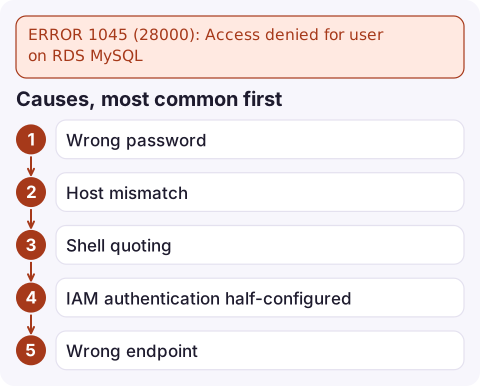
Causes, most common first
- Wrong password: typo, stale environment variable, or a Secrets Manager rotation the application has not picked up.
- Host mismatch: MySQL identifies accounts as
user@host. A user created as'app'@'localhost'or restricted to one subnet cannot log in from elsewhere. - Shell quoting: special characters such as
$or!in the password were expanded by the shell. - IAM authentication half-configured: the database user exists but uses a different plugin, or the token is expired or for the wrong host.
- Wrong endpoint: connecting to another environment's instance where this user does not exist.
Diagnose as the master user
Connect with the master user and check how the account is defined:
SELECT user, host, plugin, account_locked FROM mysql.user WHERE user = 'app';
SHOW GRANTS FOR 'app'@'%';
If the user only exists for a specific host, add or alter it for the right one. Reset the password if needed:
ALTER USER 'app'@'%' IDENTIFIED BY 'a-new-strong-password';If the password lives in Secrets Manager, compare what the app is using with the current secret version:
aws secretsmanager get-secret-value --secret-id prod/orders/db \
  --query SecretString --output text
Locked out of the master user
Reset the master password through RDS. It applies quickly and does not need a reboot:
aws rds modify-db-instance --db-instance-identifier orders-db \
  --master-user-password 'a-new-strong-password' --apply-immediately
If the instance uses an RDS-managed master secret in Secrets Manager, rotate that secret instead of setting a password directly. Avoid putting passwords on the command line on shared machines, since they end up in shell history. See reset the RDS master password.
IAM database authentication checklist
- IAM authentication is enabled on the instance.
- The user was created for the plugin:
CREATE USER 'app' IDENTIFIED WITH AWSAuthenticationPlugin AS 'RDS'; - The caller's IAM policy allows
rds-db:connectonarn:aws:rds-db:eu-west-2:123456789012:dbuser:db-ABCDEFGHIJKL01234/app, using the instance's resource ID (not its name). - The token is generated for the exact endpoint hostname, port and user (the AWS CLI's
rds generate-db-auth-tokencommand does this) and used within 15 minutes. - The connection uses TLS; IAM tokens are only accepted over SSL:
mysql -h orders-db.abcdefghijkl.eu-west-2.rds.amazonaws.com -P 3306 \
  -u app --ssl-ca=global-bundle.pem --enable-cleartext-plugin \
  --password="$TOKEN"
Questions
How do I reset the master password on RDS MySQL?
Run aws rds modify-db-instance with --master-user-password and --apply-immediately, or rotate the managed secret if RDS manages the master password in Secrets Manager.
Why does RDS say access denied using password: NO?
No password was sent. Check the client configuration or connection string; an empty environment variable is a common cause.
Why does my IAM auth token get access denied on RDS MySQL?
Typical reasons: the token expired (15 minutes), it was generated for a different hostname or user, the connection is not using SSL, or the database user was not created with AWSAuthenticationPlugin.

Authentication failures often begin right after a scheduled secret rotation, while nobody is watching. CloudConsole, a phone app for AWS, is built to show application error alarms and the related log lines on your phone, so a rotation gone wrong is caught early.
Did it start after a deploy? What changed? on the app’s alarm screen lists the deploys and configuration changes from the hour before the alarm fired.
About the app → · Download on the App Store