 CloudConsole
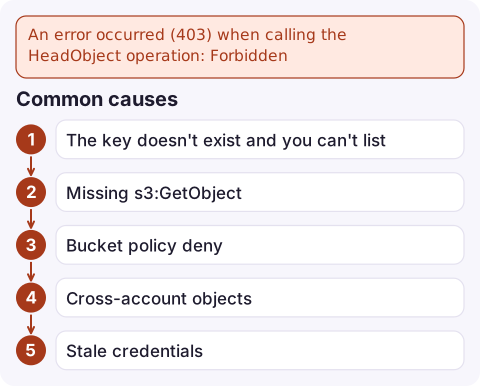
An error occurred (403) when calling the HeadObject operation: Forbidden
HeadObject is a HEAD request, so S3 can't send an error body and you only get a bare 403 Forbidden. The two usual causes are a missing s3:GetObject permission for that key, and a key that doesn't exist while the caller lacks s3:ListBucket (S3 then returns 403 instead of 404). Run the same request as a one-byte GetObject to see the full error, and check the key and ListBucket permission first.
Why the message has no detail
fatal error: An error occurred (403) when calling the HeadObject operation: Forbidden
operation error S3: HeadObject, https response error StatusCode: 403, RequestID: …, api error Forbidden: Forbidden
The first form comes from aws s3 cp, which calls HeadObject before downloading; the second is the Go SDK as used by Terraform and many tools. A HEAD response has no body, so the usual XML error code (AccessDenied, ExpiredToken and so on) is lost and every refusal looks the same. That's why the most useful first step is to get the real error.
Get the real error
Ask for the first byte of the same object with GetObject. It's authorised the same way but returns a body with the code and message:
aws s3api get-object --bucket my-bucket --key exports/2026/11/16.csv \
--range bytes=0-0 /dev/null| You now see | Meaning |
|---|---|
NoSuchKey | The key doesn't exist and this identity can list the bucket. If HEAD still returned 403, the original tool used different credentials or a different key; compare both |
AccessDenied | A policy refuses the read, or the key is missing and you lack s3:ListBucket |
AccessDenied mentioning kms:Decrypt | The object is SSE-KMS encrypted; see KMS AccessDenied |
ExpiredToken / InvalidAccessKeyId | A credentials problem, not a permission one |
Common causes
- The key doesn't exist and you can't list. Typos, a wrong date in a path, a leading slash, or URL-encoded characters. List the prefix to check:
If you getaws s3api list-objects-v2 --bucket my-bucket --prefix exports/2026/11/ \ --query 'Contents[].Key' --output textAccessDeniedhere too, the caller lackss3:ListBucket, which also explains the 403. - Missing
s3:GetObjectonarn:aws:s3:::my-bucket/*(a policy granting only the bucket ARN doesn't cover objects). HEAD requiress3:GetObject; there is no separate HeadObject permission. - Bucket policy deny, for example requests not coming through a particular VPC endpoint.
- Cross-account objects uploaded into a bucket that still uses ACLs, so the bucket owner doesn't own them.
- Stale credentials in a long-running process, which HEAD can't distinguish from a permission problem.
Fix it
Grant listing on the bucket and reading on the prefix the tool needs:
{
  "Version": "2012-10-17",
  "Statement": [
    { "Effect": "Allow", "Action": "s3:ListBucket",
      "Resource": "arn:aws:s3:::my-bucket",
      "Condition": { "StringLike": { "s3:prefix": "exports/*" } } },
    { "Effect": "Allow", "Action": "s3:GetObject",
      "Resource": "arn:aws:s3:::my-bucket/exports/*" }
  ]
}
Then retry the original command. With ListBucket in place, a wrong key now fails as a clear 404 instead of a confusing 403.
For Terraform, the failing HEAD often comes from the S3 backend reading the state object or from an aws_s3_object data source; check which credentials that part of the configuration uses.
Questions
Why does aws s3 cp fail with 403 on HeadObject?
aws s3 cp checks the source object with HeadObject first. Either the caller can't read that key, or the key doesn't exist and the caller lacks s3:ListBucket, which turns a 404 into a 403.
What permission does HeadObject need?
s3:GetObject on the object ARN. Add s3:ListBucket on the bucket if you want missing keys to return 404 instead of 403.
How do I see the real S3 error behind a HEAD 403?
Make a GetObject request for the same key with a one-byte range. The response body includes the error code and message that HEAD can't show.

HeadObject failures usually break a job that copies files on a schedule, so they surface as missing output rather than an alert. CloudConsole, a phone app for AWS, is built to show job alarms and the matching log lines on your phone so this kind of failure is spotted early.
Did it start after a deploy? What changed? on the app’s alarm screen lists the deploys and configuration changes from the hour before the alarm fired.
About the app → · Download on the App Store