 CloudConsole
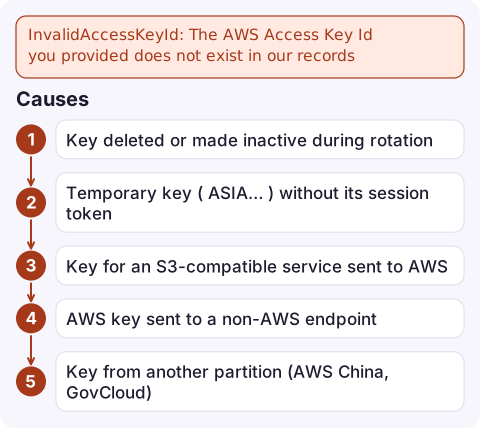
InvalidAccessKeyId: The AWS Access Key Id you provided does not exist in our records
S3 doesn't recognise the access key ID that signed the request. The key was deleted or deactivated, it's a temporary ASIA key sent without its session token, it belongs to a different provider or partition, or the request went to AWS when the key was meant for an S3-compatible service (or the reverse). Check the key with aws sts get-caller-identity using the same credentials, and check the endpoint your tool is pointed at.
What the error tells you
An error occurred (InvalidAccessKeyId) when calling the PutObject operation:
The AWS Access Key Id you provided does not exist in our records.
This is S3's wording for an authentication failure. Other services say InvalidClientTokenId or UnrecognizedClientException for similar problems. Because S3 is used by so many third-party tools (backup software, rclone, s3fs, data pipelines, presigned URLs in apps), the cause is often outside the AWS CLI setup you'd normally check.
The XML body includes the AWSAccessKeyId it received, which helps you spot a key from the wrong place.
Causes
| Cause | Clue |
|---|---|
| Key deleted or made inactive during rotation | The ID in the error doesn't appear in aws iam list-access-keys, or shows Inactive |
Temporary key (ASIA…) without its session token | Tool config has fields for key and secret only |
| Key for an S3-compatible service sent to AWS | Credentials from MinIO, Cloudflare R2, Wasabi or LocalStack, but no custom endpoint set |
| AWS key sent to a non-AWS endpoint | --endpoint-url or a tool's endpoint points somewhere else |
| Key from another partition (AWS China, GovCloud) | Works only against that partition's endpoints |
| Presigned URL signed with a key that's since been deleted | Old links fail; fresh ones work |
Fix it
- Test the same credentials against STS:
If STS rejects it too, the key is the problem. If STS accepts it, look at the endpoint and region your S3 tool uses.AWS_ACCESS_KEY_ID=AKIAEXAMPLEKEYID AWS_SECRET_ACCESS_KEY="$SECRET" \ aws sts get-caller-identity - Find who owns the key ID (works from any account for AWS keys):
It returns the account the key belongs to, which shows quickly whether you've got another team's or another account's key.aws sts get-access-key-info --access-key-id AKIAEXAMPLEKEYID - Check the user's keys and replace the dead one:
aws iam list-access-keys --user-name backup-agent \ --query 'AccessKeyMetadata[].[AccessKeyId,Status]' --output text - For temporary credentials, configure the tool's session-token field, or better, run it with a profile that assumes a role so it can refresh.
- For S3-compatible services, set the provider's endpoint explicitly, and keep their keys in a separate profile from your AWS ones.
After rotating keys
Rotations break things that kept their own copy of the old key: backup appliances, cron jobs on old servers, mobile apps with embedded keys. Before deactivating an old key, check when it was last used and by what:
aws iam get-access-key-last-used --access-key-id AKIAEXAMPLEKEYIDDeactivate first, wait, and delete only when nothing has complained; reactivating is instant if something breaks. See rotating IAM access keys.
Questions
What does InvalidAccessKeyId mean in S3?
S3 can't find the access key ID used to sign the request. The key is deleted, inactive, missing its session token, from another partition or provider, or sent to the wrong endpoint.
Can a deactivated key cause InvalidAccessKeyId?
Yes. Inactive keys are rejected the same way as deleted ones. Reactivate the key or switch to a new active key.
How do I find which account an access key belongs to?
Run aws sts get-access-key-info --access-key-id <id>. It returns the owning account ID without needing access to that account.

Key problems with S3 often appear as a backup or export job failing silently overnight. CloudConsole, a phone app for AWS, is built to show job alarms and the error lines on your phone, so a failed backup doesn't go unnoticed until you need it.
Did it start after a deploy? What changed? on the app’s alarm screen lists the deploys and configuration changes from the hour before the alarm fired.
About the app → · Download on the App Store