 CloudConsole
SlowDown: Please reduce your request rate (503)
S3 is asking you to back off because requests to one part of the bucket's key space are arriving faster than S3 has scaled to handle. S3 supports at least 3,500 writes and 5,500 reads per second per partitioned prefix and scales up further over time, so SlowDown usually comes from a sudden spike, or all traffic going to one prefix. Retry with exponential backoff, spread keys across more prefixes, and cut needless requests.
What it means
An error occurred (SlowDown) when calling the PutObject operation (reached max retries: 4):
Please reduce your request rate.
The HTTP status is 503. It's temporary throttling, not a failure of S3 or your permissions. S3 partitions a bucket's key space by prefix and adds capacity as load grows, but that takes time. Until it catches up, a sharp increase in request rate on one prefix gets some 503s. The documented baseline is 3,500 PUT/COPY/POST/DELETE and 5,500 GET/HEAD requests per second per partitioned prefix, with no limit on the number of prefixes.
What usually triggers it
| Pattern | Why it hurts |
|---|---|
| Batch job starts at full speed | Thousands of workers go from zero to peak in seconds; S3 hasn't scaled yet |
| All keys under one prefix | e.g. uploads/ or logs/2026-11-16/ receives all writes |
| Many tiny objects | Millions of small PUTs or GETs where a few large objects would do |
| Heavy overwrites of the same keys in a versioned bucket | Very large numbers of versions of a key can cause throttling on that key |
| Hot reads of popular objects | The same files fetched directly from S3 by every client |
| High CLI or SDK concurrency | aws s3 sync with raised max_concurrent_requests across many machines |
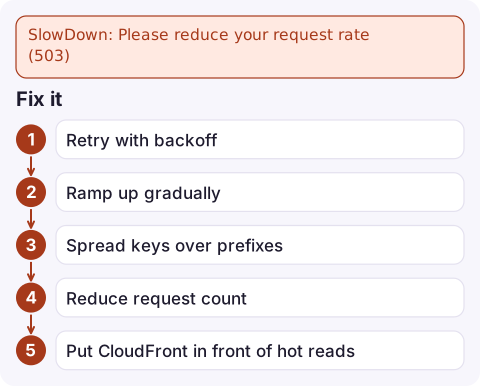
Fix it
- Retry with backoff. SDKs retry 503s automatically; give them more room for bulk jobs:
Adaptive mode also slows the client's sending rate when it sees throttling, which suits batch jobs.export AWS_RETRY_MODE=adaptive export AWS_MAX_ATTEMPTS=10 - Ramp up gradually. Increase worker count over minutes rather than starting at peak.
- Spread keys over prefixes. Put a high-cardinality value early in the key, such as a tenant ID or a short hash:
uploads/7f/2026-11-16/abc.jpgrather thanuploads/2026-11-16/abc.jpg. Parallel workers then land on different prefixes. - Reduce request count. Combine small files before upload, use multipart uploads for large ones, and cache reads.
- Put CloudFront in front of hot reads, so repeated GETs are served from edge caches.
- Turn down CLI concurrency if many hosts run transfers at once:
aws configure set default.s3.max_concurrent_requests 5
Measure it
Standard S3 storage metrics don't show request errors. Enable request metrics (a paid feature) on the bucket or a prefix filter, then watch 5xxErrors and AllRequests in CloudWatch. Server access logs or CloudTrail data events also show 503s by key, which reveals the hot prefix:
aws s3api put-bucket-metrics-configuration --bucket my-bucket --id EntireBucket \
  --metrics-configuration '{"Id":"EntireBucket"}'
Request metrics take several minutes to start appearing after you enable them.
Mistakes to avoid
Don't add aggressive retry loops of your own that ignore backoff; they make SlowDown worse. And don't conclude that S3 can't handle your load. Sustained high rates work well once keys are spread across prefixes and traffic ramps up; most SlowDown problems disappear after a change to the key layout.
Questions
What is the S3 request rate limit?
At least 3,500 PUT, COPY, POST or DELETE and 5,500 GET or HEAD requests per second per partitioned prefix. S3 scales beyond that over time, and there's no limit on the number of prefixes.
Is S3 SlowDown an outage?
No. It's S3 throttling a burst of requests while it scales. The requests can be retried with backoff.
Do I still need random key prefixes?
Fully random prefixes are no longer required for performance, but spreading heavy parallel workloads across several prefixes still helps you reach higher total request rates sooner.

SlowDown errors tend to appear when a big batch job kicks off overnight. CloudConsole, a phone app for AWS, is built to show the alarm and the job's error logs on your phone so you can judge whether the retries are coping.
Did it start after a deploy? What changed? on the app’s alarm screen lists the deploys and configuration changes from the hour before the alarm fired.
About the app → · Download on the App Store