 CloudConsole
SSM Session Manager: TargetNotConnected
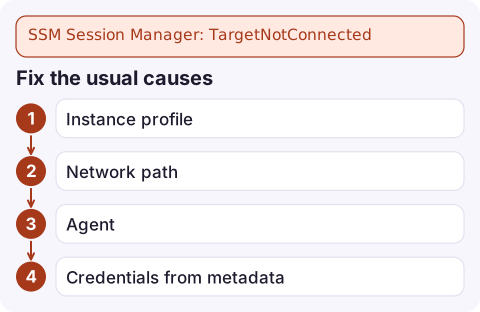
Session Manager cannot reach the SSM agent on that instance, so it is not a managed node right now. Check, in order, that the instance is running in the Region you are calling, that it has an instance profile with AmazonSSMManagedInstanceCore, that it can reach the ssm, ssmmessages and ec2messages endpoints (through NAT or VPC endpoints), and that the SSM agent is installed and running.
What the error means
An error occurred (TargetNotConnected) when calling the StartSession
operation: i-0123456789abcdef0 is not connected.
The agent on the instance has to register with Systems Manager and keep an outbound connection open. Session Manager uses that connection; nothing connects inbound to the instance. So TargetNotConnected means the agent is not checking in: missing, stopped, without credentials, or without a network path.
Check registration first
aws ssm describe-instance-information --region eu-west-2 \
  --filters Key=InstanceIds,Values=i-0123456789abcdef0 \
--query 'InstanceInformationList[].{ping:PingStatus,agent:AgentVersion,last:LastPingDateTime,os:PlatformName}'| Result | Meaning |
|---|---|
| Empty | The agent has never registered: no permissions, no network path, no agent, or wrong Region |
PingStatus: ConnectionLost | It was registered and stopped checking in: instance stopped, agent crashed, network or role changed |
PingStatus: Online | Registered; if sessions still fail, check the agent version and your own IAM permissions for ssm:StartSession |
Fix the usual causes
- Instance profile. Attach a role with the
AmazonSSMManagedInstanceCoremanaged policy:
Alternatively, enable Default Host Management Configuration in Systems Manager, which lets agents register without an instance profile.aws ec2 describe-instances --instance-ids i-0123456789abcdef0 \ --query 'Reservations[].Instances[].IamInstanceProfile.Arn' aws ec2 associate-iam-instance-profile --instance-id i-0123456789abcdef0 \ --iam-instance-profile Name=SSMInstanceProfile - Network path. Instances in private subnets need a NAT gateway or interface VPC endpoints for
com.amazonaws.eu-west-2.ssm,ssmmessagesandec2messages, with private DNS enabled and a security group allowing 443 from the instance. - Agent. It is preinstalled on Amazon Linux, recent Ubuntu and Windows AMIs from AWS; custom or older images may lack it. On the instance:
systemctl status amazon-ssm-agent, and read/var/log/amazon/ssm/amazon-ssm-agent.log. - Credentials from metadata. The agent gets the role's credentials from instance metadata; if IMDS is disabled on the instance, it cannot authenticate.
After changing the role or network, the agent picks the change up within a few minutes; restarting it speeds that up.
When you cannot get onto the instance to fix it
- Read
aws ec2 get-console-outputfor agent start-up errors. - Use EC2 Instance Connect or SSH if available, or the EC2 Serial Console.
- As a last resort, stop the instance and use user data to install or restart the agent at next boot.
Once it is Online, start a session:
aws ssm start-session --target i-0123456789abcdef0 --region eu-west-2Your local machine needs the Session Manager plugin for the AWS CLI; without it you get a local error about the plugin, not TargetNotConnected.
Questions
How do I connect to an EC2 instance with Session Manager from the CLI?
Install the Session Manager plugin, then run aws ssm start-session --target with the instance ID and its Region. The instance must show as Online in describe-instance-information.
Does Session Manager need port 22 open?
No. The SSM agent makes outbound HTTPS connections, so no inbound security group rule, public IP or key pair is needed.
Why does my instance show ConnectionLost in Systems Manager?
The agent stopped checking in: the instance was stopped, the agent crashed, the instance profile was removed, or its network path to the SSM endpoints was lost.

Session Manager is often the only way into a private instance during an incident, so a disconnected agent hurts most when you need it. CloudConsole, a phone app for AWS, is built to show instance health and alarms on your phone to help you decide what to do first.
Did it start after a deploy? What changed? on the app’s alarm screen lists the deploys and configuration changes from the hour before the alarm fired.
About the app → · Download on the App Store