 CloudConsole
How to check if AWS is down
Check the AWS Health Dashboard: the public service status page lists current issues by service and Region, and Your account health in the console shows events that affect your own resources, often earlier and in more detail. If neither shows anything, compare the failing call in another Region or account and look at your own recent changes before assuming an AWS outage.
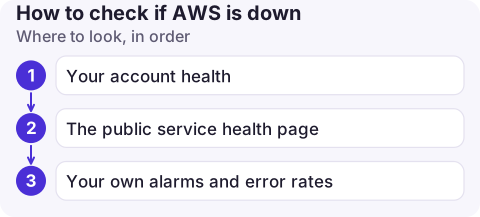
Where to look, in order
- Your account health (AWS Health Dashboard in the console): open and recent issues, scheduled changes and account notifications that apply to your account and Regions. This is the most relevant view because it's filtered to what you use.
- The public service health page (the AWS Health Dashboard's service status view): every service in every Region, with updates during an event. It doesn't need sign-in, which helps if console sign-in itself is affected.
- Your own alarms and error rates: a jump in 5xx responses from an AWS API across several of your services at once is a strong sign.
Status updates can lag the start of a problem. If you see clear evidence, act on it rather than waiting for the page to turn red.
Is it AWS or is it me?
| Signal | Points to |
|---|---|
InternalError, ServiceUnavailable, 500/503 from AWS APIs, across many callers | AWS-side problem |
| Same call works in another Region | A Regional issue (or a Regional config difference on your side) |
AccessDenied, ThrottlingException, ValidationException | Usually you: permissions, quotas, request rate; see throttling |
| Failures started right after a deploy or config change | You, until proven otherwise |
| Only one Availability Zone's instances unhealthy | Possibly an AZ issue; check account health for that AZ |
Check from the CLI
# Open issues affecting your account (needs a Business, Enterprise On-Ramp or Enterprise support plan)
aws health describe-events --region us-east-1 \
  --filter eventStatusCodes=open,eventTypeCategories=issue \
  --query 'events[].[service,region,eventTypeCode,startTime]' --output table

# Quick sanity check that an API answers in a Region
aws sts get-caller-identity --region eu-west-2
aws dynamodb list-tables --region eu-west-2 --max-items 1
The AWS Health API is only available on those support plans; without one, use the console view, which every account has.
Lessons from big Regional events
- us-east-1 is special. Several global features, including parts of IAM, the billing console and CloudFront configuration, are run from us-east-1, so problems there can be felt in other Regions. The October 2025 us-east-1 event, which began with DNS resolution problems for DynamoDB endpoints, spread to many services that depend on them.
- Data plane vs control plane. Running resources often keep working during an event while creating or changing resources fails. Avoid deploys and scaling changes during an incident unless needed.
- Multi-AZ helps for AZ problems; only multi-Region designs help for Regional ones.
Get told automatically next time
- Create an EventBridge rule with
"source": ["aws.health"]and send matching events to an SNS topic or chat channel. Health events are delivered in the Region they apply to (global ones in us-east-1), so create the rule in each Region you use. - AWS User Notifications can deliver Health events to email, chat or the AWS Console Mobile Application.
- Keep a status-check step in your incident checklist so someone looks early.
Questions
Is there an AWS outage today?
Check the AWS Health Dashboard's service status page for current issues by Region, and Your account health in the console for anything affecting your resources.
Is there an AWS outage map?
AWS doesn't publish a map; the AWS Health Dashboard lists issues by service and Region. Third-party sites aggregate user reports, but those reflect symptoms, not AWS's confirmed status.
Why does the AWS status page show green during an outage?
Public status updates can lag behind the start of an event while AWS confirms its scope. Your account health often shows issues first, and your own metrics are faster still.

Outages are when you most want a quick answer away from your desk. CloudConsole, a phone app for AWS, is built to put your alarms next to account health events on your phone, so you can tell quickly whether it is AWS or you.
About the app → · Download on the App Store