 CloudConsole
How to enable VPC Flow Logs
Create a flow log on the VPC (or a subnet or network interface): in the VPC console select the VPC, Flow logs tab, Create flow log; choose the traffic (Accept, Reject or All), a destination (CloudWatch Logs, S3 or Firehose) and, for CloudWatch Logs, an IAM role that VPC Flow Logs can assume. Records appear within minutes. Flow logs show connection metadata (IPs, ports, action), not packet contents, and only cover traffic from when they're created.
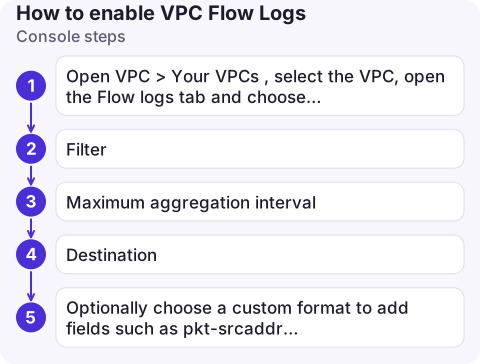
Console steps
- Open VPC > Your VPCs, select the VPC, open the Flow logs tab and choose Create flow log.
- Filter: Reject for debugging blocked traffic cheaply, All for full visibility.
- Maximum aggregation interval: 1 minute for troubleshooting, 10 minutes (default) for lower volume.
- Destination: CloudWatch Logs (pick a log group and IAM role) or S3 (enter the bucket ARN).
- Optionally choose a custom format to add fields such as
pkt-srcaddr,tcp-flagsorflow-direction, then create.
CLI steps
To S3 (no role needed; the bucket policy is added for you if you have permission):
aws ec2 create-flow-logs --resource-type VPC --resource-ids vpc-0a1b2c3d4e5f60718 \
  --traffic-type ALL --log-destination-type s3 \
  --log-destination arn:aws:s3:::my-flow-logs/prod-vpc/ \
  --max-aggregation-interval 60
To CloudWatch Logs:
aws ec2 create-flow-logs --resource-type VPC --resource-ids vpc-0a1b2c3d4e5f60718 \
  --traffic-type REJECT --log-destination-type cloud-watch-logs \
  --log-group-name /vpc/prod/flow-logs \
  --deliver-logs-permission-arn arn:aws:iam::123456789012:role/VPCFlowLogsToCloudWatch

aws ec2 describe-flow-logs --filter Name=resource-id,Values=vpc-0a1b2c3d4e5f60718 \
  --query 'FlowLogs[].[FlowLogId,FlowLogStatus,DeliverLogsStatus,LogDestinationType,DeliverLogsErrorMessage]'
The role must trust vpc-flow-logs.amazonaws.com and allow logs:CreateLogStream, logs:PutLogEvents, logs:DescribeLogGroups and logs:DescribeLogStreams (plus logs:CreateLogGroup if the group doesn't exist).
Reading them
2 123456789012 eni-0a1b2c3d4e5f60718 203.0.113.12 10.0.1.25 51544 5432 6 3 180 1731830000 1731830060 REJECT OKDefault fields: version, account, interface, source and destination address and port, protocol (6 = TCP), packets, bytes, start, end, action, log status. A REJECT means a security group or network ACL dropped it. Because security groups are stateful, a rejected response usually points at a network ACL. For queries, see rejected traffic in Logs Insights.
Common mistakes
- Waiting for old traffic: flow logs only capture from creation onwards.
- Expecting DNS, DHCP, instance metadata or Amazon Time Sync traffic: some traffic types are never logged.
- Role trust policy wrong:
DeliverLogsStatusshowsFAILEDwith an access error. Check the trust principal. - Costs: All traffic at 1-minute aggregation on a busy VPC sends a lot of data to CloudWatch Logs. S3 is usually cheaper for long-term storage; set retention or lifecycle rules either way.
- Editing a flow log: most settings can't be changed; delete and recreate it.
Questions
How do I enable VPC Flow Logs to CloudWatch?
Create a flow log on the VPC with destination CloudWatch Logs, a log group name, and an IAM role that trusts vpc-flow-logs.amazonaws.com and can write to CloudWatch Logs.
How long until VPC Flow Logs show data?
Usually within several minutes, depending on the aggregation interval (1 or 10 minutes) and delivery. They don't include traffic from before the flow log was created.
Do VPC Flow Logs show packet contents?
No. They record metadata such as addresses, ports, protocol, byte counts and accept or reject. Use Traffic Mirroring for packet capture.

Flow logs answer "is the traffic even arriving" during connectivity incidents. CloudConsole, a phone app for AWS, is being built to show logs and alarms on your phone, so you can check what is being rejected while away from a laptop.
About the app → · Download on the App Store