 CloudConsole
How to check who stopped an EC2 instance in CloudTrail
Open CloudTrail Event history in the instance's Region, filter by Resource name equal to the instance ID (or Event name StopInstances), and open the event: userIdentity shows the IAM user or assumed role that made the call. If there's no StopInstances event, the stop came from inside the operating system or from AWS; the instance's state transition reason says which.
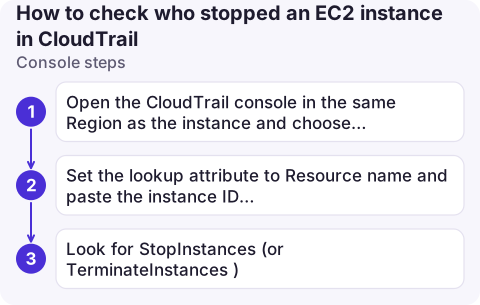
Console steps
- Open the CloudTrail console in the same Region as the instance and choose Event history.
- Set the lookup attribute to Resource name and paste the instance ID (
i-0123456789abcdef0). Narrow the time range to around when it stopped. - Look for
StopInstances(orTerminateInstances). Open it and read the event record:userIdentity,sourceIPAddressanduserAgent.
Event history covers the last 90 days of management events and needs no setup. Events can take a few minutes to appear.
CLI steps
aws cloudtrail lookup-events --region eu-west-2 \
  --lookup-attributes AttributeKey=ResourceName,AttributeValue=i-0123456789abcdef0 \
  --start-time 2026-11-15T00:00:00Z \
  --query 'Events[?EventName==`StopInstances`].[EventTime,Username,EventId]' \
  --output table

# Full record for one event, pretty-printed (needs jq)
aws cloudtrail lookup-events --region eu-west-2 \
  --lookup-attributes AttributeKey=EventName,AttributeValue=StopInstances \
  --max-results 5 --query 'Events[0].CloudTrailEvent' --output text | jq .userIdentity
lookup-events accepts only one lookup attribute per call, which is why the first command filters on the resource and then narrows by event name in --query.
Reading userIdentity
| What you see | Meaning |
|---|---|
type: IAMUser, userName | A person or script with that IAM user's keys |
type: AssumedRole, ARN ending /Admin/[email protected] | A role session; the part after the role name is the session name, often the human behind an SSO login |
invokedBy: autoscaling.amazonaws.com or a service-linked role | An AWS service acting for you (Auto Scaling, a scheduler) |
| Role used by a Lambda function or EventBridge Scheduler | An automated schedule, such as an instance scheduler |
No StopInstances event? Check the state reason
aws ec2 describe-instances --instance-ids i-0123456789abcdef0 \
--query 'Reservations[].Instances[].[StateTransitionReason,StateReason.Code,StateReason.Message]'Client.UserInitiatedShutdown: a stop via the API or console (there should be a CloudTrail event).Client.InstanceInitiatedShutdown: someone or something ranshutdowninside the OS, or the OS halted itself. Check the system logs.Server.ScheduledStop: AWS stopped it for a scheduled event such as retirement; see AWS Health.Server.SpotInstanceShutdown: a Spot interruption.
Common mistakes
- Wrong Region in Event history. EC2 events are recorded in the instance's Region.
- Looking beyond 90 days. Older events need a trail that delivers to S3 (query with Athena) or CloudTrail Lake.
- Stopping at the role name. Many people share a role; the session name and
sourceIPAddressidentify the person. For IAM Identity Center sessions, the session name is usually the user's sign-in name. - Searching a wide window.
StateTransitionReasonincludes the time of the stop in UTC; use it to narrow the CloudTrail search. - Ignoring
sourceIPAddress. A service name there, such asautoscaling.amazonaws.com, means an AWS service made the call for you.
Questions
How do I check who stopped an EC2 instance in AWS?
Search CloudTrail Event history in the instance's Region for the instance ID and open the StopInstances event. The userIdentity block names the user or role.
Why is there no CloudTrail event for my stopped instance?
The stop was not an API call. It was a shutdown from inside the operating system, a Spot interruption or an AWS scheduled event; the instance's StateReason code tells you which.
Can I get alerted when an instance is stopped?
Yes. An EventBridge rule on EC2 Instance State-change Notification events for the stopped state can notify an SNS topic.

"Who stopped this?" is usually asked by someone looking at an outage on their phone. CloudConsole, a phone app for AWS, is built to show resource changes and the identity behind them alongside the alarm.
About the app → · Download on the App Store