 CloudConsole
IAM policy: Cost Explorer read-only
Allow the ce:Get* read actions you need, typically ce:GetCostAndUsage, ce:GetCostForecast, ce:GetDimensionValues and ce:GetTags, on Resource "*". Cost Explorer must be enabled in the account, and for IAM users and roles the account must have IAM access to billing information switched on.
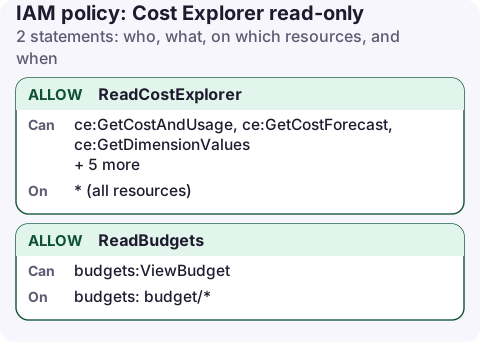
The policy
{
  "Version": "2012-10-17",
  "Statement": [
    {
      "Sid": "ReadCostExplorer",
      "Effect": "Allow",
      "Action": [
        "ce:GetCostAndUsage",
        "ce:GetCostForecast",
        "ce:GetDimensionValues",
        "ce:GetTags",
        "ce:GetCostCategories",
        "ce:GetReservationUtilization",
        "ce:GetSavingsPlansUtilization",
        "ce:GetAnomalies"
      ],
      "Resource": "*"
    },
    {
      "Sid": "ReadBudgets",
      "Effect": "Allow",
      "Action": "budgets:ViewBudget",
      "Resource": "arn:aws:budgets::123456789012:budget/*"
    }
  ]
}
What each action is for
| Action | Used for |
|---|---|
ce:GetCostAndUsage | The main query: cost by service, account, tag or usage type over time |
ce:GetCostForecast | Month-end forecast |
ce:GetDimensionValues, ce:GetTags, ce:GetCostCategories | Populating filters and group-by menus |
ce:GetReservationUtilization, ce:GetSavingsPlansUtilization | Commitment usage reports |
ce:GetAnomalies | Cost Anomaly Detection results |
budgets:ViewBudget | Seeing budgets and their status |
Cost Explorer's read actions don't support resource-level permissions, so "*" is required. They show spending for the whole account, or the whole organisation when called from the management account.
Attach and test
aws iam create-policy --policy-name cost-explorer-read \
  --policy-document file://ce-read.json
aws iam attach-role-policy --role-name finance-readonly \
  --policy-arn arn:aws:iam::123456789012:policy/cost-explorer-read

aws ce get-cost-and-usage --time-period Start=2026-11-01,End=2026-11-17 \
  --granularity MONTHLY --metrics UnblendedCost \
  --group-by Type=DIMENSION,Key=SERVICE --profile finance-readonly
Cost Explorer API requests are charged per request (see the Cost Explorer pricing page), so avoid tools that poll it every minute.
Before it works
- IAM access to billing: in the account settings, the root user must activate IAM user and role access to billing information. Until then, even a correct policy gets access denied in the Billing and Cost Management console.
- Member accounts: the management account can restrict what member accounts see in Cost Explorer.
- Enable Cost Explorer once in the console; data can take up to a day to appear the first time.
Check it from the CLI
Run a small forecast as the role. An AccessDenied that mentions billing usually means the account-level IAM access setting is off rather than a policy problem:
aws ce get-cost-forecast \
  --time-period Start=2026-11-17,End=2026-12-01 \
  --metric UNBLENDED_COST --granularity MONTHLY --profile finance-readonly
The forecast needs enough history to be meaningful; new accounts can return an error until there is some data.
Cost data is usually a day behind, and figures for the current month change as late usage arrives. Treat numbers from the last 24 hours as provisional when you compare days.
Variations and mistakes
- Managed policies:
AWSBillingReadOnlyAccesscovers Cost Explorer and the billing console pages, including invoices. Broader than many people need. - Resource-level detail:
ce:GetCostAndUsageWithResourcesreturns per-resource costs for recent days, if that option is turned on. - Mistake:
ce:*includes creating and deleting cost categories, anomaly monitors and cost allocation tag settings. - Mistake: expecting
aws-portal:ViewBillingto be enough. Billing permissions moved to fine-grained actions; use thece:actions above for Cost Explorer.
Questions
Which managed policy gives read-only access to Cost Explorer?
AWSBillingReadOnlyAccess includes it, together with read access to the rest of the billing console. For Cost Explorer alone, use the custom policy above.
Why do I get access denied in Cost Explorer with the right policy?
IAM access to billing information is probably not activated for the account. The root user turns it on in the account settings.
Spend is one of the things people most want to check away from a desk. CloudConsole is being built to show month-to-date cost and forecast on a phone, using exactly these two read actions.
About the app → · Download on the App Store