 CloudConsole
Read-only IAM policy for a mobile AWS app
For checking AWS from a phone, use a dedicated read-only role with short sessions: alarms, metrics, logs, costs, CloudTrail and resource Describe/List calls, but no s3:GetObject, secret values or write actions. The managed ReadOnlyAccess policy works too, but it also reads your data.
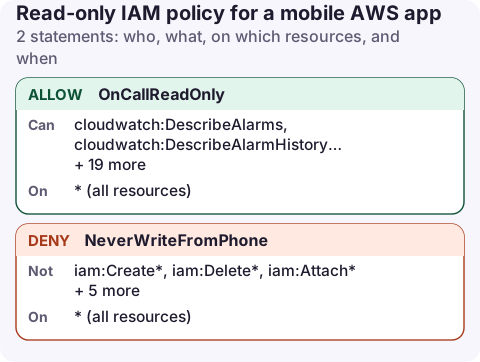
The policy
{
  "Version": "2012-10-17",
  "Statement": [
    {
      "Sid": "OnCallReadOnly",
      "Effect": "Allow",
      "Action": [
        "cloudwatch:DescribeAlarms",
        "cloudwatch:DescribeAlarmHistory",
        "cloudwatch:GetMetricData",
        "logs:DescribeLogGroups",
        "logs:DescribeLogStreams",
        "logs:FilterLogEvents",
        "logs:GetLogEvents",
        "logs:StartQuery",
        "logs:GetQueryResults",
        "logs:StopQuery",
        "ce:GetCostAndUsage",
        "ce:GetCostForecast",
        "ec2:DescribeRegions",
        "ec2:DescribeInstances",
        "ecs:ListClusters",
        "ecs:ListServices",
        "ecs:DescribeServices",
        "lambda:ListFunctions",
        "lambda:GetFunctionConfiguration",
        "rds:DescribeDBInstances",
        "cloudtrail:LookupEvents",
        "health:DescribeEvents"
      ],
      "Resource": "*"
    },
    {
      "Sid": "NeverWriteFromPhone",
      "Effect": "Deny",
      "Action": [
        "iam:Create*",
        "iam:Delete*",
        "iam:Attach*",
        "iam:Put*",
        "iam:Update*",
        "ec2:TerminateInstances",
        "s3:DeleteBucket",
        "s3:PutBucketPolicy"
      ],
      "Resource": "*"
    }
  ]
}
What it covers
- Alarms and metrics: alarm state, history and graphs.
- Logs: browsing, filtering and Logs Insights queries. Log lines may contain personal data, so decide whether on-call phones should see them; drop the
logs:read actions if not. - Cost: month-to-date and forecast.
- Resources: instance, service, function and database status. Extend with Describe/List calls for other services you run.
- What changed:
cloudtrail:LookupEventsfor recent management events, and AWS Health for service issues.
NeverWriteFromPhone is belt and braces: an explicit deny that survives someone later attaching a broader policy to the same role.
Issue short-lived credentials
- Best: IAM Identity Center. Create a permission set with this inline policy and a session length of a few hours. Sign-in uses your normal SSO and MFA; nothing long-lived is stored on the phone. See set up IAM Identity Center.
- Otherwise: a role assumed from a dedicated IAM user whose only permission is
sts:AssumeRoleon this role, with MFA required in the role's trust policy. - Never the root user or an administrator's access key.
aws iam create-policy --policy-name mobile-read-only \
  --policy-document file://mobile-read-only.json
aws iam attach-role-policy --role-name OnCallReadOnly \
  --policy-arn arn:aws:iam::123456789012:policy/mobile-read-only
ReadOnlyAccess, ViewOnlyAccess or custom?
| Option | Good | Watch out |
|---|---|---|
ReadOnlyAccess | Everything just works, every service | Includes reading S3 objects, DynamoDB items and more |
ViewOnlyAccess | Lists and describes, little data | No log contents or cost queries; add them separately |
| Custom (above) | Exactly what on-call needs | New services need adding by hand |
See ReadOnlyAccess vs ViewOnlyAccess for the details.
Check it before you rely on it
aws iam simulate-principal-policy \
  --policy-source-arn arn:aws:iam::123456789012:role/OnCallReadOnly \
  --action-names cloudwatch:DescribeAlarms ce:GetCostAndUsage ec2:TerminateInstances \
  --query 'EvaluationResults[].[EvalActionName,EvalDecision]' --output text
The first two should be allowed and the last explicitly denied.
Revisit the list when you adopt a new service. A missing permission shows up as an empty screen rather than an error in most apps, which is easy to mistake for "nothing is wrong".
Common mistakes
- Adding write actions "just for emergencies" to the same role. Use a separate, MFA-protected role for changes so the everyday session stays harmless.
- Region-scoped testing: Describe calls are regional; if a screen is empty, check the region before the policy.
- Forgetting
ec2:DescribeRegions: apps use it to list regions, and without it region pickers fail.
Questions
Is ReadOnlyAccess safe for a phone app?
It can't change anything, but it can read data such as S3 objects and DynamoDB items. A scoped policy like the one above, or ViewOnlyAccess plus a few extras, exposes less if the phone is lost.
What is the safest way to use AWS credentials on a phone?
Short-lived credentials from IAM Identity Center or an MFA-protected role, with a read-only policy, rather than a stored long-term access key.
CloudConsole's recommended permissions follow the same idea: a read-only policy for day-to-day use, with change permissions kept separate and behind production guardrails. Its help centre publishes the exact action list.
About the app → · Download on the App Store