 CloudConsole
IAM permissions boundary: let developers create roles safely
Give developers iam:CreateRole and the attach/put role-policy actions only with the condition iam:PermissionsBoundary equal to your boundary policy's ARN, and deny them changing or removing that boundary. Every role they create is then capped by the boundary, whatever policies they attach to it.
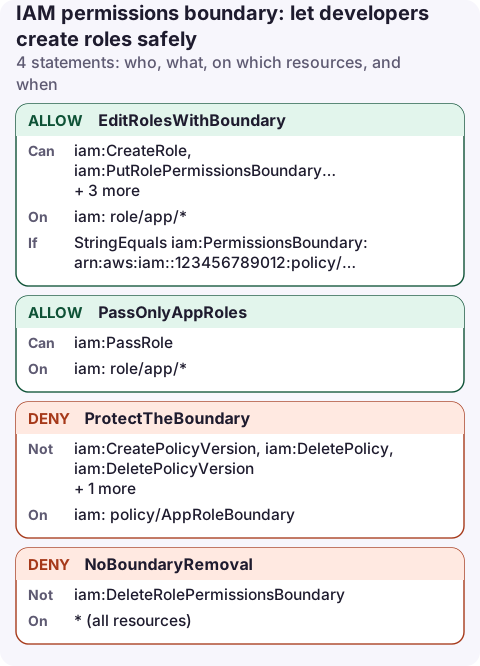
The delegated admin policy
{
  "Version": "2012-10-17",
  "Statement": [
    {
      "Sid": "EditRolesWithBoundary",
      "Effect": "Allow",
      "Action": [
        "iam:CreateRole",
        "iam:PutRolePermissionsBoundary",
        "iam:AttachRolePolicy",
        "iam:DetachRolePolicy",
        "iam:PutRolePolicy",
        "iam:DeleteRolePolicy"
      ],
      "Resource": "arn:aws:iam::123456789012:role/app/*",
      "Condition": {
        "StringEquals": {
          "iam:PermissionsBoundary": "arn:aws:iam::123456789012:policy/AppRoleBoundary"
        }
      }
    },
    {
      "Sid": "PassOnlyAppRoles",
      "Effect": "Allow",
      "Action": "iam:PassRole",
      "Resource": "arn:aws:iam::123456789012:role/app/*"
    },
    {
      "Sid": "ProtectTheBoundary",
      "Effect": "Deny",
      "Action": [
        "iam:CreatePolicyVersion",
        "iam:DeletePolicy",
        "iam:DeletePolicyVersion",
        "iam:SetDefaultPolicyVersion"
      ],
      "Resource": "arn:aws:iam::123456789012:policy/AppRoleBoundary"
    },
    {
      "Sid": "NoBoundaryRemoval",
      "Effect": "Deny",
      "Action": "iam:DeleteRolePermissionsBoundary",
      "Resource": "*"
    }
  ]
}
How it works
A permissions boundary is a managed policy set on a role that sets the maximum it can do. The role's effective permissions are the intersection of its identity policies and its boundary. If the boundary doesn't allow iam:*, a developer can attach AdministratorAccess to their role and it still can't touch IAM.
- EditRolesWithBoundary:
CreateRolesucceeds only when the request sets this exact boundary. The same condition on the attach and put actions means developers can only change roles that already carry it. Roles are limited to the/app/path. - PassOnlyAppRoles: lets them give those roles to Lambda, ECS and so on; see PassRole.
- ProtectTheBoundary / NoBoundaryRemoval: without these, the developer could rewrite the boundary policy or strip it from a role.
A boundary policy to start from
{
  "Version": "2012-10-17",
  "Statement": [
    {
      "Sid": "AppWorkloadsOnly",
      "Effect": "Allow",
      "Action": [
        "s3:*",
        "dynamodb:*",
        "sqs:*",
        "logs:*",
        "cloudwatch:PutMetricData",
        "xray:PutTraceSegments"
      ],
      "Resource": "*",
      "Condition": {
        "StringEquals": {
          "aws:RequestedRegion": "eu-west-2"
        }
      }
    }
  ]
}
A boundary only limits; it grants nothing. Broad service wildcards are normal here, because the role's own policies still have to allow each action on each resource.
aws iam create-role --role-name orders-api --path /app/ \
  --assume-role-policy-document file://lambda-trust.json \
  --permissions-boundary arn:aws:iam::123456789012:policy/AppRoleBoundary
Boundary, SCP or both?
| Permissions boundary | SCP | |
|---|---|---|
| Applies to | One user or role | Every principal in an account or OU |
| Set by | Whoever creates the role (enforced by the condition above) | The Organizations management account |
| Use for | Delegating IAM safely to teams | Account-wide rules: regions, leaving the org, root user |
Denials from a boundary appear as no permissions boundary allows; see permissions boundary deny.
Check a role's boundary
aws iam get-role --role-name orders-api \
  --query Role.PermissionsBoundary
An empty result means the role has no boundary, which with the policy above can only happen for roles created by someone else.
Common mistakes
- Forgetting
iam:DeleteRolePermissionsBoundary: the boundary can simply be removed. - No path or name restriction: developers can then edit admin roles that happen to share the boundary.
- Creating roles with tags also needs
iam:TagRole; add it to the first statement if your tooling tags on creation. - Expecting the boundary to grant access. A role with only a boundary can do nothing.
Questions
What is the difference between a permissions boundary and an SCP?
A boundary caps one role or user; an SCP caps every principal in the accounts it's attached to. Both only limit, never grant.
How do I force developers to attach a permissions boundary?
Allow iam:CreateRole only with the condition iam:PermissionsBoundary equal to the boundary ARN, as in the first statement.
Delegated role creation means more roles to keep an eye on. A phone app with IAM read access lets you check what a new role can do when someone asks for a quick review.
About the app → · Download on the App Store