 CloudConsole
IAM role trust policy: examples and how it works
A trust policy is the resource-based policy on an IAM role that says who may assume it: it has a Principal and allows sts:AssumeRole (or AssumeRoleWithWebIdentity / AssumeRoleWithSAML). It grants no permissions itself; what the role can do comes from its separate permissions policies.
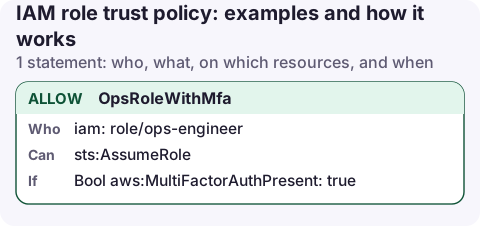
A trust policy for people in another account
{
  "Version": "2012-10-17",
  "Statement": [
    {
      "Sid": "OpsRoleWithMfa",
      "Effect": "Allow",
      "Principal": {
        "AWS": "arn:aws:iam::111122223333:role/ops-engineer"
      },
      "Action": "sts:AssumeRole",
      "Condition": {
        "Bool": {
          "aws:MultiFactorAuthPresent": "true"
        }
      }
    }
  ]
}
Only the ops-engineer role in account 111122223333 can assume this role, and only from a session that used MFA. That role also needs sts:AssumeRole on this role's ARN in its own permissions.
Trust policy vs permissions policy
| Trust policy | Permissions policy | |
|---|---|---|
| Answers | Who can become this role? | What can the role do once assumed? |
| Has a Principal | Yes, required | No |
| Typical actions | sts:AssumeRole, sts:AssumeRoleWithWebIdentity, sts:TagSession | Service actions such as s3:GetObject |
| How many | Exactly one per role | Several managed and inline |
| CLI | aws iam update-assume-role-policy | aws iam put-role-policy / attach-role-policy |
The CLI and API still call the trust policy the "assume role policy document", which is why both names appear in search results.
Other common principals
- An AWS service:
"Principal": {"Service": "lambda.amazonaws.com"}(orec2,ecs-tasks,codebuild). See Lambda execution role. - Any principal in an account:
"Principal": {"AWS": "arn:aws:iam::111122223333:root"}. This trusts the account, which then decides in its own IAM policies who may assume the role. It does not mean only the root user. - A web identity provider:
"Principal": {"Federated": "arn:aws:iam::123456789012:oidc-provider/…"}withsts:AssumeRoleWithWebIdentity; see GitHub Actions OIDC and EKS IRSA. - A third party: add
sts:ExternalId; see cross-account with ExternalId.
Update a trust policy
aws iam update-assume-role-policy --role-name prod-admin \
  --policy-document file://trust.json

aws iam get-role --role-name prod-admin \
  --query Role.AssumeRolePolicyDocument
In the console: IAM → Roles → the role → Trust relationships → Edit trust policy.
How to see who can assume a role
Before changing a trust policy, read the current one and check which principals actually use the role. CloudTrail records every AssumeRole call in the account that owns the role, including the caller's ARN.
aws iam get-role --role-name prod-admin \
  --query 'Role.{Trust:AssumeRolePolicyDocument,MaxSession:MaxSessionDuration}'

aws cloudtrail lookup-events \
  --lookup-attributes AttributeKey=EventName,AttributeValue=AssumeRole \
  --max-results 20 --query 'Events[].CloudTrailEvent'
IAM Access Analyzer also flags roles that can be assumed from outside your account or organisation, which is a quick way to audit trust policies in bulk.
Common mistakes
- Recreated principal. When you name a specific role or user, IAM stores its unique ID. If that role is deleted and recreated with the same name, the trust policy shows an ID like
AROA…instead of the ARN and no longer matches. Edit the policy and save the ARN again. - Wildcard principal (
"AWS": "*") without a strong condition: anyone in any account can assume the role. - Adding
Resourceto a trust policy: it isn't allowed there and the save fails. - Only one side configured. Cross-account access needs this trust policy and an allow on the caller's side.
- Role chaining limits the session to one hour regardless of the role's maximum session duration.
Questions
What is the difference between an assume role policy and a trust policy?
Nothing; they are the same document. The API calls it AssumeRolePolicyDocument and the console calls it the trust policy.
Does a trust policy grant permissions?
No. It only controls who can assume the role. The role's permissions policies decide what the session can do.
What does arn:aws:iam::111122223333:root mean in a trust policy?
The whole account 111122223333. Any user or role there that has sts:AssumeRole on this role in its own policies can assume it.
Assuming a role from a phone works the same as from the CLI: base credentials, then sts:AssumeRole into the target. CloudConsole is being built to keep the assumed role visible on every screen, so you always know which account you are acting in.
About the app → · Download on the App Store