 CloudConsole
IAM policy: write to one prefix in an S3 bucket
Allow s3:PutObject on arn:aws:s3:::my-bucket/uploads/* and, if the uploader needs to see what is already there, s3:ListBucket on the bucket ARN with an s3:prefix condition of uploads/. Leave out s3:DeleteObject and s3:GetObject unless the job really needs them.
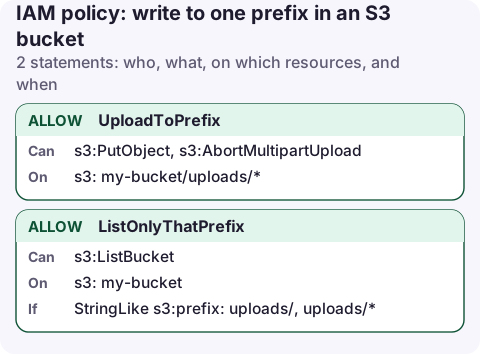
The policy
{
  "Version": "2012-10-17",
  "Statement": [
    {
      "Sid": "UploadToPrefix",
      "Effect": "Allow",
      "Action": [
        "s3:PutObject",
        "s3:AbortMultipartUpload"
      ],
      "Resource": "arn:aws:s3:::my-bucket/uploads/*"
    },
    {
      "Sid": "ListOnlyThatPrefix",
      "Effect": "Allow",
      "Action": "s3:ListBucket",
      "Resource": "arn:aws:s3:::my-bucket",
      "Condition": {
        "StringLike": {
          "s3:prefix": [
            "uploads/",
            "uploads/*"
          ]
        }
      }
    }
  ]
}
What each statement allows
UploadToPrefix lets the caller create objects whose key starts with uploads/. s3:PutObject also covers the multipart upload calls (create, upload part, complete) that the CLI and SDKs switch to for large files. s3:AbortMultipartUpload lets the client clean up a failed large upload instead of leaving orphaned parts that you pay to store.
ListOnlyThatPrefix is optional. It lets aws s3 ls s3://my-bucket/uploads/ and aws s3 sync work, but only when the request asks for keys under uploads/. A listing of the bucket root is denied because its prefix doesn't match.
Be aware that s3:PutObject can overwrite an existing key with the same name. If uploads must never replace earlier files, turn on versioning, or have the client send a conditional write (If-None-Match: *) so S3 rejects the upload when the key already exists.
Attach it
For a workload role, an inline policy keeps the permission next to the thing that uses it:
aws iam put-role-policy --role-name upload-service \
  --policy-name my-bucket-uploads \
  --policy-document file://my-bucket-uploads.json

aws s3 cp ./report.pdf s3://my-bucket/uploads/report.pdf --profile upload-service
In the console, open the role, choose Add permissions → Create inline policy → JSON and paste the document.
Variations
- A home folder per IAM user. Use a policy variable:
"Resource": "arn:aws:s3:::my-bucket/home/${aws:username}/*"and ans3:prefixcondition ofhome/${aws:username}/*. One policy then works for every user in a group.${aws:username}is only set for IAM users; for roles and SSO users use${aws:userid}or a principal tag. - Uploads that set tags need
s3:PutObjectTaggingas well. - Read back what you wrote. Add
s3:GetObjectto the first statement. - Write-only drop box for another account. Grant the other account in a bucket policy rather than IAM, and keep Object Ownership set to bucket owner enforced so you own whatever they upload.
Common mistakes
- Leading slash in the prefix. Keys don't start with
/;my-bucket//uploads/*matches nothing useful. - Granting
s3:PutObjectAclby habit. New buckets have ACLs disabled, so ACL headers other thanbucket-owner-full-controlfail anyway, and the permission is not needed. - SSE-KMS bucket: uploads also need
kms:GenerateDataKeyon the bucket's key. The error is a plain AccessDenied that mentions KMS. - Forgetting that listing reveals names. Even with the prefix condition, file names under
uploads/are visible to the uploader. Use a separate prefix per tenant if names are sensitive.
Questions
Does s3:PutObject allow overwriting files?
Yes. A PutObject to an existing key replaces it. Versioning keeps the old copy, and a conditional write with If-None-Match fails instead of overwriting.
Which permission does a multipart upload need?
s3:PutObject covers creating, uploading parts of and completing a multipart upload. Add s3:AbortMultipartUpload so clients can cancel, and s3:ListMultipartUploadParts if they resume uploads.
When an upload job starts failing at night, the first question is whether its role changed. A phone app with read access to IAM and CloudTrail can answer that before you reach a laptop.
About the app → · Download on the App Store