 CloudConsole
IAM policy: kms:Decrypt on one key
Allow kms:Decrypt (and kms:GenerateDataKey if the caller also writes) on the key's full ARN, and add a kms:ViaService condition naming the service that will use it, such as s3.eu-west-2.amazonaws.com. This only works if the key policy delegates to IAM through the account root statement.
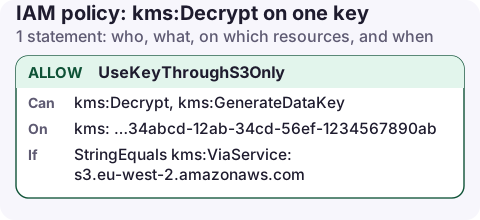
The policy
{
  "Version": "2012-10-17",
  "Statement": [
    {
      "Sid": "UseKeyThroughS3Only",
      "Effect": "Allow",
      "Action": [
        "kms:Decrypt",
        "kms:GenerateDataKey"
      ],
      "Resource": "arn:aws:kms:eu-west-2:123456789012:key/1234abcd-12ab-34cd-56ef-1234567890ab",
      "Condition": {
        "StringEquals": {
          "kms:ViaService": "s3.eu-west-2.amazonaws.com"
        }
      }
    }
  ]
}
What it allows
kms:Decryptlets the caller read data encrypted with this key: S3 objects using SSE-KMS, encrypted EBS snapshots it copies, SQS messages, secrets and so on.kms:GenerateDataKeyis what services call when writing encrypted data. Uploading to an SSE-KMS bucket needs it; reading does not.kms:ViaServicerestricts use to requests that S3 makes on the caller's behalf ineu-west-2. The role can't callaws kms decryptdirectly with this key, which limits what leaked credentials can do.
Attach it
aws iam put-role-policy --role-name reporting-app \
  --policy-name use-reports-key --policy-document file://kms-use.json

aws kms describe-key --key-id alias/reports \
  --query KeyMetadata.Arn --output text
Use describe-key to turn an alias into the key ARN for the policy. Then check the key policy still has the statement allowing arn:aws:iam::123456789012:root; see KMS key policy.
Variations
- Several services: list them, e.g.
["s3.eu-west-2.amazonaws.com", "secretsmanager.eu-west-2.amazonaws.com"]. - Direct encryption in your code (the KMS or Encryption SDK): drop the
ViaServicecondition and consider an encryption-context condition instead, such as"StringEquals": {"kms:EncryptionContext:app": "orders"}. - By alias: alias ARNs are not valid resources for Decrypt. Use
"Resource": "arn:aws:kms:eu-west-2:123456789012:key/*"with"ForAnyValue:StringEquals": {"kms:ResourceAliases": "alias/reports"}. - Key in another account: this IAM statement plus a statement in that key's policy naming your role or account.
Read the error carefully
KMS errors surfaced through S3 or another service still name the key. Check three things in order: is it the key you expected, does the key policy delegate to IAM, and does the IAM statement match that key ARN and the kms:ViaService value for the Region the service runs in.
aws kms get-key-policy --key-id 1234abcd-12ab-34cd-56ef-1234567890ab \
  --query Policy --output text
For keys in another account, the key policy check happens in that account, so the key owner has to look at their side. Send them the exact error text and your role ARN rather than asking them to "check the key".
Common mistakes
- Using the alias ARN as Resource. The policy saves fine and matches nothing.
- Granting Decrypt but not GenerateDataKey for a writer: uploads fail while downloads work.
- Key policy without the root statement: IAM grants are ignored and every call is denied. The error names the key ARN; see KMS AccessDenied.
kms:*on*to make the error go away: includes key deletion and policy changes for every key the key policies delegate.
Questions
What permissions are needed to read an SSE-KMS encrypted S3 object?
s3:GetObject on the object and kms:Decrypt on the bucket's KMS key. Uploading needs s3:PutObject and kms:GenerateDataKey.
Can I use a KMS alias in an IAM policy?
Not as the Resource for cryptographic actions. Use the key ARN, or the kms:ResourceAliases condition key.
Encryption errors often appear at the worst time, such as a nightly export failing on the first encrypted object. The KMS key ARN in the error message is the clue to look for first.
About the app → · Download on the App Store