 CloudConsole
KMS key policy: a working example explained
Every KMS key has exactly one key policy, and nothing can use the key unless that policy allows it, directly or by delegating to IAM. Keep the statement that gives the account root principal kms:*: it is what lets IAM policies grant access. Then name key administrators and key users in separate statements.
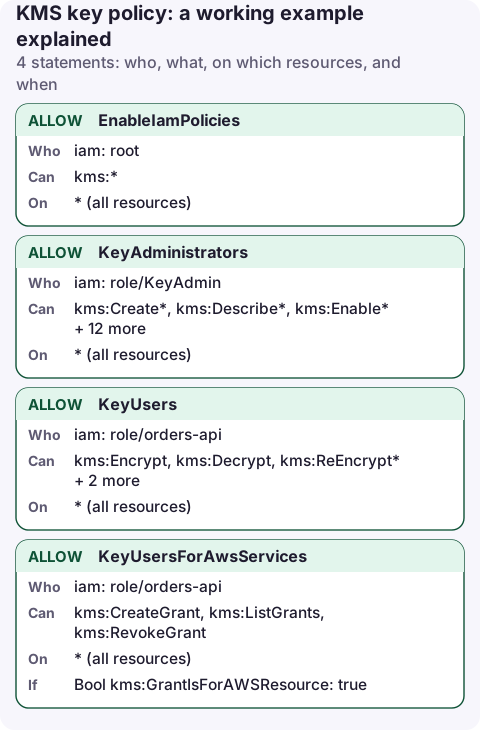
The key policy
{
  "Version": "2012-10-17",
  "Statement": [
    {
      "Sid": "EnableIamPolicies",
      "Effect": "Allow",
      "Principal": {
        "AWS": "arn:aws:iam::123456789012:root"
      },
      "Action": "kms:*",
      "Resource": "*"
    },
    {
      "Sid": "KeyAdministrators",
      "Effect": "Allow",
      "Principal": {
        "AWS": "arn:aws:iam::123456789012:role/KeyAdmin"
      },
      "Action": [
        "kms:Create*",
        "kms:Describe*",
        "kms:Enable*",
        "kms:List*",
        "kms:Put*",
        "kms:Update*",
        "kms:Revoke*",
        "kms:Disable*",
        "kms:Get*",
        "kms:Delete*",
        "kms:TagResource",
        "kms:UntagResource",
        "kms:ScheduleKeyDeletion",
        "kms:CancelKeyDeletion",
        "kms:RotateKeyOnDemand"
      ],
      "Resource": "*"
    },
    {
      "Sid": "KeyUsers",
      "Effect": "Allow",
      "Principal": {
        "AWS": "arn:aws:iam::123456789012:role/orders-api"
      },
      "Action": [
        "kms:Encrypt",
        "kms:Decrypt",
        "kms:ReEncrypt*",
        "kms:GenerateDataKey*",
        "kms:DescribeKey"
      ],
      "Resource": "*"
    },
    {
      "Sid": "KeyUsersForAwsServices",
      "Effect": "Allow",
      "Principal": {
        "AWS": "arn:aws:iam::123456789012:role/orders-api"
      },
      "Action": [
        "kms:CreateGrant",
        "kms:ListGrants",
        "kms:RevokeGrant"
      ],
      "Resource": "*",
      "Condition": {
        "Bool": {
          "kms:GrantIsForAWSResource": "true"
        }
      }
    }
  ]
}
Statement by statement
- EnableIamPolicies: the account principal (
:rootmeans the account, not the root user) gets full access to the key. In practice this hands control to IAM: any user or role whose IAM policy allows a KMS action on this key can then perform it. Without this statement, IAM policies are ignored for this key. - KeyAdministrators: manage the key without being able to use it for encryption. Admins can schedule deletion, so keep this list short.
- KeyUsers: cryptographic use.
GenerateDataKey*is what S3, EBS and most SDK envelope encryption call. - KeyUsersForAwsServices: lets services such as EBS and RDS create grants on the user's behalf, but only for AWS resources.
"Resource": "*" in a key policy means "this key"; a key policy can't refer to other keys.
Apply it
aws kms put-key-policy \
  --key-id 1234abcd-12ab-34cd-56ef-1234567890ab \
  --policy file://key-policy.json

aws kms get-key-policy --key-id 1234abcd-12ab-34cd-56ef-1234567890ab \
  --query Policy --output text
put-key-policy replaces the whole policy. KMS runs a lockout safety check and rejects a policy that would stop the caller from changing it again; don't override that with --bypass-policy-lockout-safety-check.
Variations
- Key policy only (no IAM delegation): remove
EnableIamPoliciesand list every principal explicitly. More control, much more maintenance, and a real risk of an unmanageable key. - Another account uses the key: add its account or role as a principal in
KeyUsers. That account must also grant the action in its own IAM policies. - A service principal such as CloudWatch Logs or CloudTrail encrypting with the key: add a statement for
"Service": "logs.eu-west-2.amazonaws.com"with anaws:SourceArnor encryption-context condition, per that service's docs.
Who can use the key today
aws kms list-grants --key-id 1234abcd-12ab-34cd-56ef-1234567890ab \
  --query 'Grants[].[GranteePrincipal,Operations]'
Grants are a second way to access a key alongside the key policy and IAM. Services such as EBS create them automatically; review them when auditing a key.
Common mistakes
- Deleting the root statement while editing. If no remaining principal can call
PutKeyPolicy, only AWS Support can help you regain control. - Granting
kms:*to applications. That includesScheduleKeyDeletion. - Naming a role that is later recreated. Like trust policies, key policies store the role's unique ID; recreate the role and the key no longer recognises it.
- Key in the wrong region. KMS keys are regional unless they are multi-Region keys.
Questions
What is the difference between a KMS key policy and an IAM policy?
The key policy is attached to the key and is always evaluated. IAM policies only work for a key if its key policy allows the account to delegate, usually through the root statement.
What does the root principal in a KMS key policy mean?
It means the AWS account. It enables IAM policies in that account to grant access to the key; it doesn't give the root user special use of it.
KMS mistakes surface as AccessDenied errors far from the key itself. Reading the failing service's logs on a phone, then the key policy, is usually enough to see which statement is missing.
About the app → · Download on the App Store