 CloudConsole
IAM policy: read-only access to a single S3 bucket
Allow s3:ListBucket on the bucket ARN (arn:aws:s3:::my-bucket) and s3:GetObject on the object ARN (arn:aws:s3:::my-bucket/*). Those are two different resources, so they need two statements. Nothing else is required to list and download objects with the CLI or an SDK.
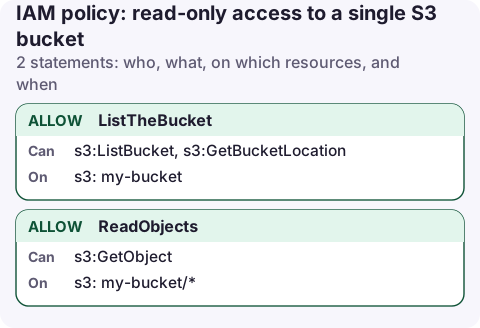
The policy
{
  "Version": "2012-10-17",
  "Statement": [
    {
      "Sid": "ListTheBucket",
      "Effect": "Allow",
      "Action": [
        "s3:ListBucket",
        "s3:GetBucketLocation"
      ],
      "Resource": "arn:aws:s3:::my-bucket"
    },
    {
      "Sid": "ReadObjects",
      "Effect": "Allow",
      "Action": "s3:GetObject",
      "Resource": "arn:aws:s3:::my-bucket/*"
    }
  ]
}
Replace my-bucket with your bucket name. The policy grants nothing in any other bucket and cannot write, delete or change settings.
What each statement allows
- ListTheBucket:
s3:ListBucketis the permission behindListObjectsV2, which is whataws s3 ls s3://my-bucket/andaws s3 synccall. It applies to the bucket, so the resource is the bucket ARN with no trailing slash.s3:GetBucketLocationlets older tools discover the bucket's region; it is harmless to include. - ReadObjects:
s3:GetObjectcovers downloading objects andHeadObjectmetadata calls. It applies to objects, so the resource ends in/*.
Without ListBucket, a download of a key that doesn't exist returns 403 Access Denied instead of 404, which confuses people debugging a missing file. That is deliberate: S3 won't tell a caller that a key is absent unless the caller could have listed it.
Attach it
In the console: IAM → Policies → Create policy → JSON, paste, name it my-bucket-read, then attach it to the user, group or role from its Permissions tab. From the CLI:
aws iam create-policy --policy-name my-bucket-read \
  --policy-document file://my-bucket-read.json

aws iam attach-role-policy --role-name reporting-app \
  --policy-arn arn:aws:iam::123456789012:policy/my-bucket-read

# test it as the role
aws s3 ls s3://my-bucket/ --profile reporting-app
aws s3 cp s3://my-bucket/reports/latest.csv . --profile reporting-app
Variations
- Only one folder. Change the object resource to
arn:aws:s3:::my-bucket/reports/*and add a condition to the list statement:"Condition": {"StringLike": {"s3:prefix": ["reports/", "reports/*"]}}. Without it, the caller can still see every key name in the bucket. - Older versions. Add
s3:GetObjectVersionands3:ListBucketVersionsif people need to restore a previous version. - Console browsing. The S3 console first lists all buckets. Add
s3:ListAllMyBucketson"Resource": "*"if the user works in the console; it reveals bucket names in the account, not contents. - KMS-encrypted objects. If the bucket uses SSE-KMS with a customer managed key, also allow
kms:Decrypton that key ARN. See the KMS decrypt policy.
Common mistakes
| Mistake | Symptom |
|---|---|
s3:ListBucket on my-bucket/* | aws s3 ls fails with AccessDenied; downloads work. |
s3:GetObject on arn:aws:s3:::my-bucket | Listing works; every download is denied. |
Using s3:* "just to test" | Grants delete and policy changes. Remove it once the real issue is found. |
| Bucket in another account | The bucket policy must also grant your role. See bucket policy vs IAM policy. |
If access is still denied, check for an explicit deny in the bucket policy, an SCP, or a permissions boundary; the error text usually names which. S3 Access Denied walks through it.
Questions
Does s3:GetObject allow listing the bucket?
No. Listing is s3:ListBucket on the bucket ARN. GetObject only lets you download a key you already know.
What is the difference between arn:aws:s3:::my-bucket and arn:aws:s3:::my-bucket/*?
The first is the bucket itself, used for bucket-level actions such as ListBucket. The second matches every object in it, used for object actions such as GetObject and PutObject.
Is the AmazonS3ReadOnlyAccess managed policy good enough?
It grants read access to every bucket in the account, including their contents. Use the scoped policy above when the job only needs one bucket.
A read-only bucket policy is a good fit for a phone: you can check whether last night's export landed without carrying credentials that can delete it. CloudConsole is being built to browse resources on a phone using exactly this kind of read-only role.
About the app → · Download on the App Store