 CloudConsole
IAM policy: read one secret from Secrets Manager
Allow secretsmanager:GetSecretValue (and DescribeSecret if needed) on the secret's ARN, ending the name with -?????? to match the random six-character suffix AWS adds. If the secret uses a customer managed KMS key, also allow kms:Decrypt on that key with a kms:ViaService condition.
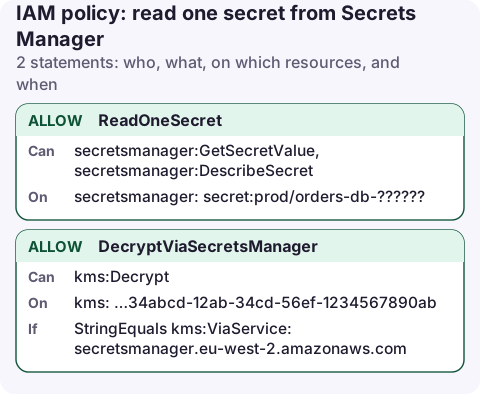
The policy
{
  "Version": "2012-10-17",
  "Statement": [
    {
      "Sid": "ReadOneSecret",
      "Effect": "Allow",
      "Action": [
        "secretsmanager:GetSecretValue",
        "secretsmanager:DescribeSecret"
      ],
      "Resource": "arn:aws:secretsmanager:eu-west-2:123456789012:secret:prod/orders-db-??????"
    },
    {
      "Sid": "DecryptViaSecretsManager",
      "Effect": "Allow",
      "Action": "kms:Decrypt",
      "Resource": "arn:aws:kms:eu-west-2:123456789012:key/1234abcd-12ab-34cd-56ef-1234567890ab",
      "Condition": {
        "StringEquals": {
          "kms:ViaService": "secretsmanager.eu-west-2.amazonaws.com"
        }
      }
    }
  ]
}
What each part does
- The
-??????suffix: every secret ARN ends in a hyphen and six random characters, such asprod/orders-db-AbC123. Each?matches exactly one character, so this matches your secret but notprod/orders-db-replica-AbC123, whichprod/orders-db*would. You can also paste the full ARN. GetSecretValuereturns the secret.DescribeSecretreturns metadata only (rotation, tags); include it if your library calls it.- DecryptViaSecretsManager is only needed for a customer managed key. With the default
aws/secretsmanagerkey, the key policy already allows use through Secrets Manager.kms:ViaServicemeans the role can decrypt with this key only when Secrets Manager asks, not by calling KMS directly.
Attach and test
aws iam put-role-policy --role-name orders-api-task \
  --policy-name read-db-secret --policy-document file://read-secret.json

aws secretsmanager get-secret-value --secret-id prod/orders-db \
  --query SecretString --output text --profile orders-api-task
For ECS tasks that inject the secret as an environment variable, the permission belongs on the task execution role; see task role vs execution role.
Variations
- All secrets under a path:
secret:prod/orders/*. Anyone who can create secrets under that name can then add to what the role reads. - Tag-based: allow on
"*"with"StringEquals": {"aws:ResourceTag/app": "orders"}; see ABAC with tags. - Several secrets in one call:
BatchGetSecretValueneedssecretsmanager:BatchGetSecretValue(on"*") plusGetSecretValueon each secret. - Another account: add a resource policy on the secret granting the other role, and use a customer managed key whose key policy allows it. The default
aws/secretsmanagerkey can't be shared across accounts.
Get the exact ARN
aws secretsmanager describe-secret --secret-id prod/orders-db \
  --query '[ARN,KmsKeyId]' --output text
If KmsKeyId is empty, the secret uses the default aws/secretsmanager key and you can drop the KMS statement.
Copy the ARN straight into the policy if you prefer exact matches over the ?????? pattern. Just remember that deleting and recreating the secret, even with the same name, produces a new suffix, and the policy then stops matching.
Common mistakes
- ARN without the suffix, e.g.
secret:prod/orders-db. It matches nothing, so access is denied even though the name looks right. - Granting
secretsmanager:ListSecrets"so the app can find it". It needs"*"and reveals every secret name; use the name directly. - Confusing a missing secret with a denial. Without permission, some calls fail with AccessDenied rather than ResourceNotFound; see can't find the specified secret.
Questions
Why does my Secrets Manager policy need -?????? at the end?
Secrets Manager appends a hyphen and six random characters to every secret ARN. The six question marks match exactly that suffix.
Do I need kms:Decrypt to read a secret?
Only when the secret is encrypted with a customer managed key. The default aws/secretsmanager key needs no extra IAM permission.
Secret values have no place on a phone screen. A read-only role for checking rotation status and alarms should list secrets without being able to read them, which is how CloudConsole's recommended policy is shaped.
About the app → · Download on the App Store