 CloudConsole
IAM policy: deny deleting critical resources
Attach an explicit Deny for the delete actions (dynamodb:DeleteTable, s3:DeleteBucket, rds:DeleteDBInstance and so on) on the specific resource ARNs. An explicit deny overrides every allow, including AdministratorAccess. Put it in an SCP or permissions boundary if the people it protects against can edit IAM.
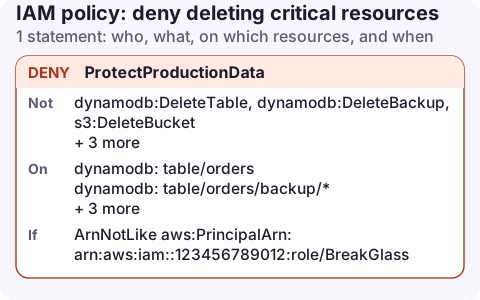
The policy
{
  "Version": "2012-10-17",
  "Statement": [
    {
      "Sid": "ProtectProductionData",
      "Effect": "Deny",
      "Action": [
        "dynamodb:DeleteTable",
        "dynamodb:DeleteBackup",
        "s3:DeleteBucket",
        "s3:DeleteBucketPolicy",
        "rds:DeleteDBInstance",
        "rds:DeleteDBCluster"
      ],
      "Resource": [
        "arn:aws:dynamodb:eu-west-2:123456789012:table/orders",
        "arn:aws:dynamodb:eu-west-2:123456789012:table/orders/backup/*",
        "arn:aws:s3:::my-bucket",
        "arn:aws:rds:eu-west-2:123456789012:db:orders-prod",
        "arn:aws:rds:eu-west-2:123456789012:cluster:orders-prod"
      ],
      "Condition": {
        "ArnNotLike": {
          "aws:PrincipalArn": "arn:aws:iam::123456789012:role/BreakGlass"
        }
      }
    }
  ]
}
How it works
IAM evaluates every applicable policy. If any statement denies the request, it is denied, regardless of how many allows match. That is why this works against admins.
- Action lists only deletions. Everything else these principals may do is unaffected.
- Resource names the protected resources exactly. A DynamoDB backup's ARN sits under its table; S3 buckets have no region or account in their ARN.
- ArnNotLike on
aws:PrincipalArnexempts a break-glass role, so you can still delete in a planned, logged way.
Where to attach it
| Attach to | Protects against | Weakness |
|---|---|---|
| Users, groups or roles (IAM policy) | Accidents | Anyone with IAM rights can detach it |
| Permissions boundary | Delegated admins | Only for principals that have the boundary |
| SCP on the account | Everyone in the account, including admins | Not the management account; needs Organizations |
aws iam create-policy --policy-name protect-production-data \
  --policy-document file://deny-delete.json
aws iam attach-group-policy --group-name admins \
  --policy-arn arn:aws:iam::123456789012:policy/protect-production-data
Pair it with built-in protection
- DynamoDB: turn on deletion protection on the table.
- RDS: turn on deletion protection on the instance or cluster.
- EC2: termination protection.
- S3 objects: versioning plus Object Lock if deletes must be impossible for a period. Denying
s3:DeleteObjectin IAM still leaves lifecycle rules able to expire objects. - CloudFormation:
DeletionPolicy: Retainand stack termination protection.
Switching deletion protection off is an ordinary modify call (rds:ModifyDBInstance, dynamodb:UpdateTable), which is too broad to deny outright, so the IAM deny above remains the backstop.
Test that the deny works
aws iam simulate-principal-policy \
  --policy-source-arn arn:aws:iam::123456789012:role/Admin \
  --action-names dynamodb:DeleteTable \
  --resource-arns arn:aws:dynamodb:eu-west-2:123456789012:table/orders
The result should be explicitDeny with the matched statement listed. The simulator evaluates identity policies and permissions boundaries, but not SCPs, so test an SCP version in a sandbox account instead.
Common mistakes
- Using NotAction in a Deny by accident:
"NotAction": "s3:DeleteBucket"denies everything except deleting the bucket. - Protecting the table but not its replicas in a global table: each region's ARN is separate.
- Forgetting deletion via CloudFormation: stacks act with your credentials or a service role. A deny on the user doesn't stop a stack service role from deleting the resource.
Questions
Does an explicit Deny override AdministratorAccess?
Yes. An explicit Deny in any applicable policy always wins over Allows, whichever policy grants them.
How do I deny all actions except a few?
Use a Deny with NotAction listing the actions to keep. Be careful: it denies every other action, including ones you didn't think of.
A deny guard is what makes it reasonable to carry production access on a phone at all. CloudConsole is being built with its own production guardrails as well, but the IAM deny is the one AWS enforces.
About the app → · Download on the App Store