 CloudConsole
Lambda execution role: trust policy and basic permissions
A Lambda execution role needs a trust policy that lets lambda.amazonaws.com call sts:AssumeRole, and a permissions policy allowing logs:CreateLogStream and logs:PutLogEvents on the function's log group. Everything else the code touches (S3, DynamoDB, SQS) is added to the same role.
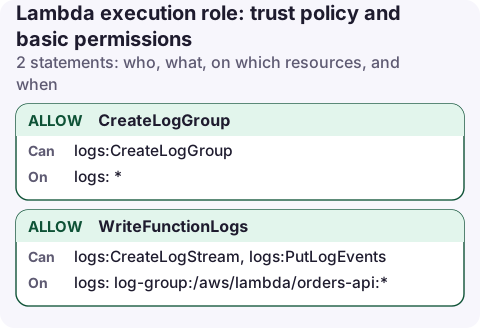
The permissions policy
{
  "Version": "2012-10-17",
  "Statement": [
    {
      "Sid": "CreateLogGroup",
      "Effect": "Allow",
      "Action": "logs:CreateLogGroup",
      "Resource": "arn:aws:logs:eu-west-2:123456789012:*"
    },
    {
      "Sid": "WriteFunctionLogs",
      "Effect": "Allow",
      "Action": [
        "logs:CreateLogStream",
        "logs:PutLogEvents"
      ],
      "Resource": "arn:aws:logs:eu-west-2:123456789012:log-group:/aws/lambda/orders-api:*"
    }
  ]
}
This is what the AWS managed policy AWSLambdaBasicExecutionRole does, but limited to one function's log group instead of every log group in the account.
The trust policy
{
  "Version": "2012-10-17",
  "Statement": [
    {
      "Effect": "Allow",
      "Principal": {
        "Service": "lambda.amazonaws.com"
      },
      "Action": "sts:AssumeRole"
    }
  ]
}
The trust policy decides who can use the role; the permissions policy decides what the role can do. Lambda assumes the role each time it starts an execution environment and hands the temporary credentials to your code through environment variables.
Create the role
aws iam create-role --role-name orders-api-lambda \
  --assume-role-policy-document file://trust.json

aws iam put-role-policy --role-name orders-api-lambda \
  --policy-name logs --policy-document file://logs.json

aws lambda update-function-configuration --function-name orders-api \
  --role arn:aws:iam::123456789012:role/orders-api-lambda
To set a role on a function you need iam:PassRole for it; see the PassRole policy. The console's "Create a new role with basic Lambda permissions" option creates the same two documents for you.
What to add for common features
| Feature | Permissions |
|---|---|
| Function in a VPC | ec2:CreateNetworkInterface, ec2:DescribeNetworkInterfaces, ec2:DeleteNetworkInterface and related actions; the managed policy AWSLambdaVPCAccessExecutionRole has the full set |
| X-Ray tracing | xray:PutTraceSegments, xray:PutTelemetryRecords |
| SQS trigger | See Lambda SQS policy |
| DynamoDB table | See DynamoDB one-table policy |
| Secret at start-up | See read one secret |
| Custom log group (advanced logging controls) | Point the log statements at that group's ARN instead |
Check the role a function uses
aws lambda get-function-configuration --function-name orders-api \
  --query Role --output text

aws iam list-attached-role-policies --role-name orders-api-lambda
aws iam list-role-policies --role-name orders-api-lambda
Inline policies don't show up in the attached list, so check both.
If the function was created by a framework such as SAM, CDK or the Serverless Framework, the role usually has a generated name. Read it from the function configuration rather than guessing from the function name.
Common mistakes
- No logs at all after deploying: the role can't write to CloudWatch Logs, and Lambda doesn't report that as an error. Check the log statement's ARN; the stream ARN needs the trailing
:*. - Granting permissions to the deploying user instead of the execution role. The function's code runs as the role, not as you.
- Sharing one role across many functions. It is convenient, but each function then gets the union of every permission. One role per function is the least-privilege default.
- Changes not taking effect: credentials are cached in warm execution environments for a short time. Wait a minute or publish a new version before assuming the policy is wrong.
Questions
What is the difference between a Lambda execution role and a resource-based policy?
The execution role is what the function can do. The resource-based policy (lambda add-permission) is who can invoke the function, such as API Gateway or S3.
What does AWSLambdaBasicExecutionRole allow?
Creating log groups and streams and writing log events in CloudWatch Logs, on all log groups in the account. Nothing else.
When a function starts failing with AccessDenied right after a deploy, the error and the role name are both in its logs. Reading the log group from your phone usually tells you which permission went missing.
About the app → · Download on the App Store