 CloudConsole
SCP: deny all actions by the root user
Attach an SCP with a Deny on Action * and Resource * when aws:PrincipalArn matches arn:aws:iam::*:root. Every API call made as the root user in the targeted member accounts is then refused. It doesn't affect the management account, so protect that root user with MFA instead.
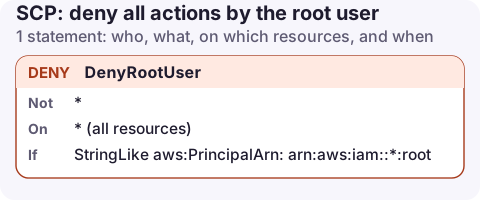
The policy
{
  "Version": "2012-10-17",
  "Statement": [
    {
      "Sid": "DenyRootUser",
      "Effect": "Deny",
      "Action": "*",
      "Resource": "*",
      "Condition": {
        "StringLike": {
          "aws:PrincipalArn": "arn:aws:iam::*:root"
        }
      }
    }
  ]
}
How it works
aws:PrincipalArnfor a root user session isarn:aws:iam::<account>:root. The*in the account position matches every account the SCP is attached to.- Action and Resource *: every call is denied. The root user can still sign in, but every console page and API call fails with an explicit deny from an SCP.
- Roles and IAM users are unaffected, because their principal ARNs never end in
:root.
Because StringLike on :root only matches the root user, this doesn't touch roles that trust arn:aws:iam::111122223333:root in their trust policies; that is the account principal, a different thing.
Attach it
aws organizations create-policy --name deny-root-user \
  --type SERVICE_CONTROL_POLICY \
  --description "Block root user actions in member accounts" \
  --content file://deny-root.json

aws organizations attach-policy --policy-id p-examplepolicyid222 \
  --target-id ou-exampleouid-111aaa22
Centralised root access
AWS Organizations can now manage root access centrally: you can remove root user credentials from member accounts entirely, and the management account (or a delegated administrator) performs the few root-only tasks, such as unlocking a bucket policy that denies everyone, through short-lived privileged sessions (sts:AssumeRoot). Where that is enabled, this SCP becomes a second layer rather than the only one.
If you don't use centralised root access, you'll occasionally need to detach this SCP for a root-only task, for example changing account contact details or deleting a bucket policy that locks everyone out. Do it for the shortest time possible and watch CloudTrail while it is detached.
Find recent root activity first
Before blocking root, check whether anything still uses root in your member accounts. CloudTrail marks those events with a user identity type of Root; run this in each member account and Region you care about:
aws cloudtrail lookup-events --max-results 50 \
  --query 'Events[].CloudTrailEvent' --output text | grep -c '"type":"Root"'
A count above zero means something, often an old script or an integration set up years ago, still relies on root. Move it to a role before attaching the SCP, or it will break the moment the policy takes effect.
Common mistakes
- Expecting it to protect the management account. SCPs never apply there.
- Using
aws:PrincipalArnwithStringEqualsand a wildcard. Wildcards only work withStringLike(orArnLike). - Leaving root credentials unprotected because "the SCP blocks it". Password reset and MFA still matter for the root user, especially in the management account.
- Adding exceptions for root. If you find you need them often, move that task to a role instead.
Questions
Can an SCP restrict the root user?
Yes, in member accounts. The root user of a member account is subject to SCPs like any other principal. The management account's root user is not.
What is the ARN of the root user?
arn:aws:iam::123456789012:root, with the account ID. The same string in a trust policy Principal means the whole account, not the root user.
Root credentials have no place on a phone or anywhere used day to day. An app that works with SSO or a scoped role keeps that separation without extra effort.
About the app → · Download on the App Store