 CloudConsole
Deny all regions except approved ones (aws:RequestedRegion)
Use a Deny with NotAction listing global services (IAM, STS, CloudFront, Route 53, Organizations, support and billing), Resource *, and a StringNotEquals condition on aws:RequestedRegion with your allowed regions. As an SCP it applies to every principal in the member accounts; exempt an admin role with aws:PrincipalArn.
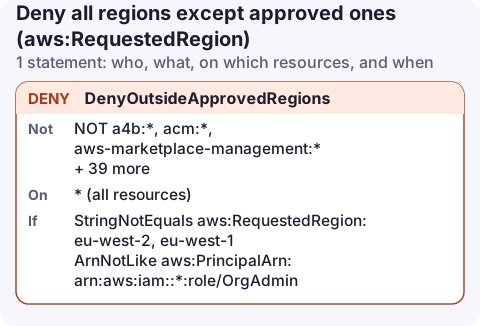
The policy
{
  "Version": "2012-10-17",
  "Statement": [
    {
      "Sid": "DenyOutsideApprovedRegions",
      "Effect": "Deny",
      "NotAction": [
        "a4b:*",
        "acm:*",
        "aws-marketplace-management:*",
        "aws-marketplace:*",
        "aws-portal:*",
        "budgets:*",
        "ce:*",
        "chime:*",
        "cloudfront:*",
        "config:*",
        "cur:*",
        "directconnect:*",
        "ec2:DescribeRegions",
        "ec2:DescribeTransitGateways",
        "ec2:DescribeVpnGateways",
        "fms:*",
        "globalaccelerator:*",
        "health:*",
        "iam:*",
        "importexport:*",
        "kms:*",
        "mobileanalytics:*",
        "networkmanager:*",
        "organizations:*",
        "pricing:*",
        "route53:*",
        "route53domains:*",
        "route53-recovery-cluster:*",
        "route53-recovery-control-config:*",
        "route53-recovery-readiness:*",
        "s3:GetAccountPublic*",
        "s3:ListAllMyBuckets",
        "s3:ListMultiRegionAccessPoints",
        "s3:PutAccountPublic*",
        "shield:*",
        "sts:*",
        "support:*",
        "trustedadvisor:*",
        "waf-regional:*",
        "waf:*",
        "wafv2:*",
        "wellarchitected:*"
      ],
      "Resource": "*",
      "Condition": {
        "StringNotEquals": {
          "aws:RequestedRegion": [
            "eu-west-2",
            "eu-west-1"
          ]
        },
        "ArnNotLike": {
          "aws:PrincipalArn": [
            "arn:aws:iam::*:role/OrgAdmin"
          ]
        }
      }
    }
  ]
}
This follows the shape of AWS's published example. AWS updates its exemption list as services change, so compare with the current version in the Organizations documentation before you deploy.
Why NotAction, and why these services
aws:RequestedRegion is the region the API call is sent to. Global services have a single endpoint, mostly in us-east-1, so a plain "deny everything outside eu-west-2" also denies IAM, STS, Route 53, CloudFront, Organizations, billing and support. People then can't sign in properly, manage users or update DNS.
NotAction with a Deny means "deny every action except these". Read it as: for all regional services, refuse calls to regions not in the list. The listed services are left alone. A few specific actions are listed instead of whole services, such as ec2:DescribeRegions (so tools can enumerate regions) and the account-level S3 Block Public Access calls.
kms:* and acm:* are exempt because CloudFront needs certificates in us-east-1, and keys there may protect those resources. If you never use CloudFront, you can tighten this.
Apply it as an SCP
aws organizations create-policy --name deny-unapproved-regions \
  --type SERVICE_CONTROL_POLICY \
  --description "Only eu-west-2 and eu-west-1" \
  --content file://deny-regions.json

aws organizations attach-policy --policy-id p-examplepolicyid111 \
  --target-id ou-exampleouid-111aaa22
Attach it to an OU of test accounts first. SCPs do not affect the management account. The same document also works as an IAM policy on one user or role, minus the aws:PrincipalArn exception.
After you apply it
- Errors look like with an explicit deny in a service control policy; see SCP explicit deny.
- Region-scoped features in us-east-1 that people forget: AWS Health organisational views, billing alarms (the
EstimatedChargesmetric is only inus-east-1), and CloudFront's WAF web ACLs. Add us-east-1 to the allowed list if you need them. - The console region selector still shows every region; selecting one just produces access denied errors.
- Existing resources in denied regions keep running and keep costing money. Check with find resources in all regions first.
Common mistakes
- An Allow with
StringEquals aws:RequestedRegioninstead of this Deny: it doesn't stop other policies granting the same actions elsewhere. - Exempting a role by name only. Use the full ARN pattern;
arn:aws:iam::*:role/OrgAdminmatches that role name in every account. - Forgetting opt-in regions. Regions that aren't enabled are already unusable; you don't need to list them, but enabling one later doesn't bypass this policy.
Questions
Which AWS services are global and need exempting in a region restriction?
IAM, STS, Organizations, CloudFront, Route 53, WAF (classic and global), Shield, Global Accelerator, Support, Trusted Advisor and the billing and cost services, among others. AWS publishes the current list in its SCP region example.
Can an IAM policy restrict regions, or do I need an SCP?
An IAM policy works for the principals it is attached to. An SCP covers every principal in the targeted accounts, including roles created later.
Does aws:RequestedRegion block the console?
Only for regional actions in other regions. The console itself and global services keep working when they are exempted as above.
Region guardrails mean the resources you care about live in a known place. On a phone, that keeps a region picker short and the "where is it running?" question easy to answer.
About the app → · Download on the App Store