 CloudConsole
IAM policy: RDS IAM database authentication
Allow rds-db:connect on arn:aws:rds-db:<region>:<account>:dbuser:<DbiResourceId>/<db-user>. The resource ID is the instance's DbiResourceId (db-…) or the Aurora cluster's resource ID (cluster-…), not its name. The database user must also be set up for IAM auth, and clients connect with a 15-minute token instead of a password.
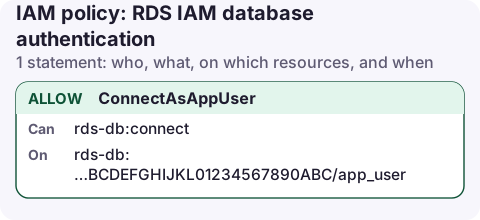
The policy
{
  "Version": "2012-10-17",
  "Statement": [
    {
      "Sid": "ConnectAsAppUser",
      "Effect": "Allow",
      "Action": "rds-db:connect",
      "Resource": "arn:aws:rds-db:eu-west-2:123456789012:dbuser:db-ABCDEFGHIJKL01234567890ABC/app_user"
    }
  ]
}
How the ARN is built
- Service prefix
rds-db, notrds. - Resource ID: for an instance, its
DbiResourceId; for an Aurora cluster, itsDbClusterResourceId. Both are immutable IDs, unlike the instance name. - Database user name after the slash, exactly as created in the database.
dbuser:db-ABCDEFGHIJKL01234567890ABC/*allows every user, which is rarely what you want.
aws rds describe-db-instances --db-instance-identifier orders-prod \
  --query 'DBInstances[0].DbiResourceId' --output text
Set it up end to end
# 1. turn on IAM auth for the instance
aws rds modify-db-instance --db-instance-identifier orders-prod \
  --enable-iam-database-authentication --apply-immediately

# 2. create the database user (PostgreSQL)
#    CREATE USER app_user; GRANT rds_iam TO app_user;
# (MySQL: CREATE USER app_user IDENTIFIED WITH AWSAuthenticationPlugin AS 'RDS';)

# 3. attach the policy to the app's role
aws iam put-role-policy --role-name orders-api-task \
  --policy-name rds-connect --policy-document file://rds-connect.json

# 4. connect with a token
export PGPASSWORD="$(aws rds generate-db-auth-token \
  --hostname orders-prod.abc123xyz.eu-west-2.rds.amazonaws.com \
  --port 5432 --username app_user --region eu-west-2)"
psql "host=orders-prod.abc123xyz.eu-west-2.rds.amazonaws.com port=5432 dbname=orders user=app_user sslmode=verify-full sslrootcert=global-bundle.pem"
The token is generated locally by signing a request with your credentials; no API call is made, so a bad policy only shows up when the database rejects the login.
Things to know
- Tokens last 15 minutes, but only for opening a connection. An established connection stays open after the token expires.
- TLS is required for IAM authentication. Use the RDS CA bundle and verify the hostname.
- Connection rate: IAM authentication adds work to each new connection. Use connection pooling, or RDS Proxy (which also supports IAM auth), for workloads that open many connections per second.
- Cross-account: the role in the other account needs this policy with your account and resource ID; no change is needed on the database side.
Check IAM auth is on
aws rds describe-db-instances --db-instance-identifier orders-prod \
  --query 'DBInstances[0].[IAMDatabaseAuthenticationEnabled,DbiResourceId]' --output text
Common mistakes
- Using the instance name (
orders-prod) in the ARN instead of the resource ID. - Database user not granted
rds_iam(PostgreSQL) or not created with the authentication plugin (MySQL): the error is a normal password failure. See password authentication failed and MySQL access denied for user. - Token generated for a different host, port or region than the one you connect to; the signature covers all three.
- Using a reader or custom endpoint hostname is fine, but the token must be generated for that exact hostname.
Questions
How long is an RDS IAM authentication token valid?
15 minutes for opening new connections. Connections already open are not closed when the token expires.
Why do I get password authentication failed with IAM auth?
The database user isn't set up for IAM auth, the token was made for a different host, port or region, or the IAM policy's resource ID or user name doesn't match.
Database login failures at night are often a credential change, not an outage. Checking the instance status and recent connection errors from a phone tells you which kind of problem you have.
About the app → · Download on the App Store