 CloudConsole
ReadOnlyAccess vs ViewOnlyAccess (and SecurityAudit)
ReadOnlyAccess allows Get, List and Describe across almost every service, including reading data such as S3 objects and DynamoDB items. ViewOnlyAccess is a job-function policy that lists and describes resources without reading their contents. SecurityAudit reads configuration and metadata for security review. If you use ReadOnlyAccess, add a deny for data reads.
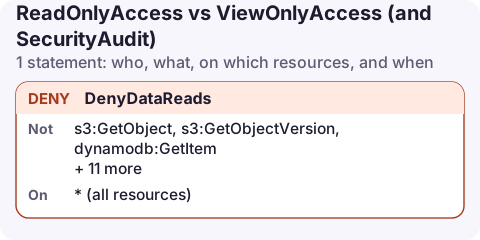
Deny add-on for ReadOnlyAccess
{
  "Version": "2012-10-17",
  "Statement": [
    {
      "Sid": "DenyDataReads",
      "Effect": "Deny",
      "Action": [
        "s3:GetObject",
        "s3:GetObjectVersion",
        "dynamodb:GetItem",
        "dynamodb:BatchGetItem",
        "dynamodb:Query",
        "dynamodb:Scan",
        "secretsmanager:GetSecretValue",
        "ssm:GetParameter",
        "ssm:GetParameters",
        "ssm:GetParametersByPath",
        "sqs:ReceiveMessage",
        "kinesis:GetRecords",
        "lambda:GetFunction",
        "athena:GetQueryResults"
      ],
      "Resource": "*"
    }
  ]
}
Attach this next to ReadOnlyAccess. The explicit deny wins, so the role keeps its broad metadata access but can't pull out data, secrets, queue messages or function code.
How the three compare
| ReadOnlyAccess | ViewOnlyAccess | SecurityAudit | |
|---|---|---|---|
| List and describe resources | Yes | Yes | Mostly |
| Read data (objects, items) | Yes | No | No |
| Read policies and configuration | Yes | Partly | Yes, in depth |
| Typical user | Engineers debugging | Managers, inventory, on-call overview | Auditors, security scanners |
AWS updates these managed policies as services launch, so the exact action lists change over time. Read the current version in the AWS managed policy reference before relying on a specific action being in or out.
Why the deny list contains these actions
s3:GetObject, the DynamoDB reads,kinesis:GetRecords,athena:GetQueryResults: application data.sqs:ReceiveMessage: reading a message also hides it from consumers for the visibility timeout, so a "read-only" user can affect production.lambda:GetFunction: returns a link to download the function's code.GetFunctionConfigurationstill works for settings.ssm:GetParameter*,secretsmanager:GetSecretValue: configuration that often holds credentials. Denying them is harmless ifReadOnlyAccessdoesn't include them, and protects you if it does.
Attach them
aws iam attach-role-policy --role-name Auditor \
  --policy-arn arn:aws:iam::aws:policy/ReadOnlyAccess
aws iam put-role-policy --role-name Auditor \
  --policy-name deny-data-reads --policy-document file://deny-data.json

# or the narrower job-function policy
aws iam attach-role-policy --role-name Viewer \
  --policy-arn arn:aws:iam::aws:policy/job-function/ViewOnlyAccess
Note the job-function/ path in the ViewOnlyAccess ARN; leaving it out gives a "policy does not exist" error.
Compare the policies yourself
Managed policies are versioned, so you can read exactly what they allow today:
aws iam get-policy --policy-arn arn:aws:iam::aws:policy/job-function/ViewOnlyAccess \
  --query Policy.DefaultVersionId --output text

aws iam get-policy-version --policy-arn arn:aws:iam::aws:policy/job-function/ViewOnlyAccess \
  --version-id v1 --query PolicyVersion.Document
Use the version ID returned by the first command in the second.
Job-function policies such as ViewOnlyAccess are maintained by AWS like any other managed policy, so they gain actions for new services over time. Reviewing the default version now and then tells you what changed.
Common mistakes
- Assuming "read-only" means "safe to share". ReadOnlyAccess on a production account can read customer data.
- Choosing ViewOnlyAccess for on-call and then finding log contents and cost queries are missing. Add the specific
logs:andce:read actions you need. - Forgetting SCPs and boundaries still apply on top of managed policies.
Questions
What is the difference between ReadOnlyAccess and ViewOnlyAccess?
ReadOnlyAccess can read resource contents such as S3 objects; ViewOnlyAccess only lists and describes resources. Both are AWS managed and can't change anything.
Does ReadOnlyAccess allow reading S3 objects?
Yes. It includes s3:Get* actions, so it can download objects unless a bucket policy, SCP or explicit deny blocks it.
Phones get lost, so a mobile session should be the least capable one you have. ViewOnlyAccess plus logs and cost reads, or ReadOnlyAccess with the deny above, keeps a lost device boring.
About the app → · Download on the App Store