 CloudConsole
IAM role for an EC2 instance to access S3
Create a role whose trust policy allows ec2.amazonaws.com to assume it, attach a policy for the bucket, put the role in an instance profile and associate the profile with the instance. The SDK and CLI on the instance pick up the credentials from the instance metadata service automatically.
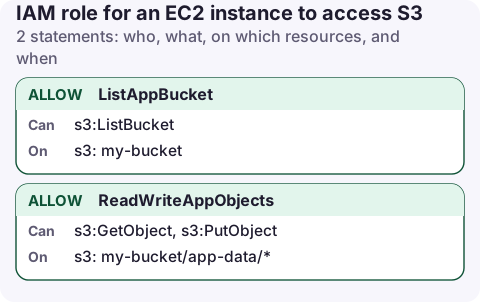
The permissions policy
{
  "Version": "2012-10-17",
  "Statement": [
    {
      "Sid": "ListAppBucket",
      "Effect": "Allow",
      "Action": "s3:ListBucket",
      "Resource": "arn:aws:s3:::my-bucket"
    },
    {
      "Sid": "ReadWriteAppObjects",
      "Effect": "Allow",
      "Action": [
        "s3:GetObject",
        "s3:PutObject"
      ],
      "Resource": "arn:aws:s3:::my-bucket/app-data/*"
    }
  ]
}
And the trust policy that lets EC2 use the role:
{
  "Version": "2012-10-17",
  "Statement": [
    {
      "Effect": "Allow",
      "Principal": {
        "Service": "ec2.amazonaws.com"
      },
      "Action": "sts:AssumeRole"
    }
  ]
}
Create and attach it
aws iam create-role --role-name app-server \
  --assume-role-policy-document file://ec2-trust.json
aws iam put-role-policy --role-name app-server \
  --policy-name app-bucket --policy-document file://app-bucket.json

aws iam create-instance-profile --instance-profile-name app-server
aws iam add-role-to-instance-profile --instance-profile-name app-server \
  --role-name app-server

aws ec2 associate-iam-instance-profile --instance-id i-0123456789abcdef0 \
  --iam-instance-profile Name=app-server
The console does the instance-profile step for you: when you create a role for the EC2 use case, a profile with the same name is created. Attach it from the instance's Actions → Security → Modify IAM role; no reboot is needed.
Check it from the instance
aws sts get-caller-identity
# arn:aws:sts::123456789012:assumed-role/app-server/i-0123456789abcdef0

aws s3 cp ./export.csv s3://my-bucket/app-data/export.csv
The credentials rotate automatically before they expire. If get-caller-identity shows an IAM user instead, there are access keys in ~/.aws/credentials or environment variables on the instance taking precedence over the role. Remove them.
Variations
- Read-only: drop
s3:PutObject. See read-only bucket access. - Also Session Manager and the CloudWatch agent: attach
AmazonSSMManagedInstanceCoreand a log-writing policy to the same role. - Auto Scaling groups: set the instance profile in the launch template, so every new instance gets it.
Use IMDSv2
The role's credentials are served by the instance metadata service. Requiring IMDSv2 (session tokens) protects them from server-side request forgery bugs in your application, which is the classic way instance credentials are stolen.
aws ec2 modify-instance-metadata-options --instance-id i-0123456789abcdef0 \
  --http-tokens required --http-endpoint enabled
On an instance where the CLI isn't installed, a request to the metadata service with a session token shows the role name under iam/security-credentials/. The credentials returned there are what the SDK uses; never copy them elsewhere.
Common mistakes
- Copying access keys onto the instance instead of using a role. Keys never expire unless you rotate them, and they tend to end up in AMIs and backups.
- Role exists but no instance profile (common when the role was created with the CLI or Terraform). EC2 only accepts instance profiles.
- IMDS blocked: if the instance requires IMDSv2 and a container on it can't reach the metadata service because of the hop limit, the SDK finds no credentials. Raise the hop limit to 2 for containers.
- Launching with a profile needs
iam:PassRoleon the role; see PassRole.
Questions
How do I give an EC2 instance access to S3 without access keys?
Attach an IAM role through an instance profile. The SDK and CLI fetch temporary credentials from the instance metadata service.
Do I need to restart an EC2 instance after attaching a role?
No. Credentials are available within moments of associating the instance profile.
If an instance's jobs start failing, its role is one of the first things to check. A phone app with EC2 and IAM read access can show which profile the instance has without logging in to it.
About the app → · Download on the App Store